FAQ about Salesforce Connection
Here are some frequently asked questions about importing Salesforce data and their answers.
What editions of Salesforce do you support for connection?
You can import Salesforce data if you have subscribed to the following editions of Salesforce.
- Professional (if you have a paid upgrade)
- Enterprise
- Unlimited
- Performance
When I create a data connection and try to import data, I get an error.
After creating a Salesforce connection, when I try to import data, I get the following error.
Error in catch_errors(httr_response) : INSUFFICIENT_ACCESS: use of the Metadata API requires a user with the ModifyAllData or ModifyMetadata permissionsThe above error means that you do not have that permission. If you wish to assign the permission, please check with the department that manages Salesforce permissions (such as the Information System department).
When I write SQL to import data, the columns are sorted alphabetically, not in SELECT order.
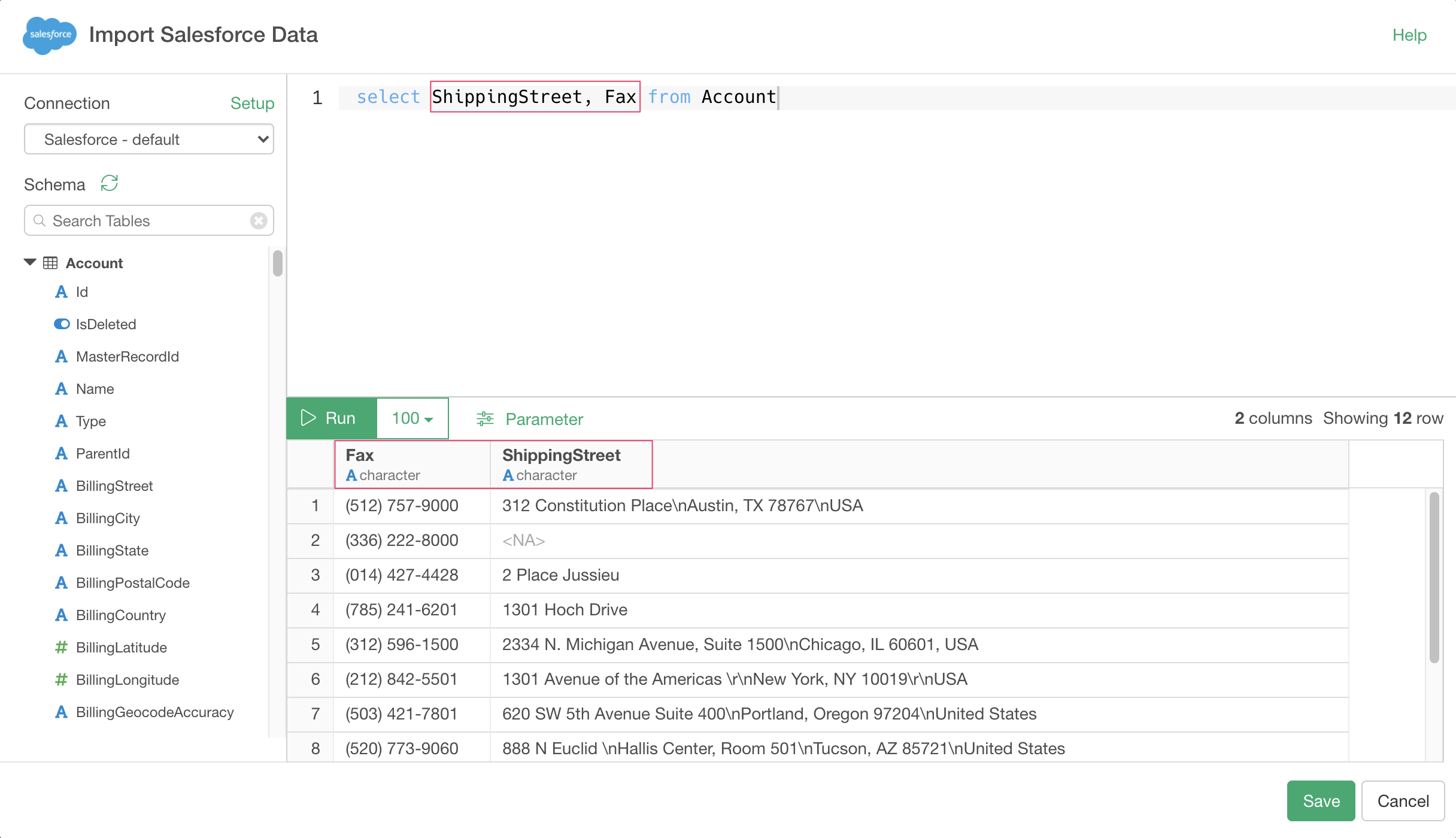
Normally, when you write an SQL query to retrieve data from a database, the columns are sorted in the order selected in the SELECT clause, but when you write a SOQL to retrieve Salesforce data, the columns are sorted alphabetically.
If you want to respect the order of columns in each table in Salesforce, import the data from the cloud application data source.