How to Fix Name Variations with AI Function
“Can you look at this CRM data? ‘3M’, ‘3M Co.’, and ‘MMM’ are all the same company, right? If we aggregate this as is, we’ll count more companies than we actually have…”
On Monday morning, as you read through your manager’s message, you open the customer list displayed on your screen. There, you find countless “name variations” where the same company is recorded differently depending on who entered the data.
You know exactly how many hours this work will take. And you also know this isn’t the analysis work you should be doing.
In data analysis environments, these “name variations” continue to steal your time.
Decreased Analysis Accuracy: The same entity is counted as different entities, making it impossible to grasp the accurate situation
Enormous Time Waste: Time that should be spent on strategic planning is consumed by data correction
Lost Opportunities: Decision-making based on inaccurate data leads to missed business opportunities
Traditionally, solving this problem required either a specialized staff member to write rule-based programs or you yourself spending endless hours on manual corrections.
However, the AI Functions added in Exploratory v14 are about to fundamentally change this situation.
Four Common “Name Variation” Problems That Block Your Analysis
While we call them “name variations” as a single term, the patterns are diverse. Do you see these problems lurking in your data?
Problem 1: Company and Organization Name Variations
Even though they refer to the same company, cases like “3M”, “3M Co.”, and “MMM” where legal entity formats, abbreviations, and ticker symbols are mixed. What makes it even more troublesome is when formal names and common names are mixed, such as “Apple” and “Apple Inc.”, or “Amazon” and “Amazon.com, Inc.”.
| Examples (Before Standardization) | After Standardization |
|---|---|
| 3M | 3M Company |
| 3M Co. | 3M Company |
| MMM | 3M Company |
| AT&T | AT&T Inc. |
| ATT | AT&T Inc. |
| APPLE | Apple Inc. |
| Apple Computer Inc. | Apple Inc. |
| AMAZON | Amazon.com, Inc. |
| Amazon.com | Amazon.com, Inc. |
| Bank of America | Bank of America Corporation |
| BofA | Bank of America Corporation |
Humans can understand these refer to the same company. However, computers recognize them as mere “strings”, so even if it’s the same company, different notation methods cause them to be judged as “completely different entities”. This makes accurate customer counts and business partner counts difficult.
Problem 2: Proper Noun Variations (Notation Differences)
Even though they refer to exactly the same thing, pure notation differences like “Excel”, “excel”, and “EXCEL” with uppercase and lowercase letters result in separate values.
| Examples (Before Standardization) | After Standardization |
|---|---|
| Excel | Excel |
| excel | Excel |
| EXCEL | Excel |
| Python | Python |
| python | Python |
| phython | Python |
| Google Sheets | Google Sheets |
| Sheets | Google Sheets |
| sheets | Google Sheets |
This commonly occurs in internal tool usage surveys or analysis of free-form responses about specific products, but differences in notation methods cause them to be recognized as separate values, becoming a major obstacle when trying to grasp accurate counts.
Problem 3: Product and Service Name Variations (Mixed Attribute Information)
Like “iPhone 15 Pro 256GB” and “iPhone 15 Pro 128GB White”, even though they’re essentially the same product series, color, capacity, and size attribute (variation) information is added, causing them to be treated as separate products.
| Examples (Before Standardization) | After Standardization |
|---|---|
| iPhone15 Pro 128GB | iPhone 15 Pro |
| iphone 15 256GB | iPhone 15 |
| IPHONE 14Pro | iPhone 14 Pro |
| IPHONE 14Pro 512GB Black | iPhone 14 Pro |
| Galaxy S24 Ultra 256 GB | Galaxy S24 Ultra |
| GALAXYS24Ultra 256 GB | Galaxy S24 Ultra |
| Galaxy S24 512GB | Galaxy S24 |
| Xperia 10 V 256GB | Xperia 10 V |
| XPERIA 5V | Xperia 5 V |
| Xperia 5V 256 GB | Xperia 5 V |
| MACBOOK Air 16GB | MacBook Air |
When analyzing sales and wanting to see the overall trends of the “iPhone 15 series”, these variation differences become noise.
Problem 4: Address Variations
Address data is particularly prone to name variations, such as inconsistent uppercase/lowercase like “123 Main St” and “123 main street”, mixed abbreviations like “Avenue” and “Ave”, and inconsistent full-width/half-width spaces.
| Type | Examples (Before Standardization) | After Standardization |
|---|---|---|
| Mixed Upper/Lowercase | 123 main st, new york, NY 10001 | 123 Main St, New York, NY 10001 |
| Inconsistent Abbreviations | 456 OAK AVENUE, LOS ANGELES, ca 90012-3456 | 456 Oak Ave, Los Angeles, CA 90012-3456 |
| Directional Notation | 10 E. Cedar Dr, PHOENIX, AZ 85004 | 10 E Cedar Dr, Phoenix, AZ 85004 |
| Inconsistent Spacing | 21 west elm court, philadelphia, pa 19103 | 21 W Elm Ct, Philadelphia, PA 19103 |
| State Name Notation | 44 north lincoln way, San Diego, Calif. 92101 | 44 N Lincoln Way, San Diego, CA 92101 |
| Street Number Notation | One washington boulevard, Houston, TX, 77002 | 1 Washington Blvd, Houston, TX 77002 |
| Apartment Number Notation | 2112 N Main St #101, PORTLAND, or 97205 | 2112 N Main St Apt 101, Portland, OR 97205 |
| P.O. Box Notation | P.O. Box 1234, SACRAMENTO, CA 95814 | PO Box 1234, Sacramento, CA 95814 |
| Combined Notation Variations | 4334 East Pine Lane, Apt 3B, OKLAHOMA CITY, ok 73102 | 4334 E Pine Ln Apt 3B, Oklahoma City, OK 73102 |
Address variations lead to major confusion in customer data integration and delivery management.
And Everyone Sinks into the Swamp of “Manual Work”
Despite being a problem in so many workplaces, why aren’t name variations resolved? It’s because traditional solutions have been far too high and steep a barrier.
First, you try “creating rules for automation”. But you quickly hit a wall.
Company name “Inc./Corp./LLC” variations, tool name “uppercase/lowercase” variations, product name “capacity/color/size” variations, address “state abbreviations/street number notation” - when you create one rule, you inevitably find new exceptions. Before you know it, you’ve created complex rules like an unmaintainable “secret sauce”, but the reality is you’re far from perfect standardization.
Next, you consider “hiring specialists”. But you’re shocked when you see the estimate.
“System development costs hundreds of thousands of dollars, plus monthly maintenance fees…” “Building a custom AI model requires hiring data scientists and expensive infrastructure…” Most companies decide they can’t invest that much in data correction, which is essentially “defensive” work.
Rules that are too complex, costs that are too high. Faced with these two barriers, many people reach the same conclusion.
“Can you handle this manually this time?”
With those words, an analyst’s precious hours, or even days, are consumed by simple data correction work. The time for the analysis and strategic planning they should be doing is stolen, and they simply become exhausted.
This is the true nature of the quiet “hell” that has been repeated in data analysis workplaces.
But it’s okay now.
No Complex Rules or Specialized Knowledge Needed. AI Functions Enable Notation Standardization
Exploratory’s AI Functions deliver the power of cutting-edge large language models to you.
No complex pattern matching, no rule building, no programming required. All you need is one thing: Just tell it what you want to do in your own words.
The usage is surprisingly simple.
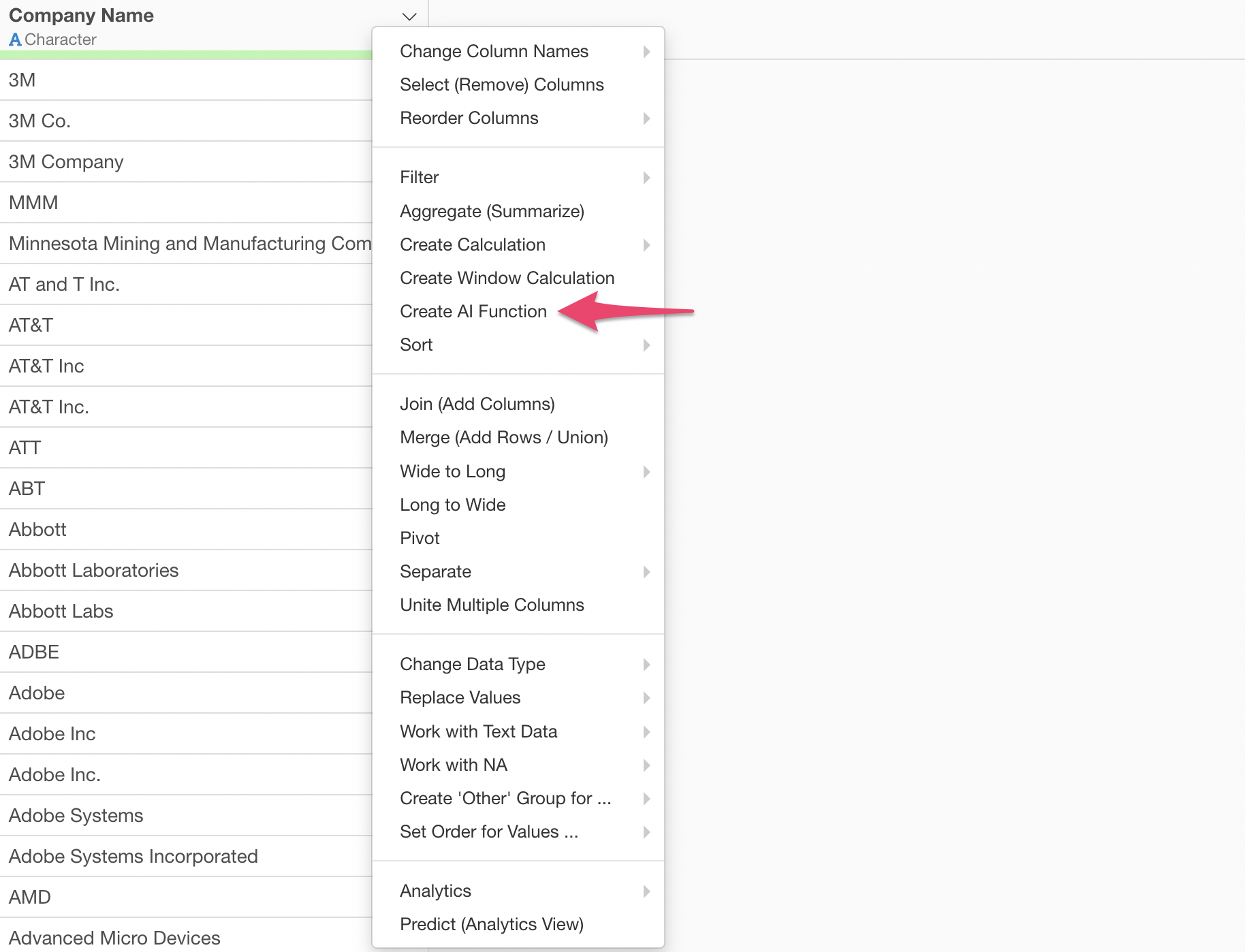
Select “Create AI Function” from the column header menu.
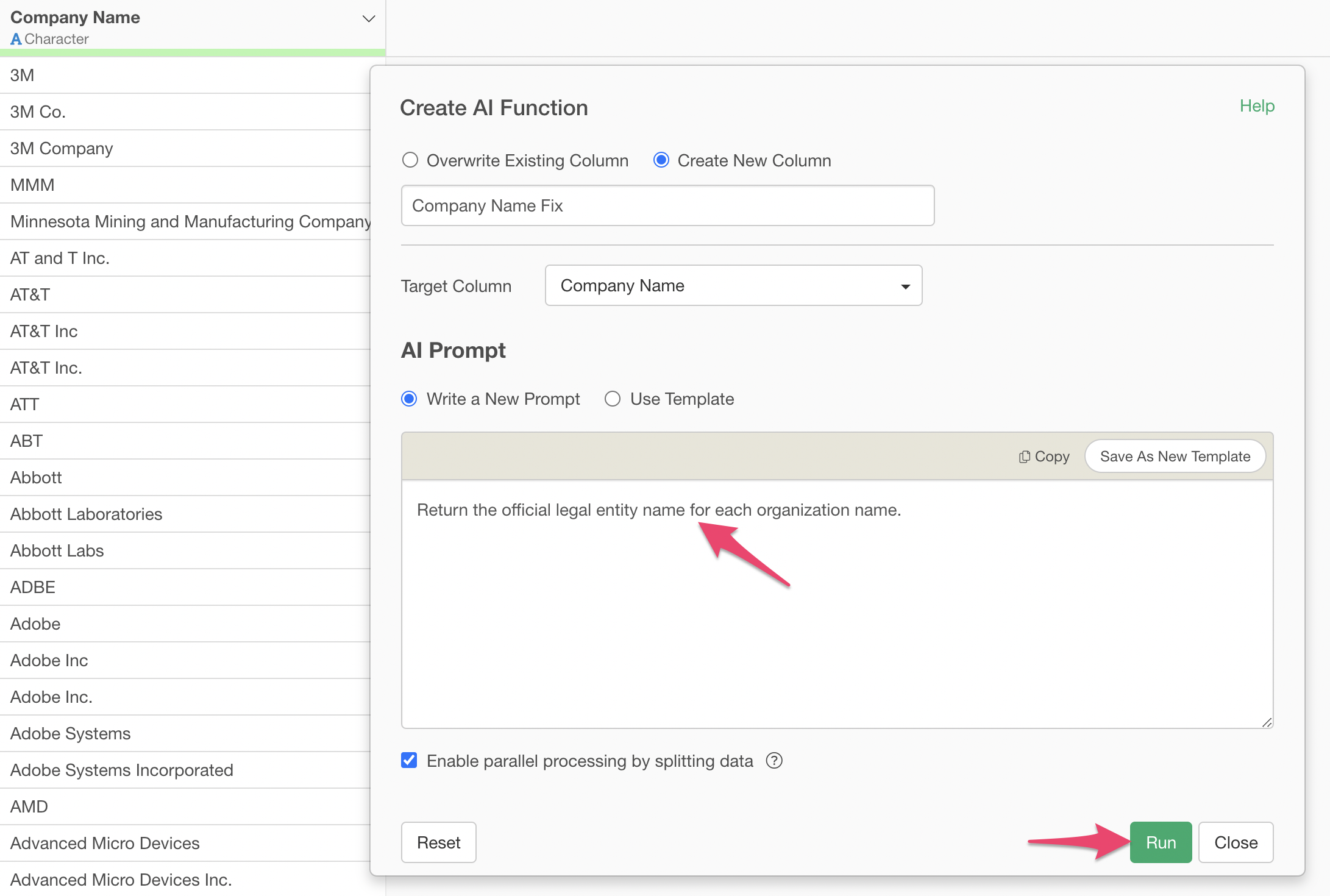
Just write the instructions you want AI to execute in the prompt input field and run it.
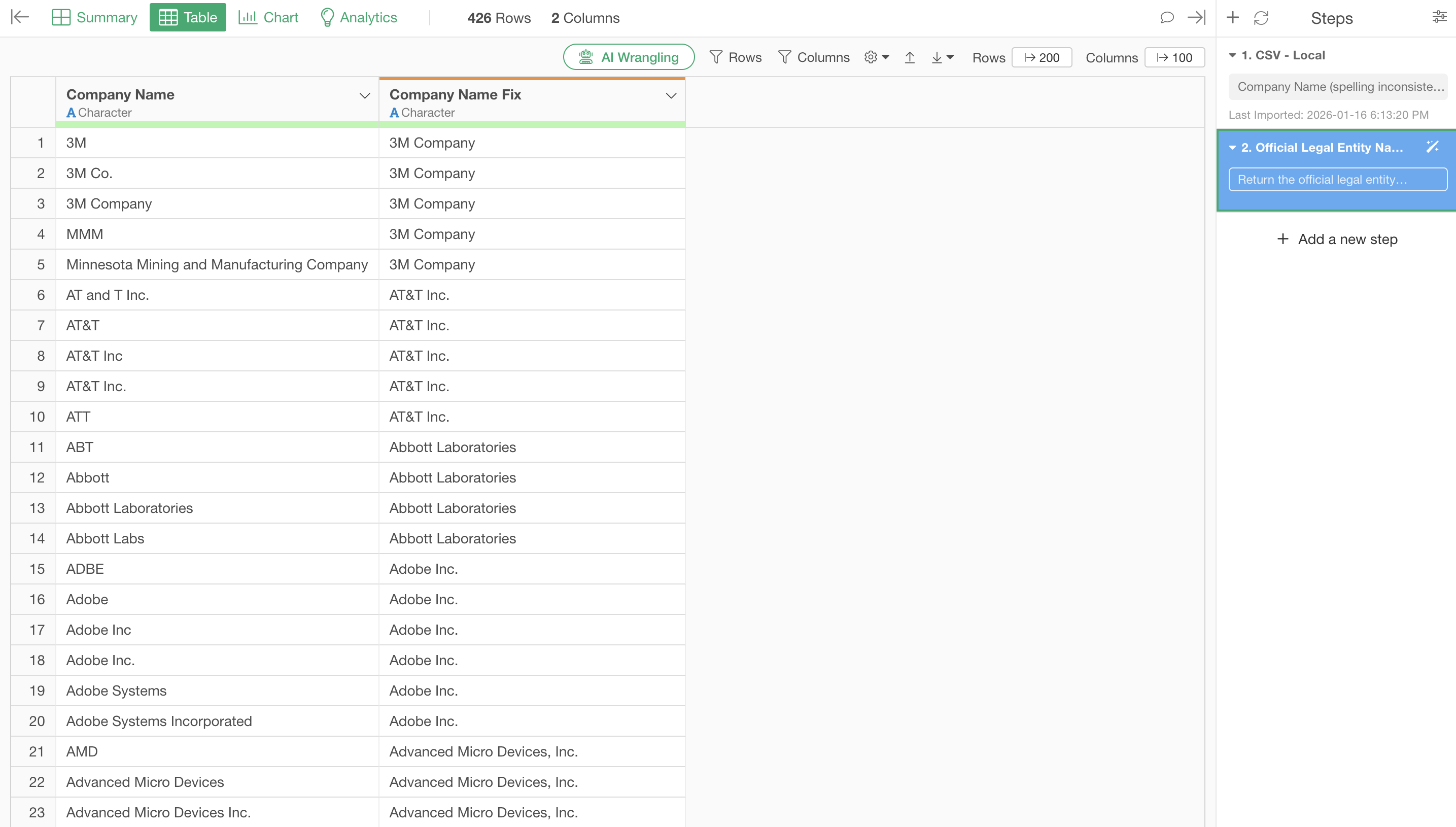
That’s all it takes - name variation corrections for thousands of rows of data are completed in just tens of seconds to a few minutes.
Four Typical Name Variation Solution Stories
Now let’s look at how AI Functions solve four typical problems occurring in actual workplaces.
1. Company and Organization Name Variations
You’ve been in the Sales Operations department for 3 months. Your manager has given you instructions to “accurately determine the number of client companies”. However, when you open the CRM data…
The same Apple is counted as 4 different companies: “APPLE”, “Apple”, “Apple Inc”, and “Apple Inc.”. 3M Company is also scattered as “3M”, “3M Co.”, and “MMM”. You can’t even get an accurate company count like this.
Solution with AI Functions:
Just write the following in the prompt input field.
Return the official legal entity name for each organization name.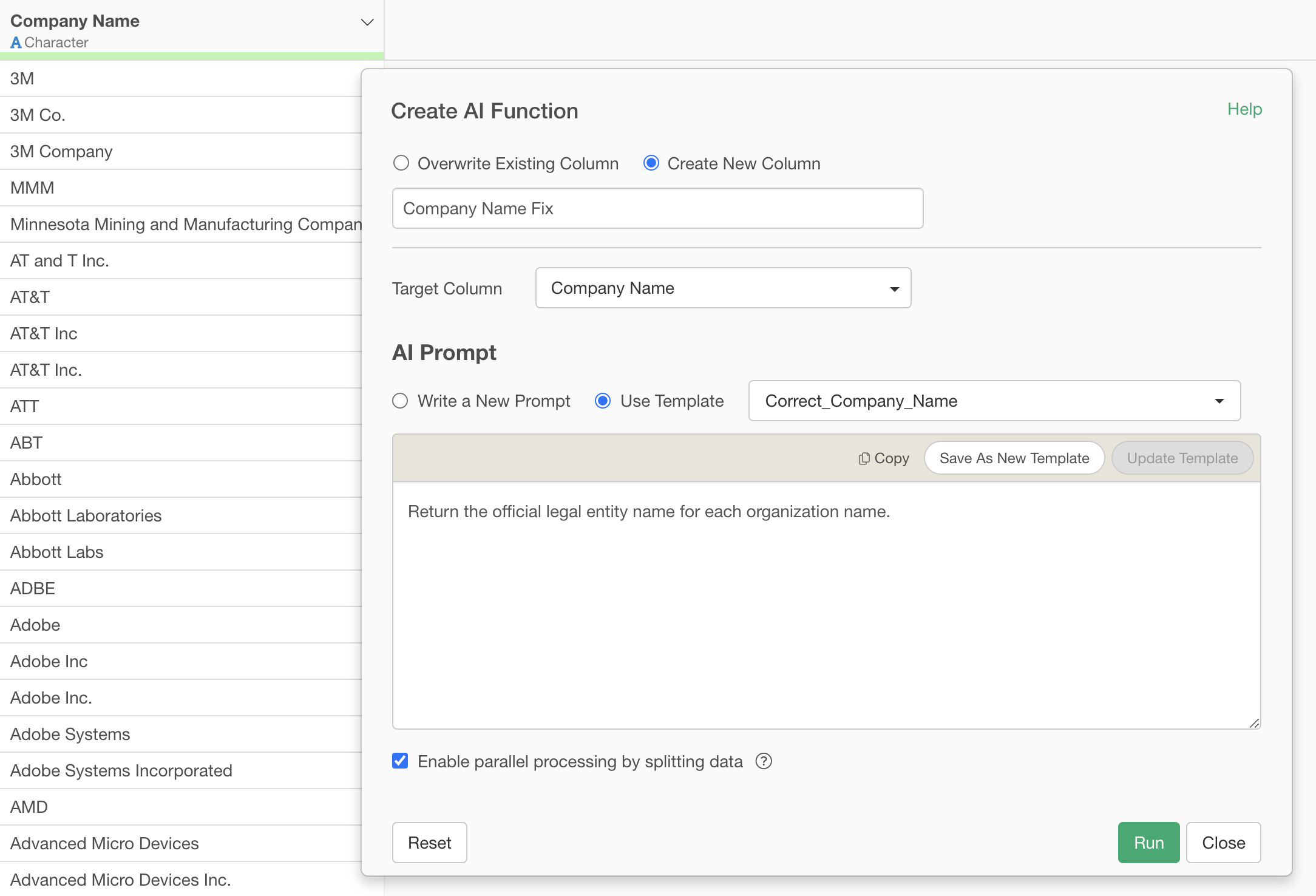
By executing this, the name variations are corrected as shown below.
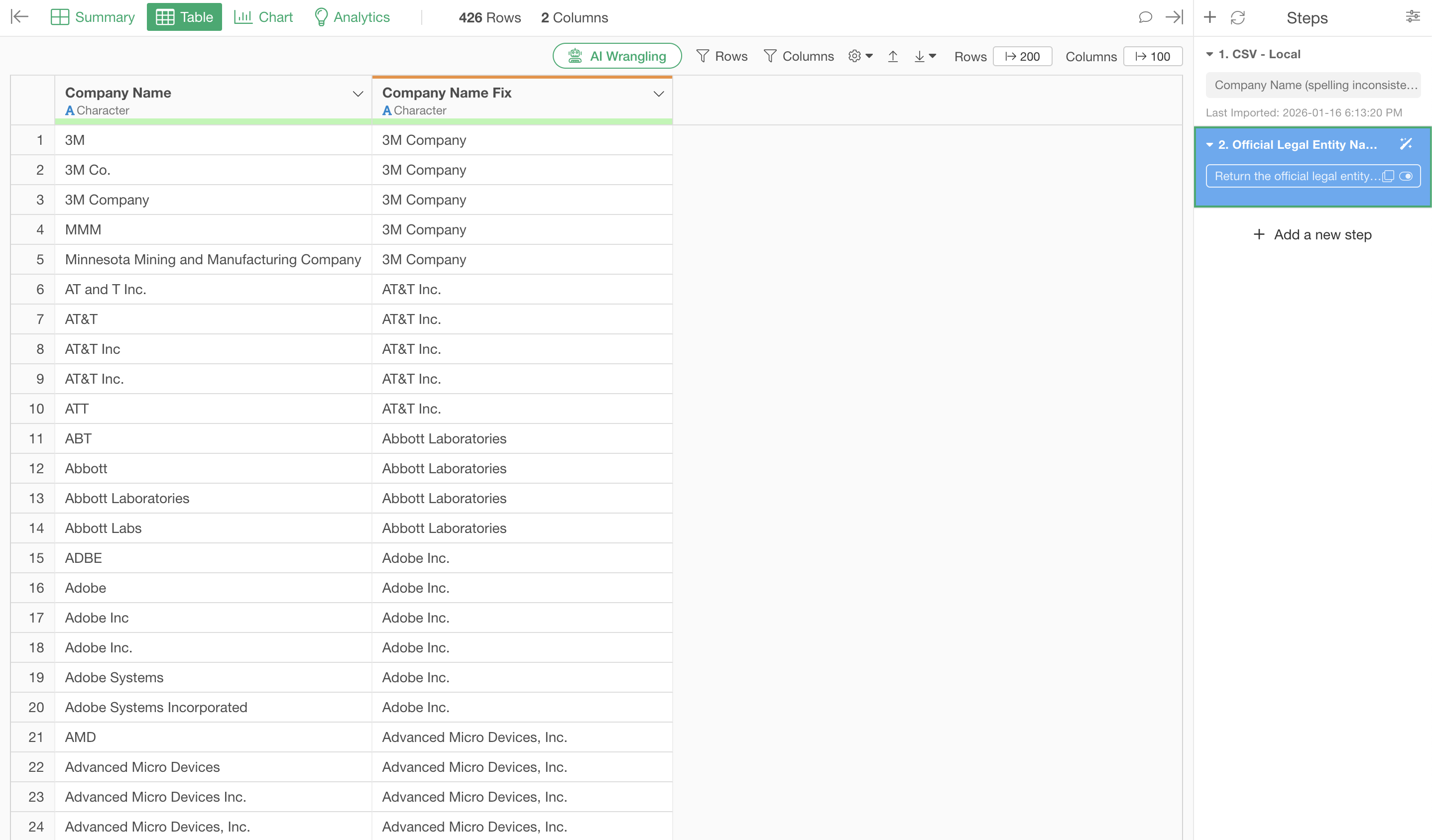
Furthermore, it converts ticker symbols like “MMM” to “3M Company” and “ATT” to “AT&T Inc.”.
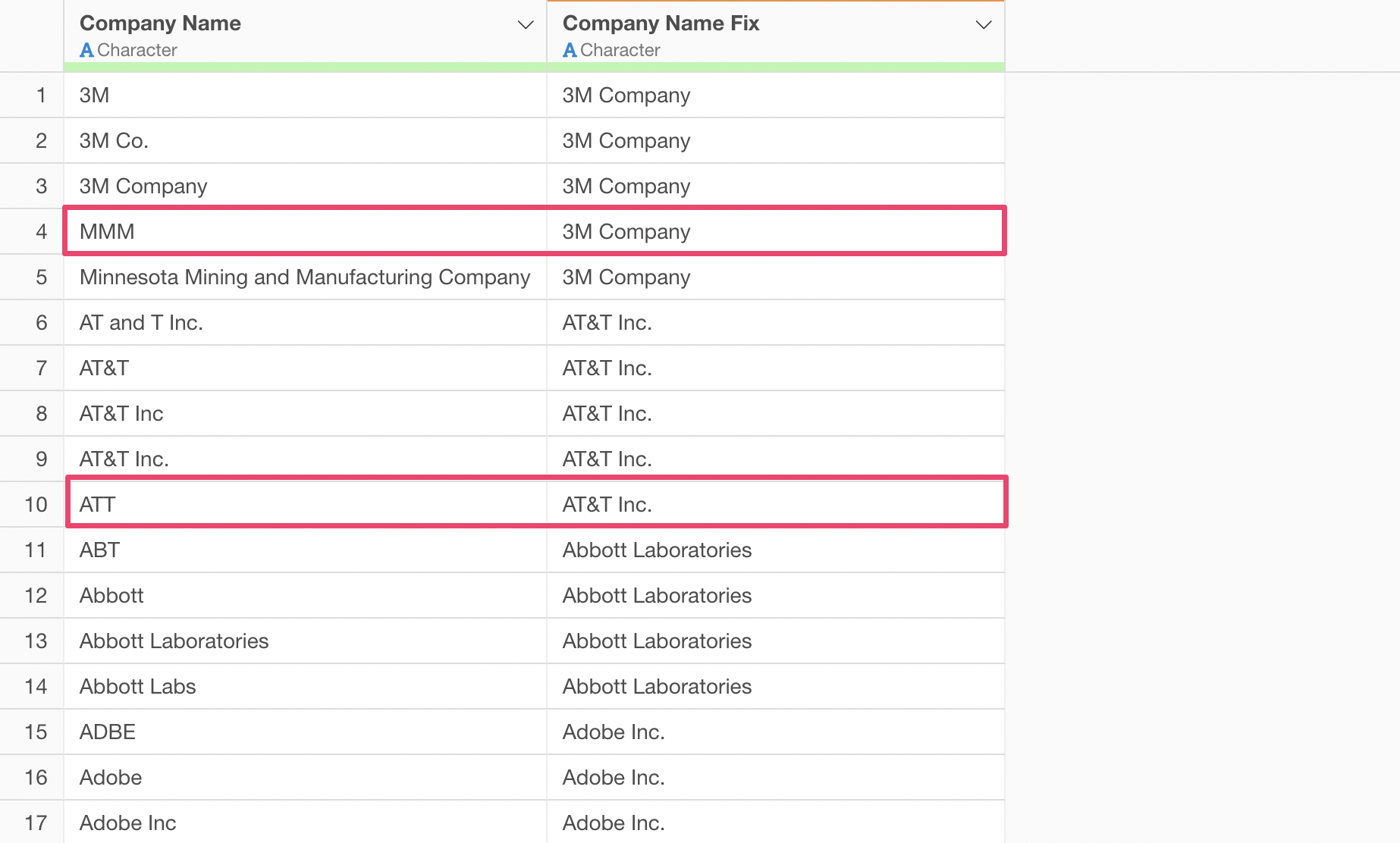
There was no need to write programs or correct each entry manually. AI accurately converted abbreviations and ticker symbols to complete legal entity names, including “Inc.”, “Corp.”, and “Co.”.
2. Proper Noun Variations (Notation Differences)
You’re in the IT department and conducted a survey about internal tool usage. However, you were dismayed when looking at the collected response data.
The same Excel appears scattered as “excel”, “EXCEL”, “Exel”, and “Excal”. Google Sheets also has inconsistent notation like “Google Spread sheets” and “Sheets”.
You can’t grasp accurate usage patterns like this.
Solution with AI Functions:
Clearly communicate the expected behavior to AI Functions.
Return the official names for the provided tool name data and correct any inconsistencies in notation. If uncertain, return an empty result.

Examples:

- Excel, excel, EXCEL -> Excel
- Power BI, power bi, PowerBI -> Power BI
- Google Spreadsheets, Google Sheets -> Google Sheets

Do not return incorrect tools such as Excel when the input is Power BI or Tableau.

For the same tool, always return the exact same official name with identical characters (no leading or trailing spaces).

Also, if a single cell contains multiple values, separate them with commas in the result.
Excel Power BI -> Excel, Power BI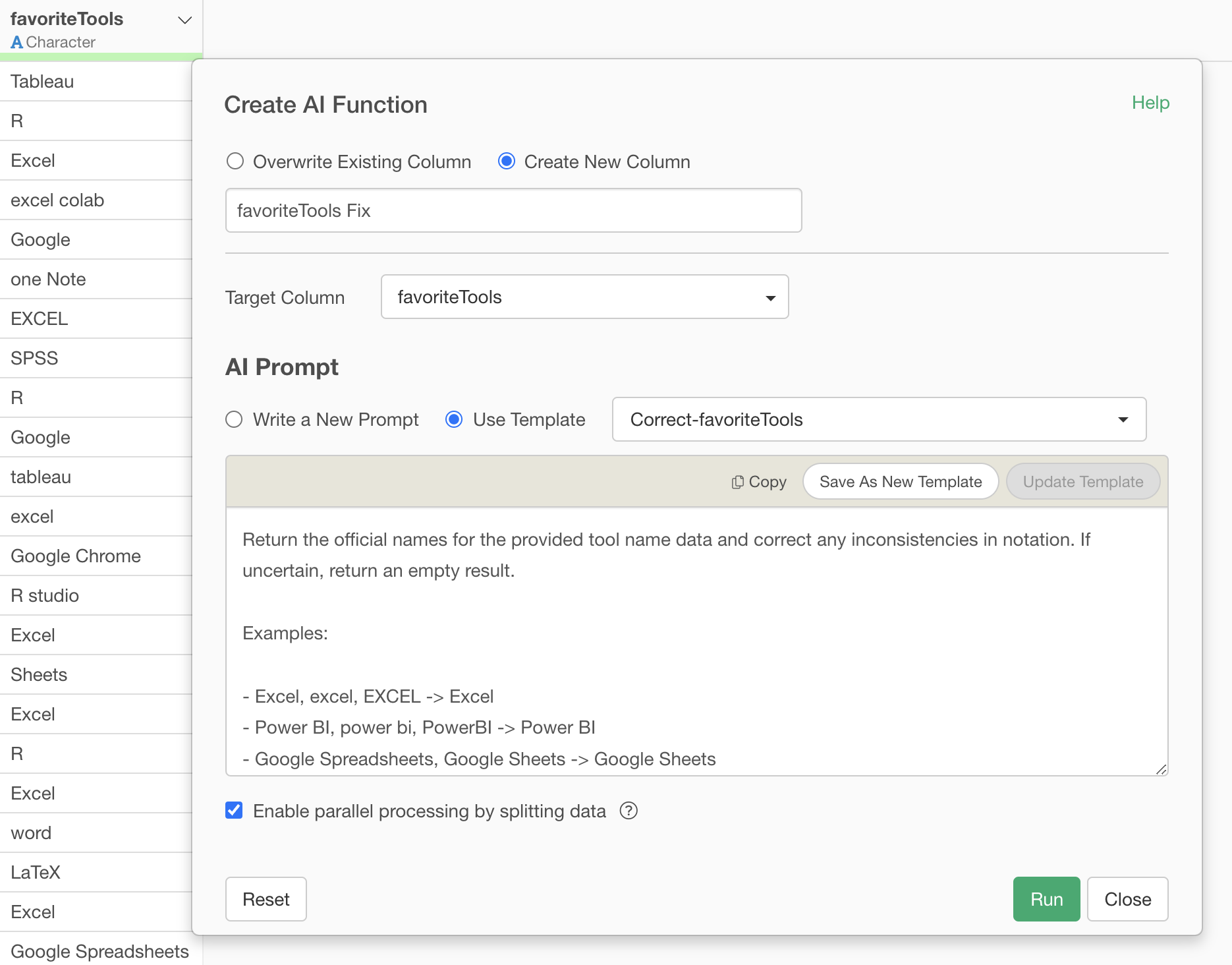
Through unifying uppercase/lowercase, normalizing spaces, and properly separating multiple tools, they are unified to the correct tool names.
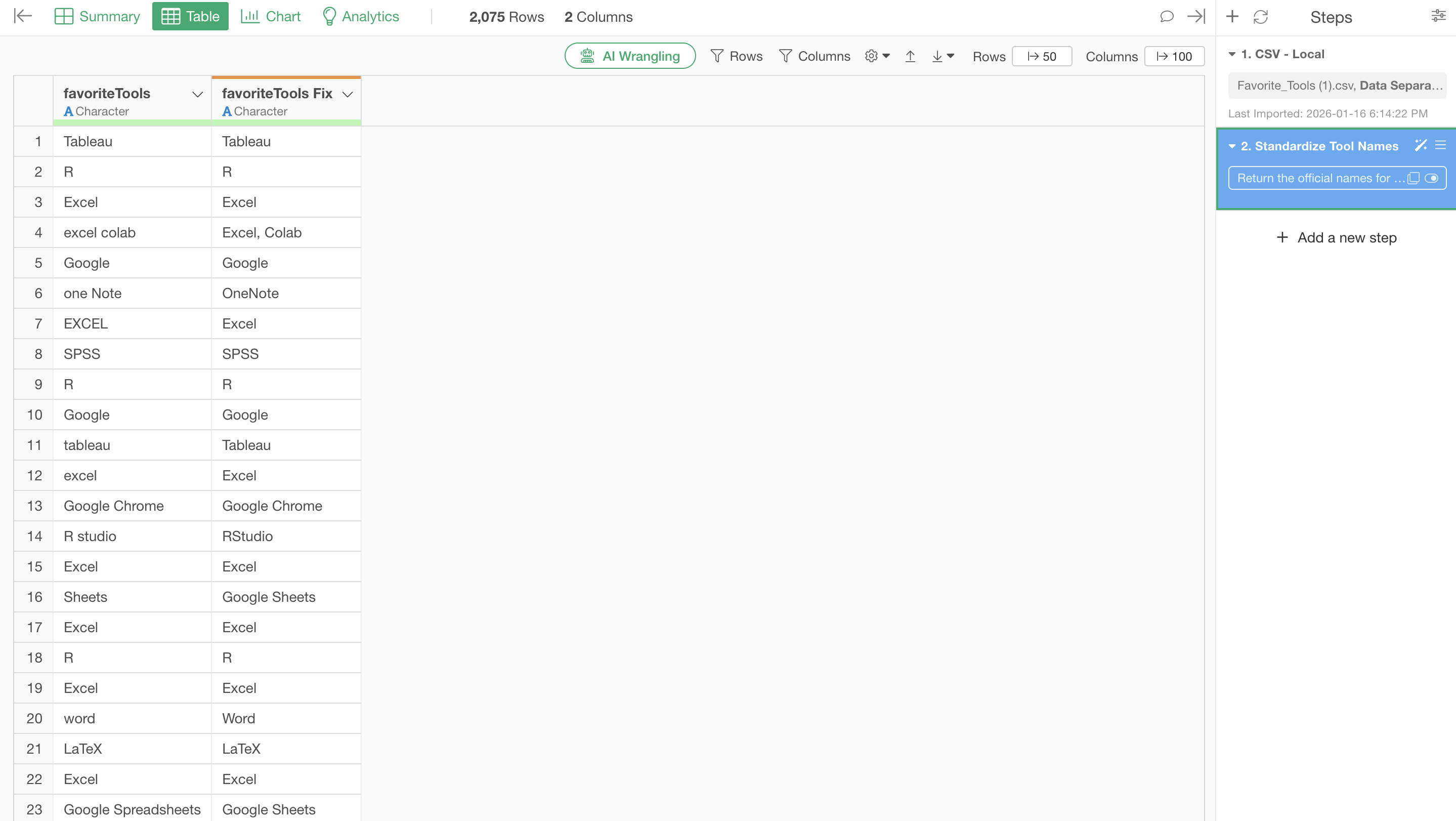
You can confirm that Excel variations are also unified.
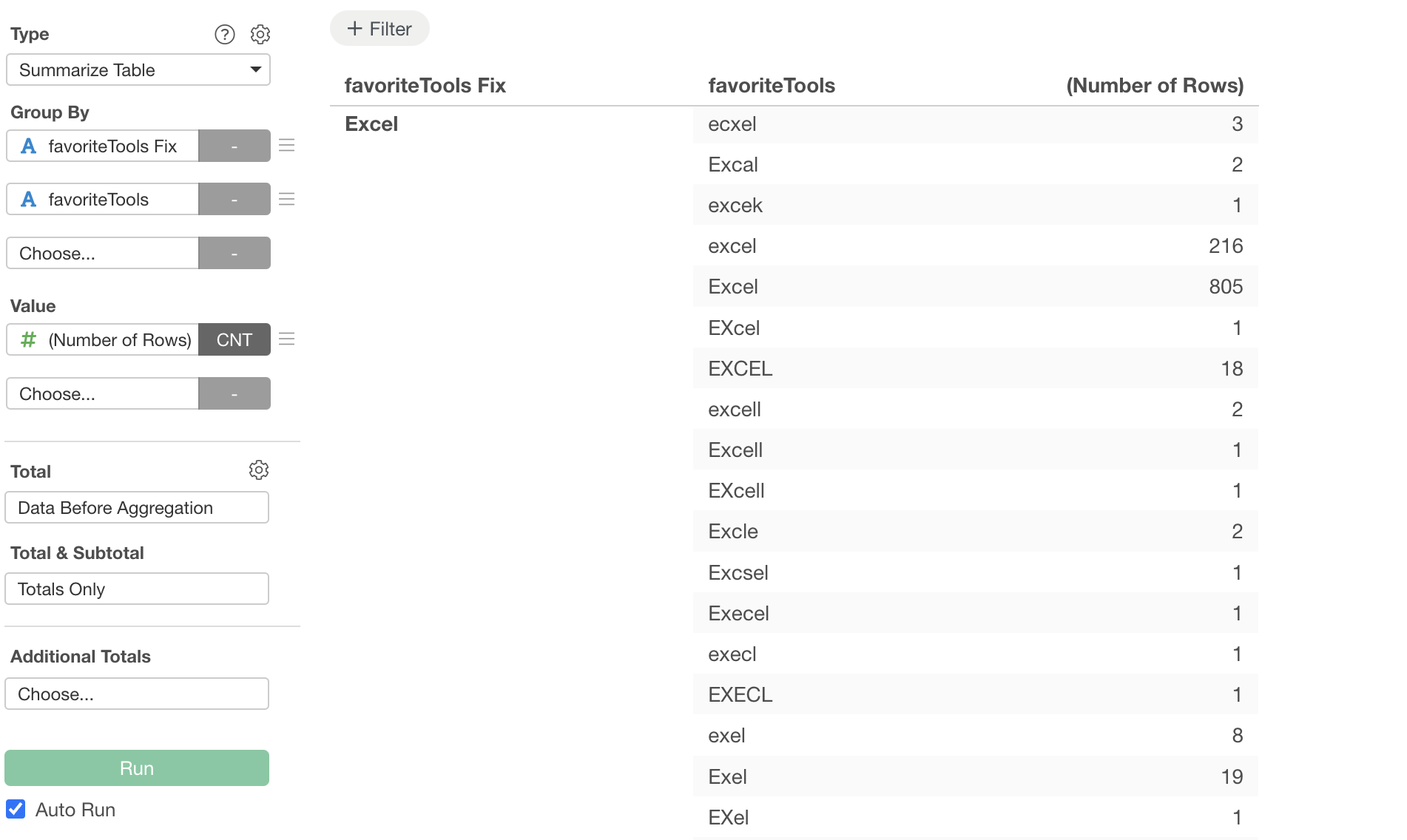
Unifying uppercase/lowercase, correcting spelling mistakes, normalizing abbreviations. With everything processed accurately, you can finally see “the tools actually being used internally”. Which is more prevalent, Excel or Google Sheets? Only with accurate data can you make appropriate license contracts, plan necessary training, and determine IT investment priorities. And the data preparation that forms this foundation was completed with a single prompt.
3. Product and Service Name Variations (Mixed Attribute Information)
You’re in charge of inventory management for an e-commerce site. When trying to aggregate sales data by product for monthly report creation, you noticed a big problem.
The product “iPhone 15 Pro” is recorded like completely different products due to different capacities and colors.
“iPhone15 Pro 128GB”
“iPhone 15 Pro 256GB Black”
“IPHONE 15 Pro Max 128 GB”
“iphone15 Pro 512GB”
Uppercase/lowercase is scattered. Spacing presence is inconsistent. You can’t see “which product is actually selling the most” like this.
Solution with AI Functions:
There’s no need to define complex rules - just tell AI Functions the following.
Remove variation information such as capacity and color from product names, and standardize them to the official basic product name with correct capitalization and spacing.

# Items to Remove
 - Capacity: Storage capacity such as GB, TB
 - Size: Screen size such as inches, type
 - Color: Color information such as black, white, etc.
 - Memory: RAM size (16GB, 32GB, etc.)
 - Other Variations: WiFi model, cellular model, etc.

# Items to Keep and Standardize

 - Manufacturer name (with correct capitalization)
 - Product series name (with correct capitalization and spacing)
 - Model name/number (with correct capitalization and spacing)
 - Generation information (10th generation, Series 9, etc.)

# Standardization Rules
 - Unify capitalization to match the official product name (e.g., "AirPods" not "Airpods" or "airpods")
 - Unify spacing to match the official product name (e.g., "AirPods Pro" not "AirpodsPro")
 - Ensure the same product always returns the exact same standardized name

# Examples

 - Amazon Fire HD 10 Plus 64GB → Amazon Fire HD 10 Plus
 - iPhone 15 Pro 256GB Black → iPhone 15 Pro
 - MacBook Pro 14-inch M3 16GB 512GB → MacBook Pro 14-inch M3
 - Airpods Max → AirPods Max
 - AirpodsPro 2 → AirPods Pro 2
 - IPHONE 15 Pro Max 128GB White → iPhone 15 Pro Max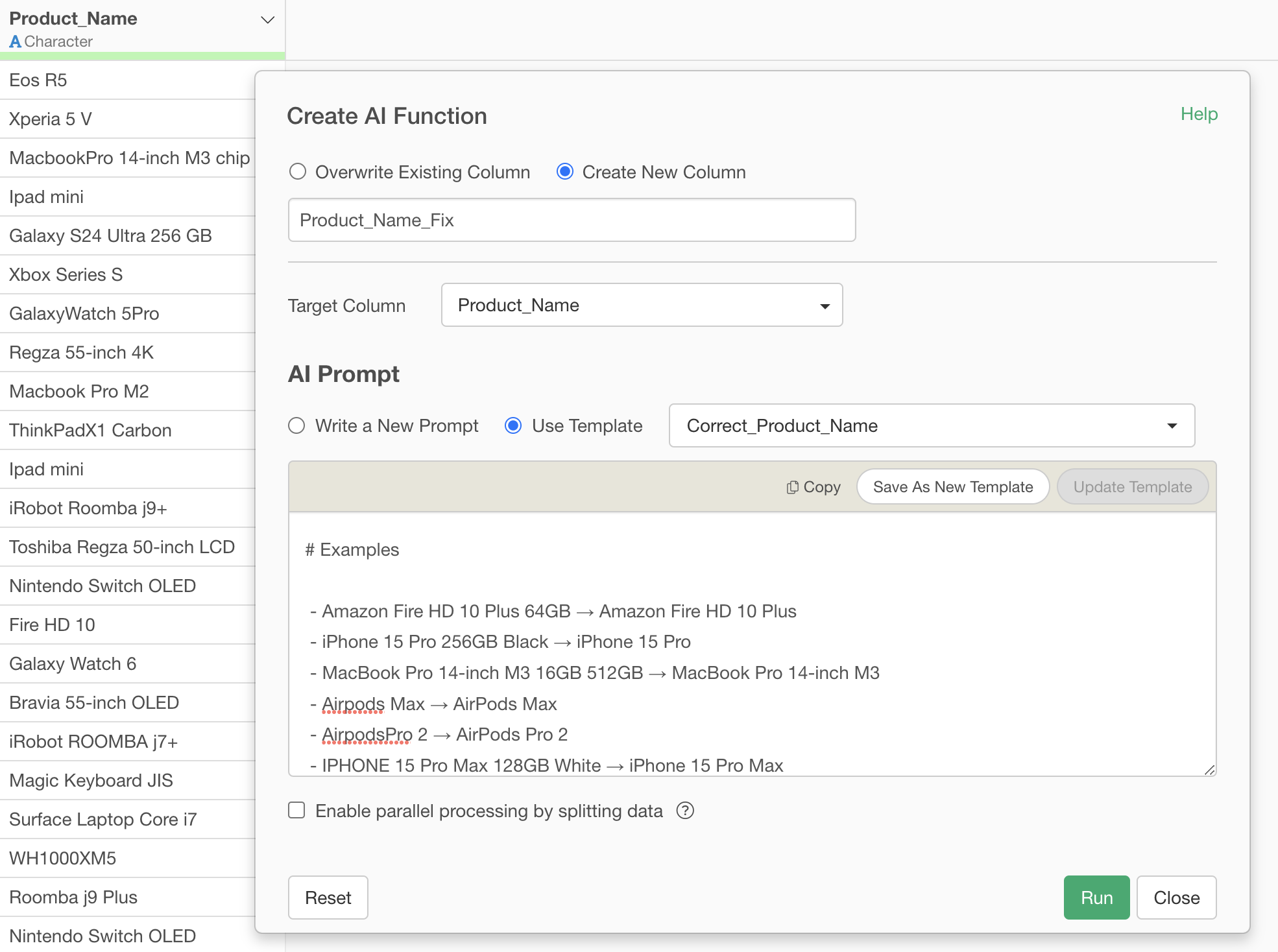
With this, unifying uppercase/lowercase, removing unnecessary capacity information, and converting to official product names - everything was completed at once.
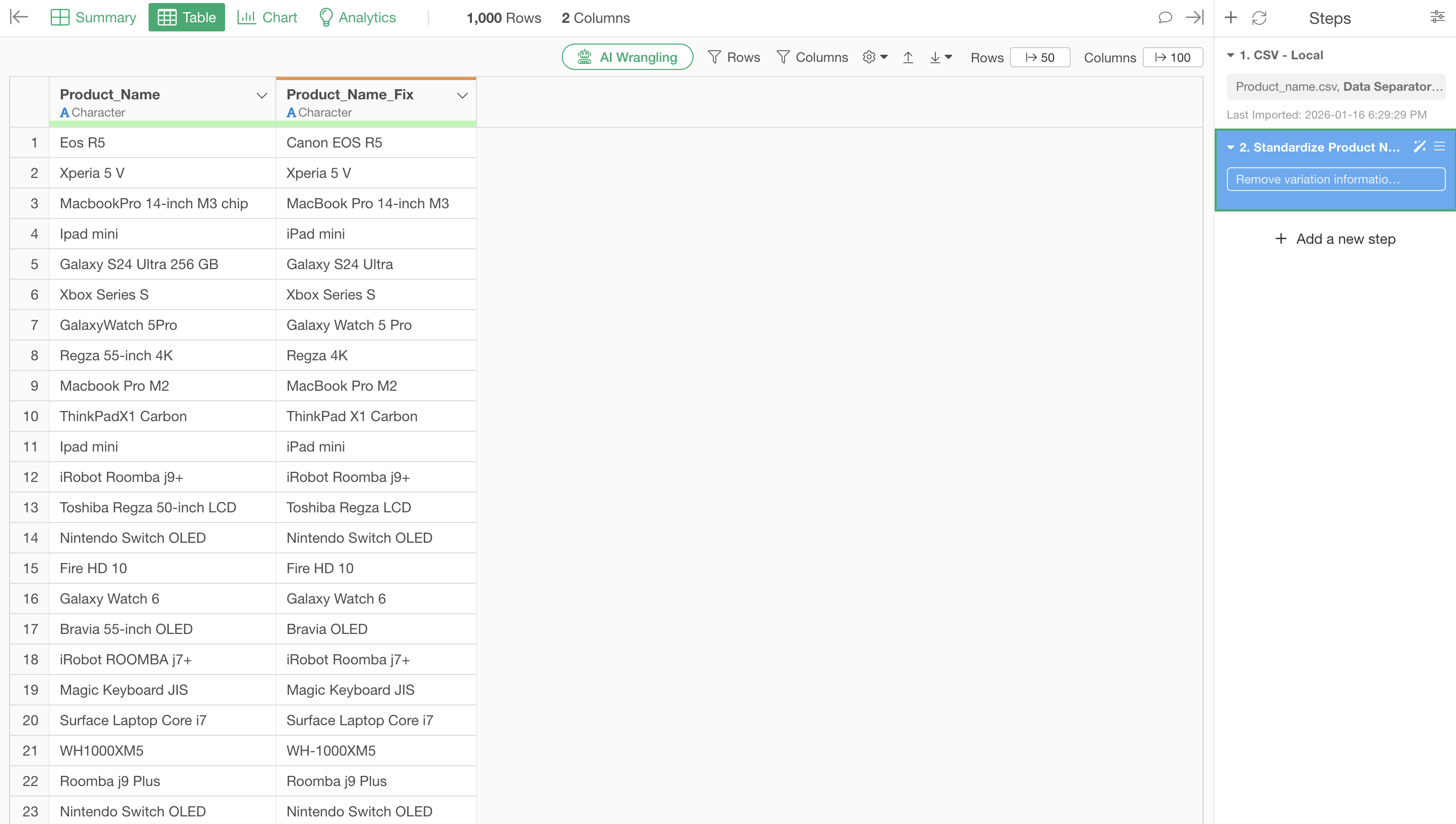
Comparing before execution, the number of unique values (unique count) decreased dramatically from “538” to “146”. You can see how many name variations had occurred.
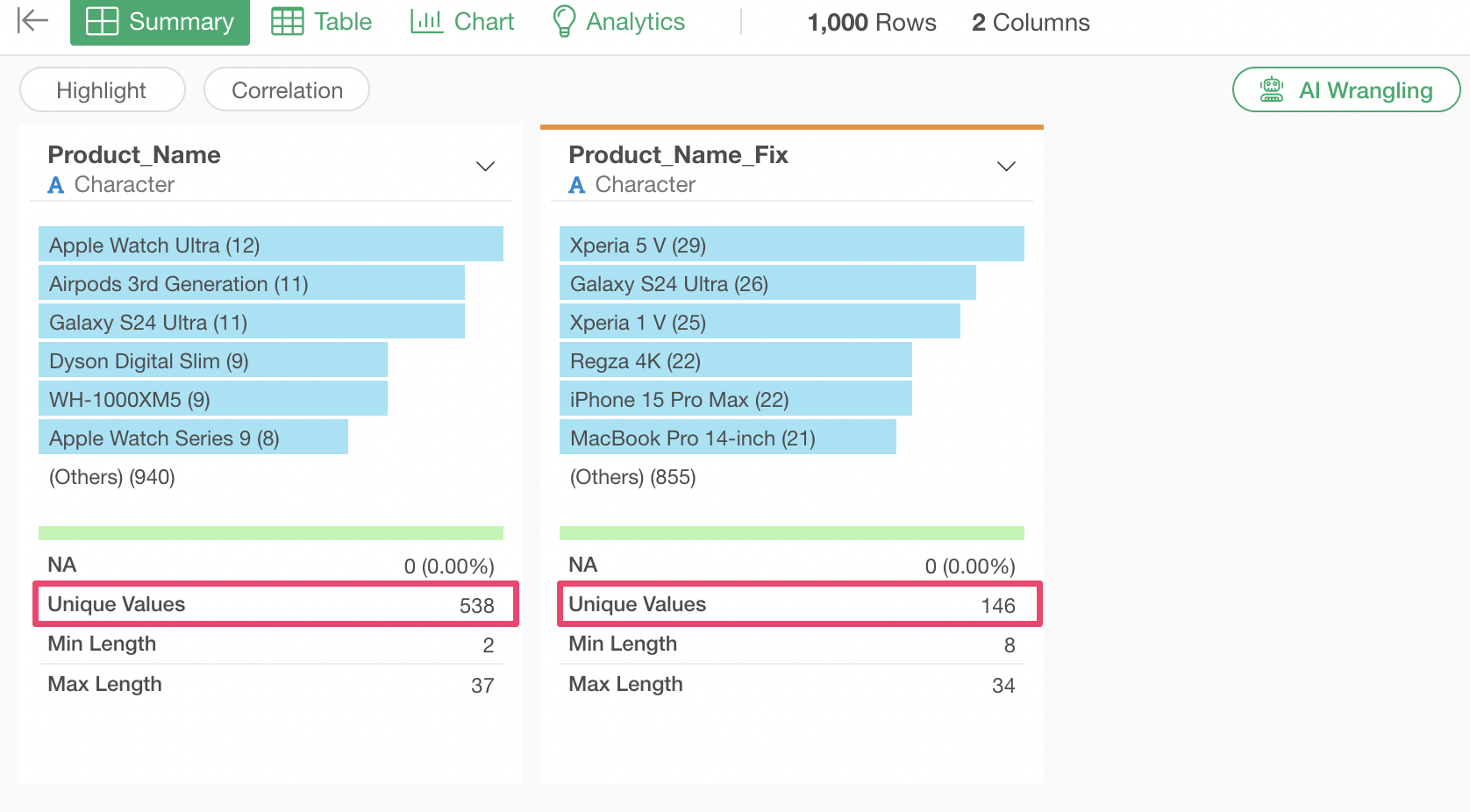
Looking at the corrected results, when representing the same iPhone model, it returns one iPhone model even if there are differences in color or capacity.
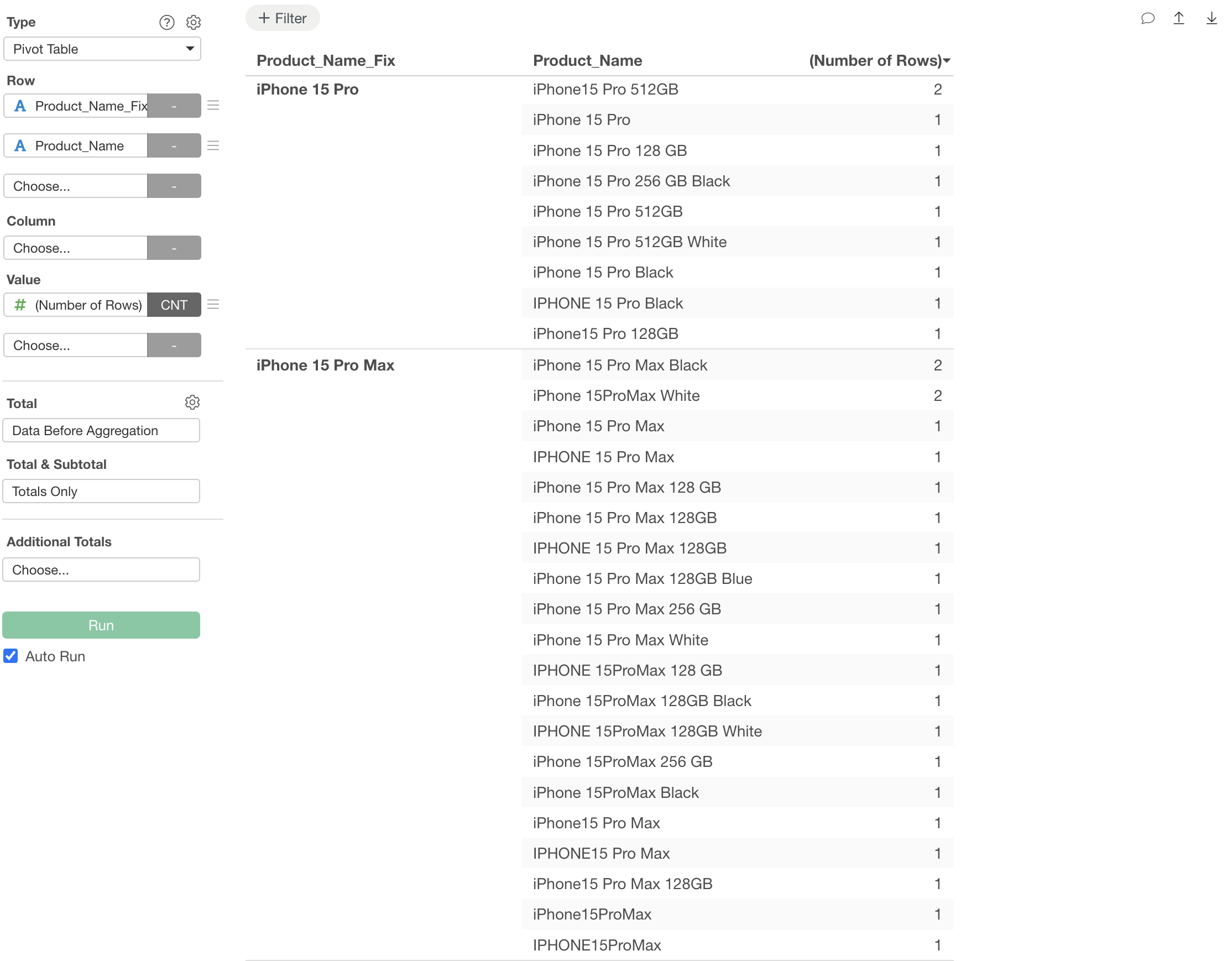
In this way, even when unifying product names, corrections can be easily done using the power of AI. Inventory strategy, marketing measures - everything starts from this “accurate data”. And that first step was completed in just tens of seconds.
4. Address Variations
You’re in charge of logistics system management. Recently, reports have been coming in about increased delivery errors. When investigating the cause, you discovered there are data quality issues with delivery addresses.
Even though they should be the same address, different input by different people causes the system to recognize them as different addresses.
“123 main st, new york, NY 10001” (mixed lowercase)
“456 OAK AVENUE, LOS ANGELES, ca 90012-3456” (all uppercase, state name lowercase)
“One washington boulevard, Houston, TX, 77002” (number as word, extra comma)
“2112 N Main St #101, PORTLAND, or 97205” (apartment number notation)
Solution with AI Functions:
For address standardization, let’s use rules based on USPS guidelines.
Standardize the provided US address according to USPS guidelines with the following rules:

1. Street Types - Use standard USPS abbreviations without periods:
   - Street → St
   - Avenue → Ave
   - Boulevard → Blvd
   - Drive → Dr
   - Road → Rd
   - Lane → Ln
   - Circle → Cir
   - Court → Ct
   - Place → Pl
   - Way → Way

2. Directional Prefixes/Suffixes - Use single letter without periods:
   - North → N
   - South → S
   - East → E
   - West → W
   - Northeast → NE
   - Northwest → NW
   - Southeast → SE
   - Southwest → SW

3. Secondary Unit Designators - Use standard abbreviations without periods:
   - Apartment → Apt
   - Suite → Ste
   - Unit → Unit
   - Building → Bldg
   - # → Apt (convert to Apt)

4. Capitalization:
   - Use Title Case for street names
   - Use UPPERCASE for state abbreviations
   - Use lowercase for city names, then capitalize first letter of each word

5. State Names:
   - Always use 2-letter USPS state codes in UPPERCASE (e.g., CA, TX, NY)

6. ZIP Codes:
   - Keep 5-digit or 9-digit format (XXXXX or XXXXX-XXXX)

7. Spacing:
   - Single space between words
   - Comma followed by space before city
   - Comma followed by space before state

8. P.O. Box:
   - Format as "PO Box" (no periods, capital P and O, capital B)

9. Special Cases:
   - Remove extra spaces
   - Remove unnecessary periods except in abbreviations where required by USPS

Output Format:
[Street Number] [Directional] [Street Name] [Street Type] [Secondary Unit], [City], [STATE] [ZIP]

Example:
Input: "474 S Lake Street, Indian Wells, CA 92210"
Output: "474 S Lake St, Indian Wells, CA 92210"

Input: "321 N Park Cir, #10, Umatilla, OR 97882"
Output: "321 N Park Cir Apt 10, Umatilla, OR 97882"

Return ONLY the standardized address without any explanation or additional text.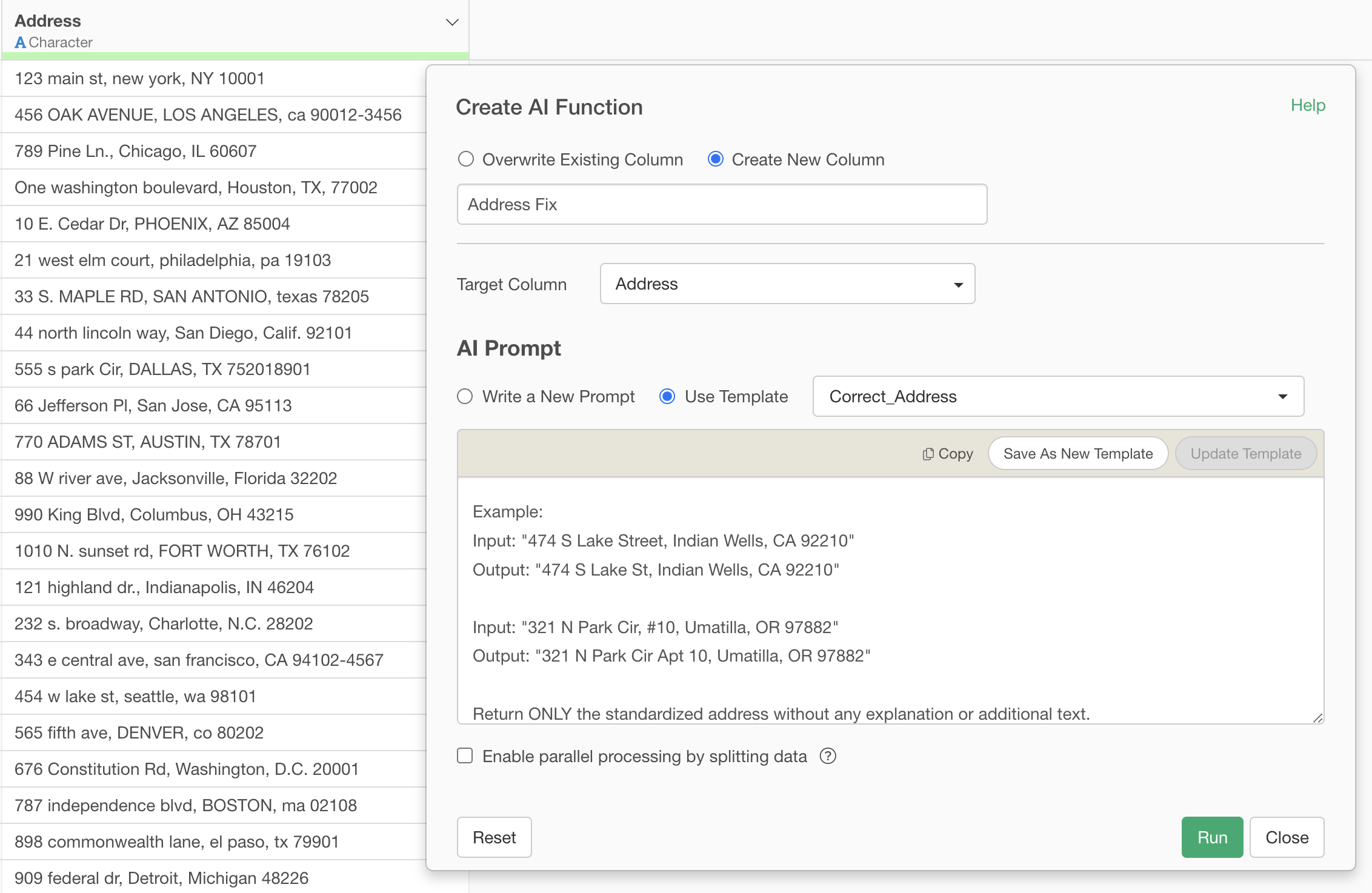
Unifying uppercase/lowercase, standardizing abbreviations, and unifying apartment number notation were all processed.
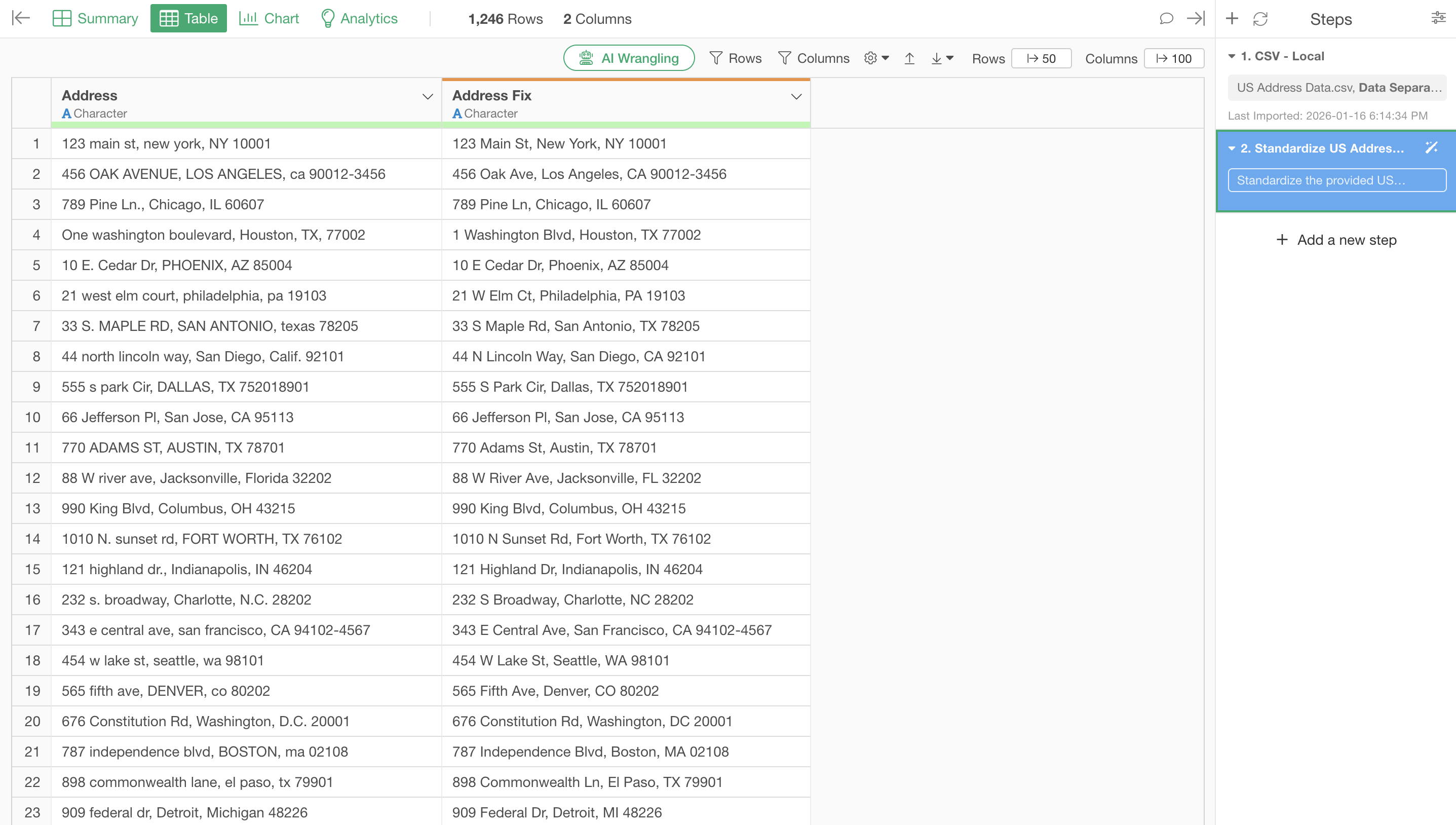
With this, “Street” was unified to “St”, “Avenue” to “Ave”, “#101” to “Apt 101”, and state names were all standardized to 2-letter uppercase codes. And most importantly, the entire logistics team can now focus on their actual work of route optimization and delivery efficiency improvement, rather than data correction.
Summary: A New Era of Name Variation Correction Begins Here
The “AI Functions” added in Exploratory v14 are a revolutionary feature that allows users without programming skills to automatically correct name variations using cutting-edge AI.
The four case studies introduced in this article - unifying company names to official legal entity names, unifying tool names, removing variation information from product names, and standardizing addresses - are all issues that occur daily in many companies.
Until now, solving these issues required:
Hiring specialized engineers, or
Investing hundreds of thousands of dollars in outsourcing, or
Spending hours doing manual corrections yourself
These were the only options.
However, with AI Functions, just by writing a prompt, name variation corrections for thousands of rows of data are completed in minutes. No specialized knowledge, no programming skills, no large budget required.
You can now use the time spent on data correction for the analysis work and strategic planning you should be doing. That’s the future AI Functions bring.
Why Not Experience Its Power Right Now?
Rather than explaining in words, it’s best to experience it yourself.
Exploratory offers a 30-day free trial. No credit card registration required.
Use AI Functions with your own data to try name variation correction. Please experience for yourself the surprise of completing it in just a few clicks.
For Those Who Want to Discuss Implementation
“I want to know how we can utilize this with our company’s data”
“I want to discuss specific implementation steps”
“We’re considering team usage”
If you have these questions, please feel free to contact us. The Exploratory team will fully support your data utilization.