Setting Up Exploratory Desktop When Proxy Configuration Is Done by PAC File
If PAC file is used to configure proxy server usage to connect to the internet from within your intranet, please find out which proxy server is used to connect to exploratory.io by checking the content of the PAC file, and configure Exploratory Desktop with the info about the proxy server.
Reading PAC File
PAC File is a JavaScript program that tells which proxy server to use when. By checking the content of it, you can figure out which proxy server should be used to connect to exploratory.io.
For example, the following example PAC file is for the policy that one should not use proxy for exampleintranet.com domain, but use proxy.exampleintranet.com:8080 as the proxy server for any other domains.
Example PAC File :
function FindProxyForURL(url, host) {
     if (dnsDomainIs(host, ".exampleintranet.com")) {
         return "DIRECT";
     }
     return "PROXY proxy.exampleintranet.com:8080";
}
In this case, since proxy.exampleintranet.com:8080 is the proxy server to use to connect to exploratory.io, we are going to configure Exploratory Desktop with this info.
Configuration on Exploratory Desktop
Open System Configuration dialog, and click Web Proxy tab. Configure the info about the proxy server you found out from the PAC file.
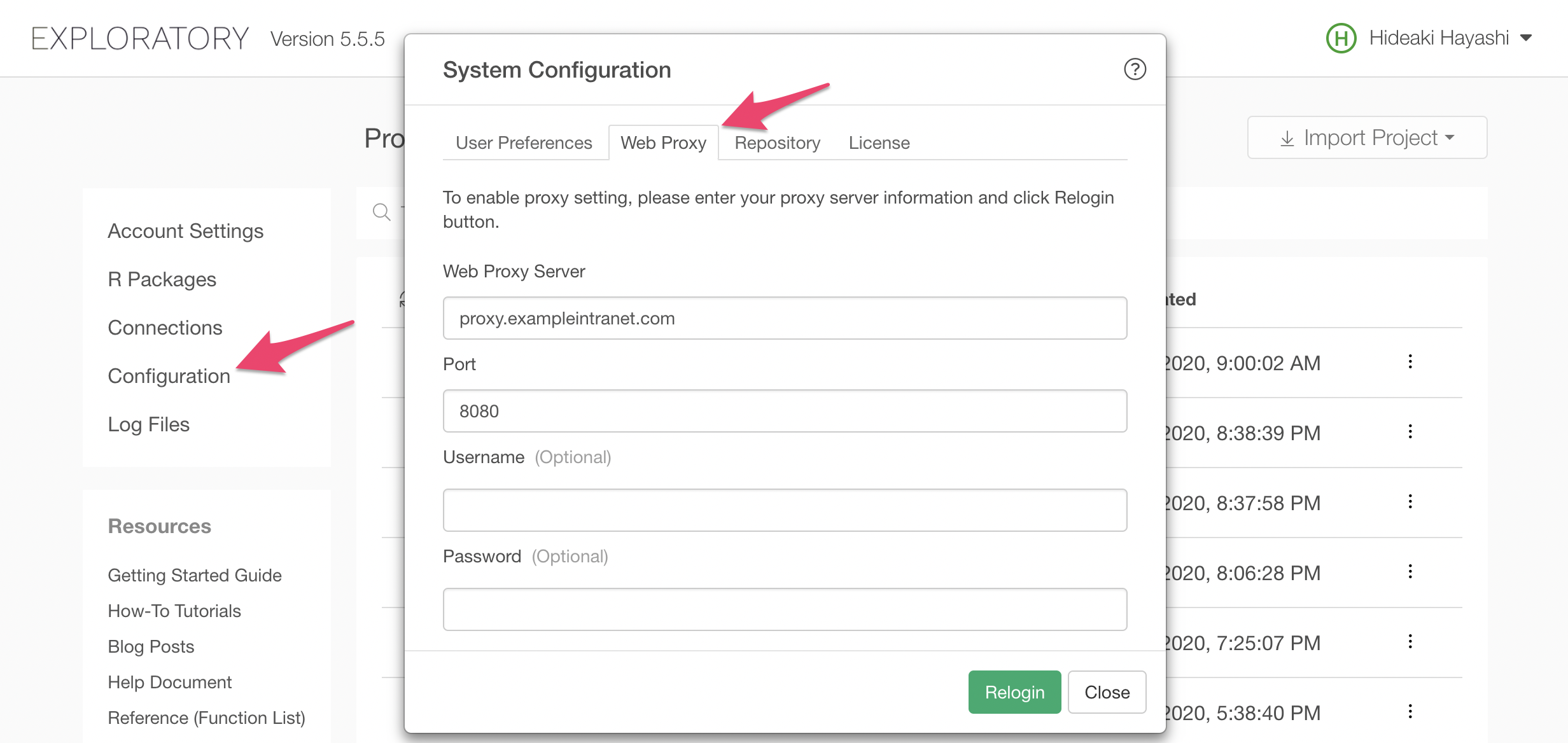
Click Relogin button to relogin, and the Exploratory Desktop will start connecting to exploratory.io through the configured proxy server.