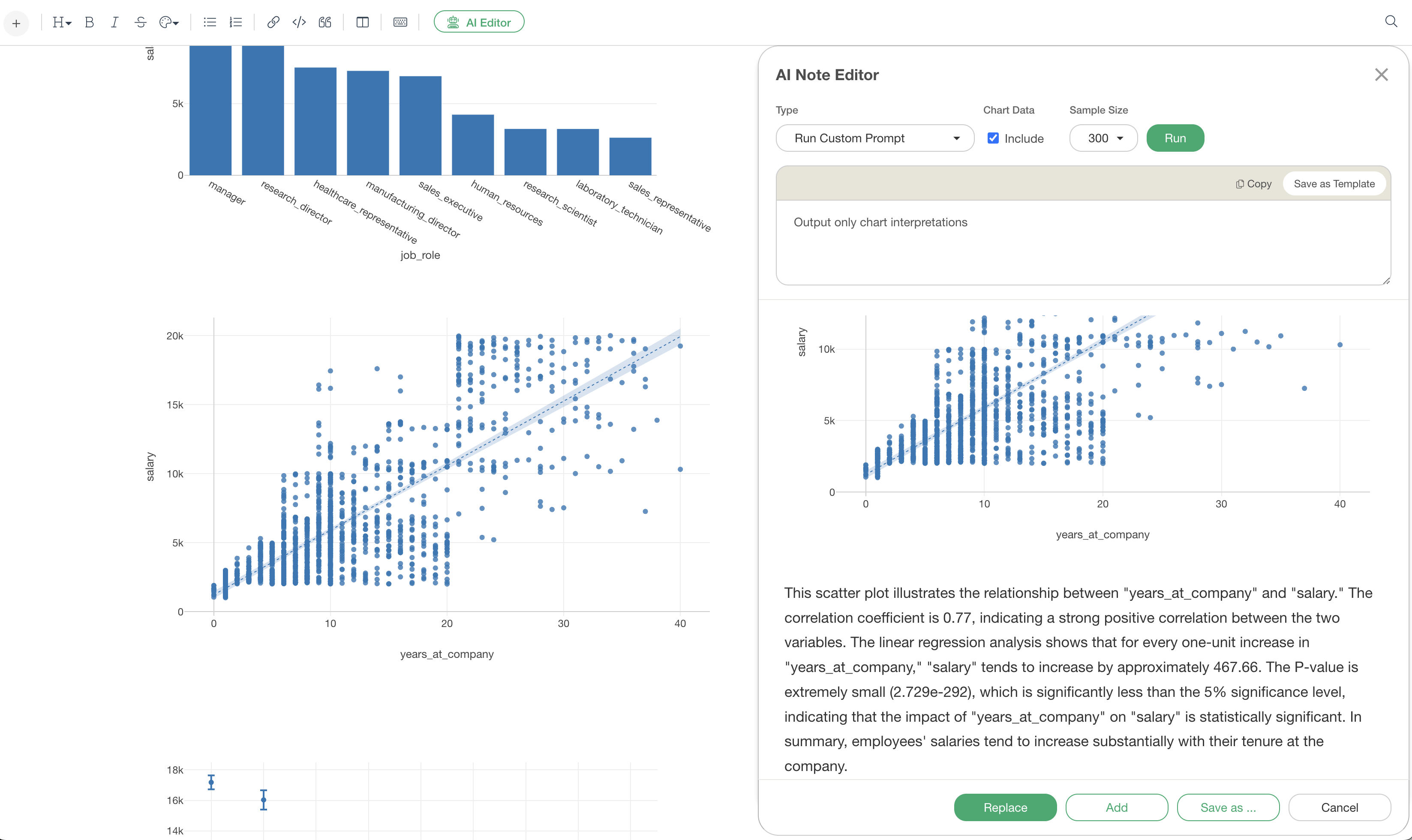
Introducing the AI Note Editor’s chart interpretation
In data analysis, creating charts is relatively easy, but accurately articulating the insights gained from them can be surprisingly difficult.
In particular, verbalizing specialized analyses such as extracting specific numerical values, determining statistical significance, and identifying trends and patterns requires both statistical knowledge and writing skills.
Exploratory’s “AI Note Editor” chart interpretation feature solves this problem. It automatically analyzes charts added to notes and generates professional interpretations that include data characteristics, statistical evidence, and business insights.
This note will introduce specific examples of how AI generates interpretations for various chart types.
How to use the chart interpretation feature
The AI Note Editor’s chart interpretation feature is very easy to use.
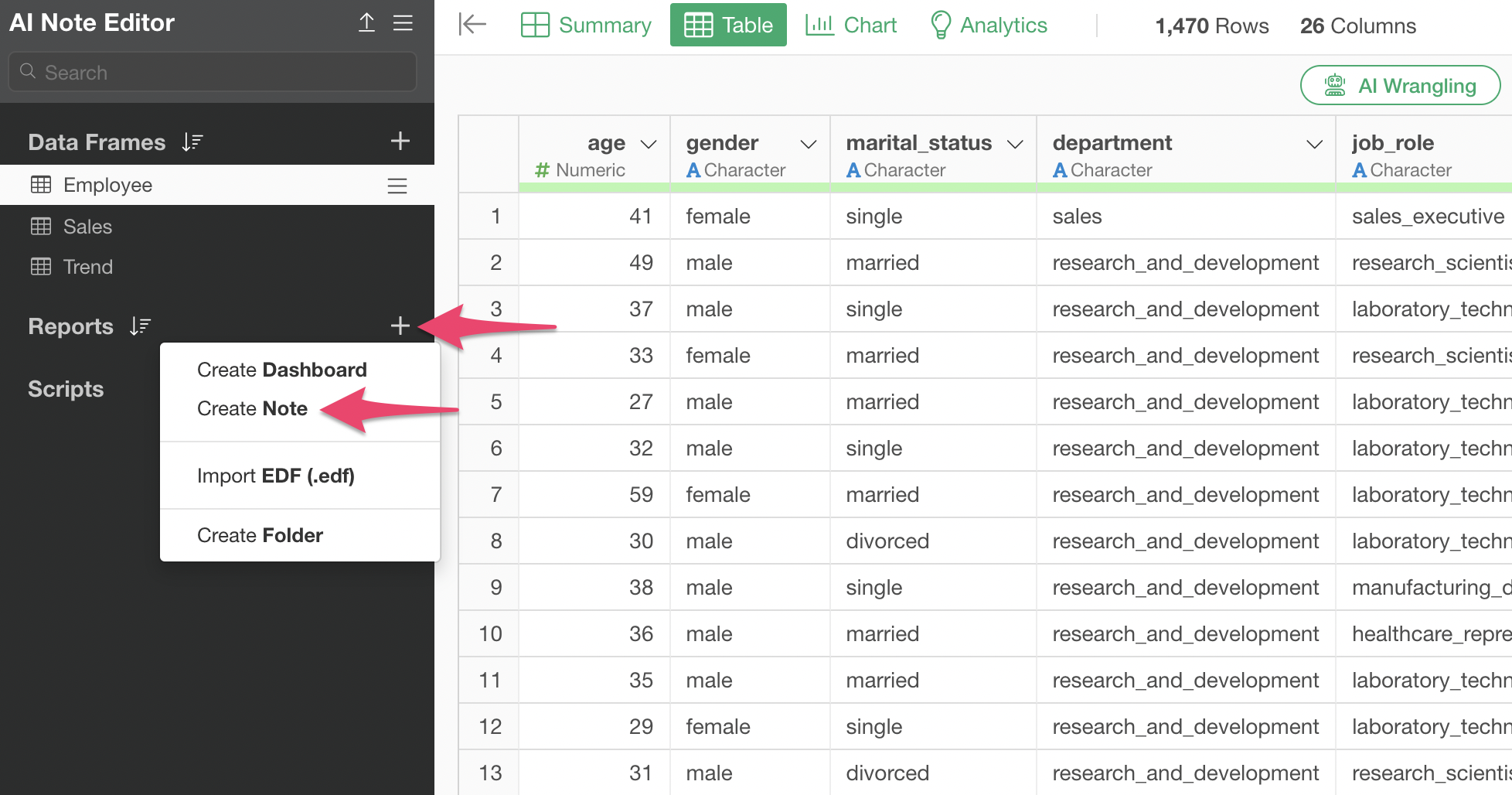
Select “Create Note” from the report’s plus button.
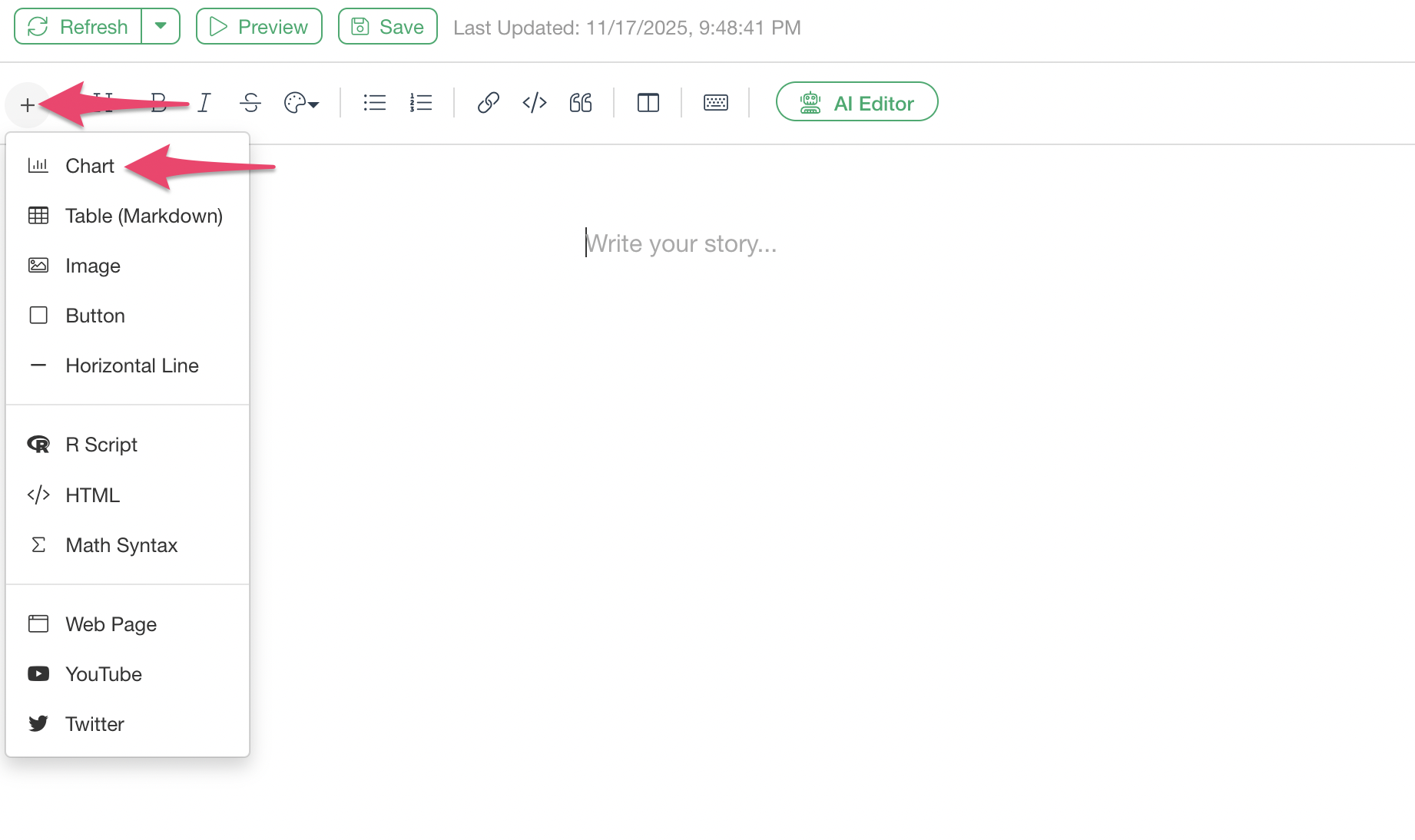
Select “Chart” from the plus button in the upper left of the note.
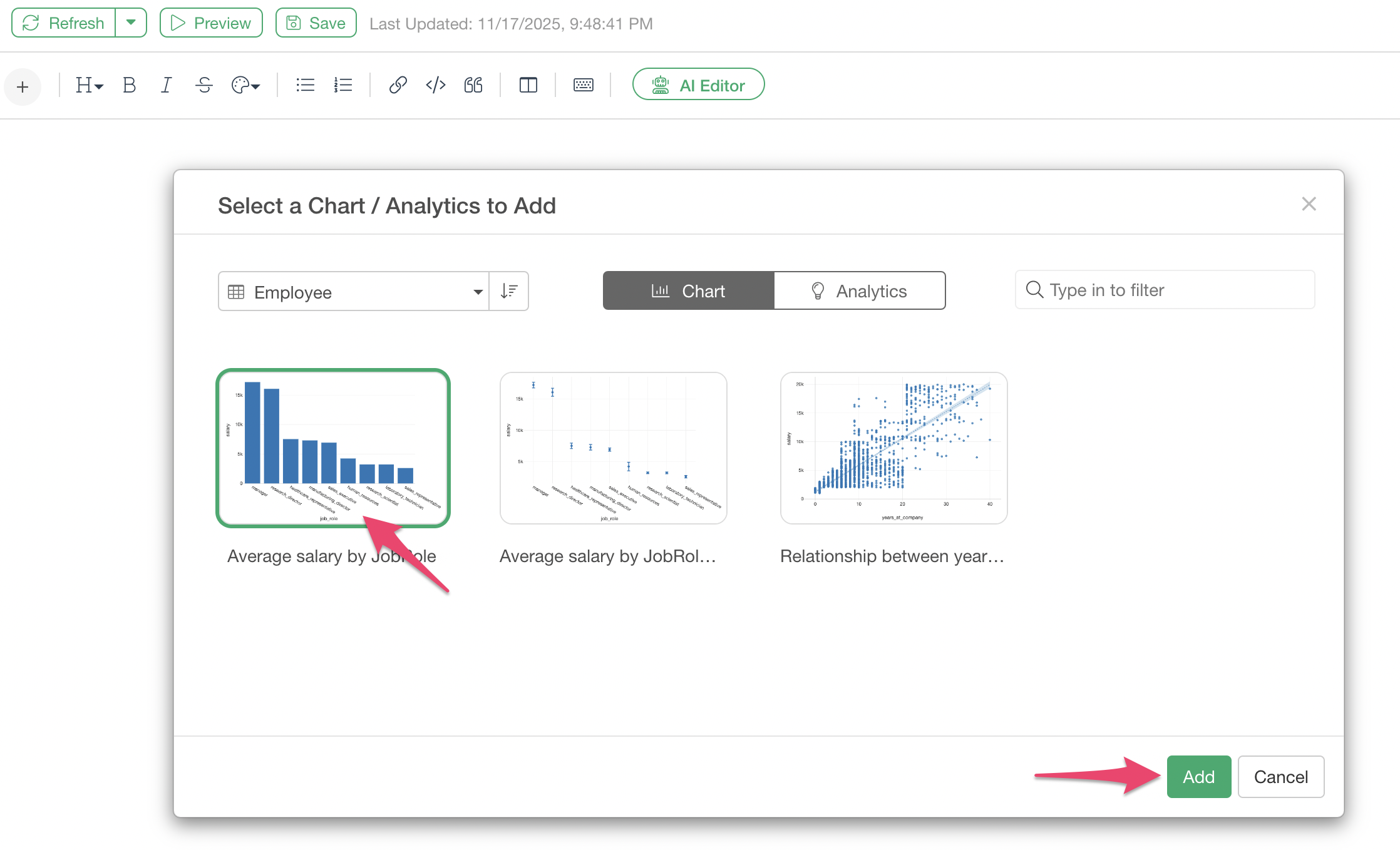
The chart selection dialog will appear, so insert the created chart into the note.
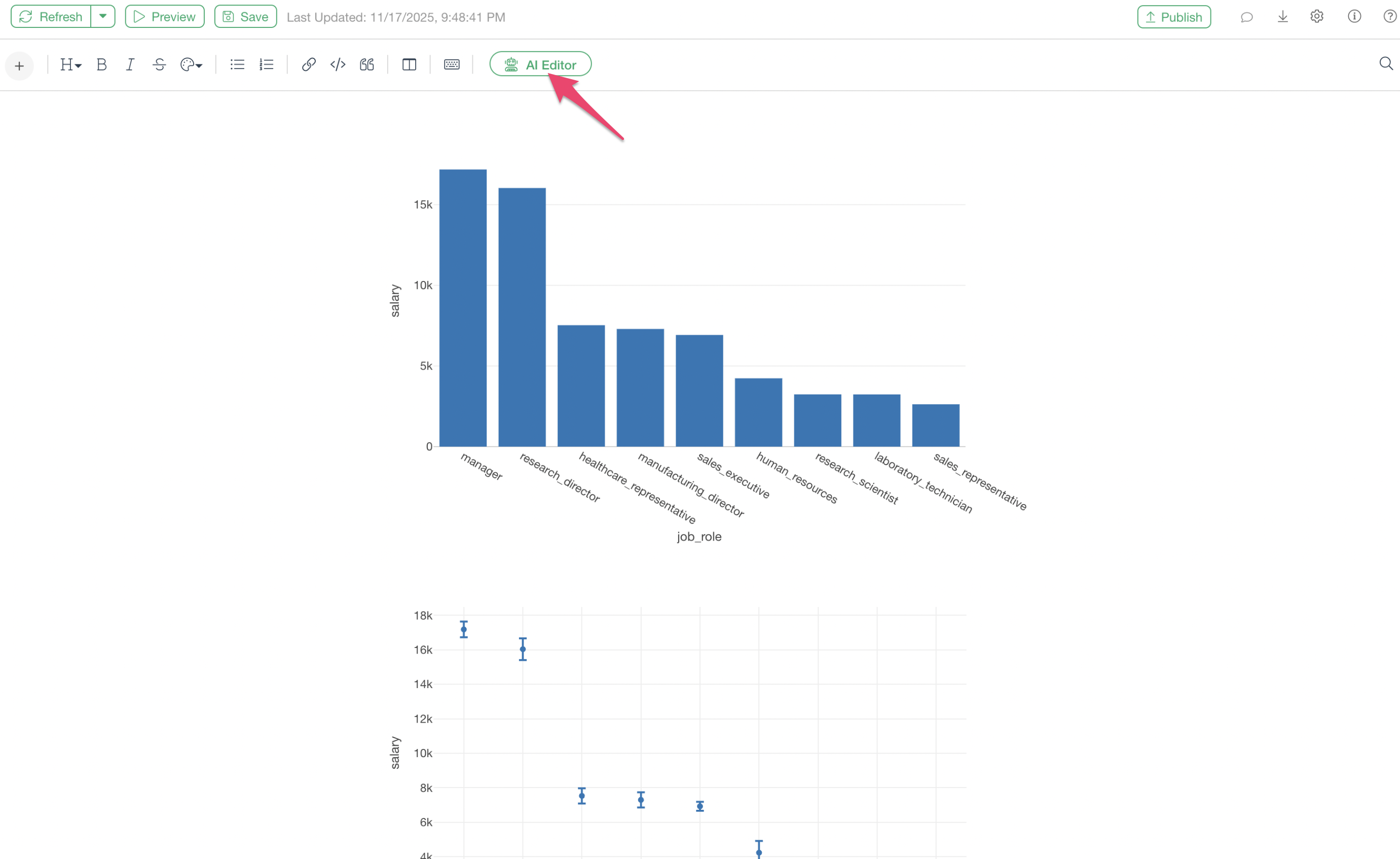
Next, click the “AI Editor” button at the top of the editing screen.
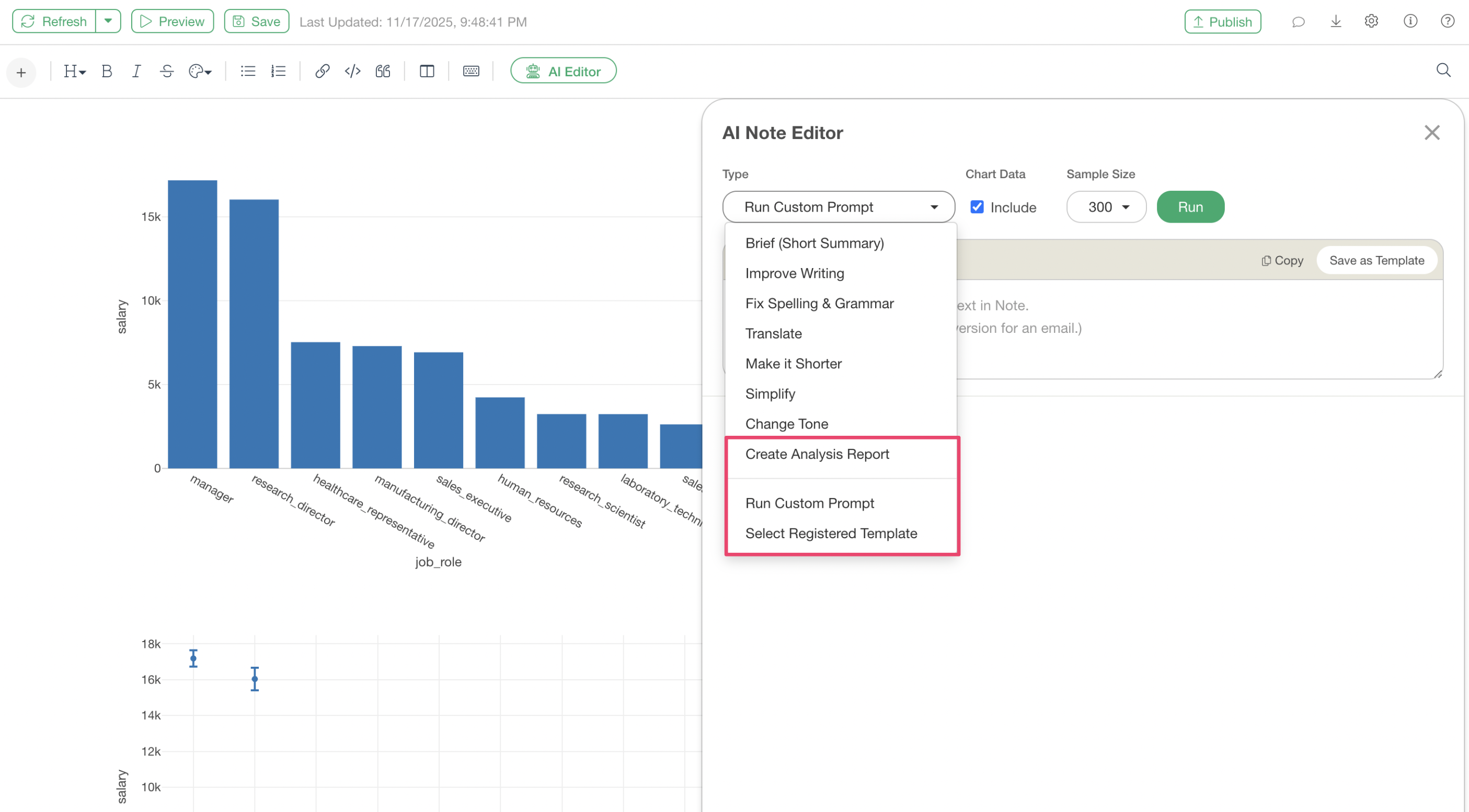
Then, the AI Editor’s editing dialog will appear, so select “Create Analysis Report,” “Run Custom Prompt,” or “Select Registered Template” for the type.
These types support the “Chart Interpretation” feature, and in the case of an analysis report, you can create a full-fledged report including objectives, background, and more.
For more details, please refer to this note: here.
If you use “Run Custom Prompt,” you can specify a prompt such as “Output only chart interpretations” and run it.
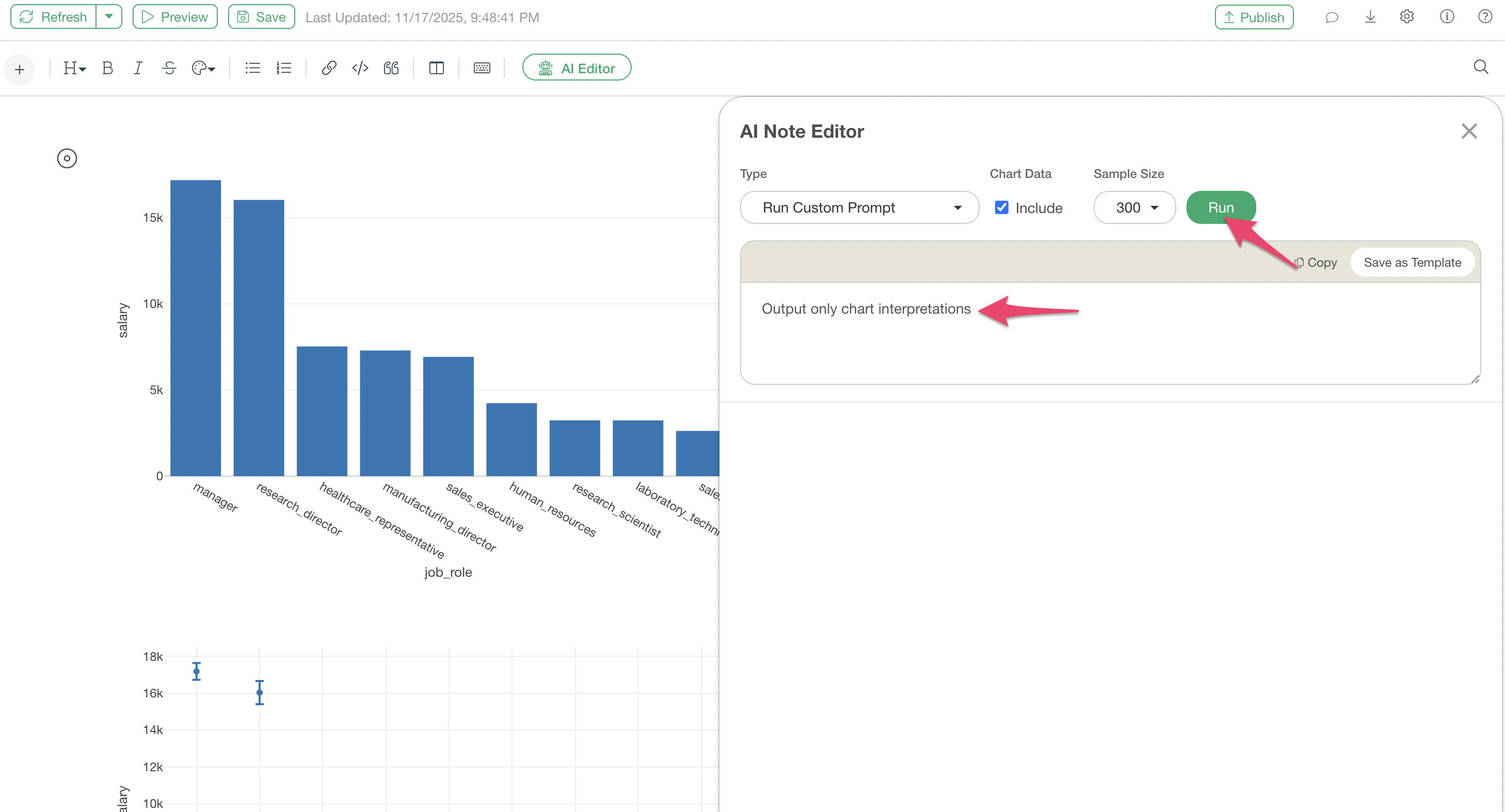
Click the “Run” button to generate the chart interpretation text.
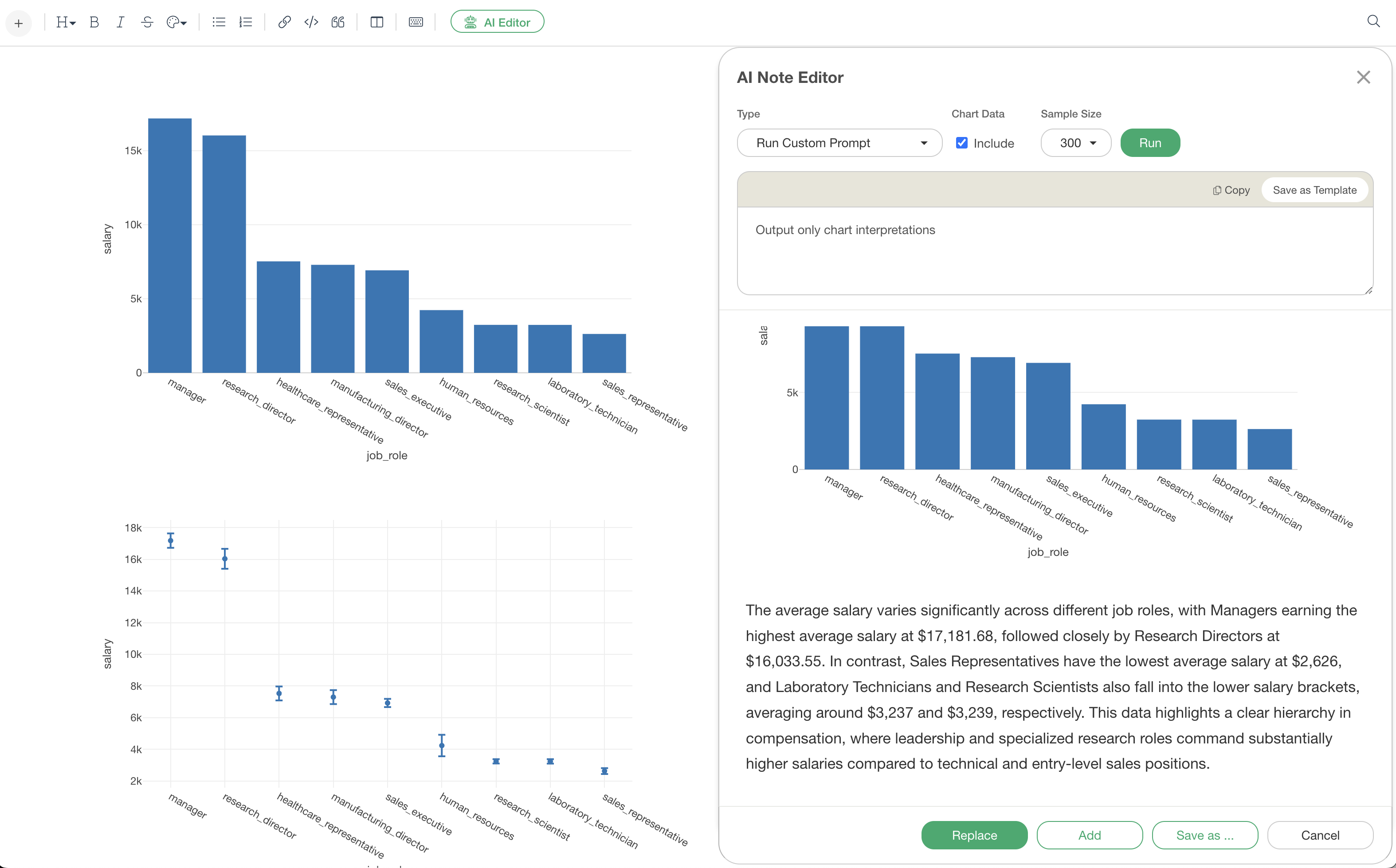
For example, by selecting “Replace,” you can replace the existing content in the note with AI-generated content.
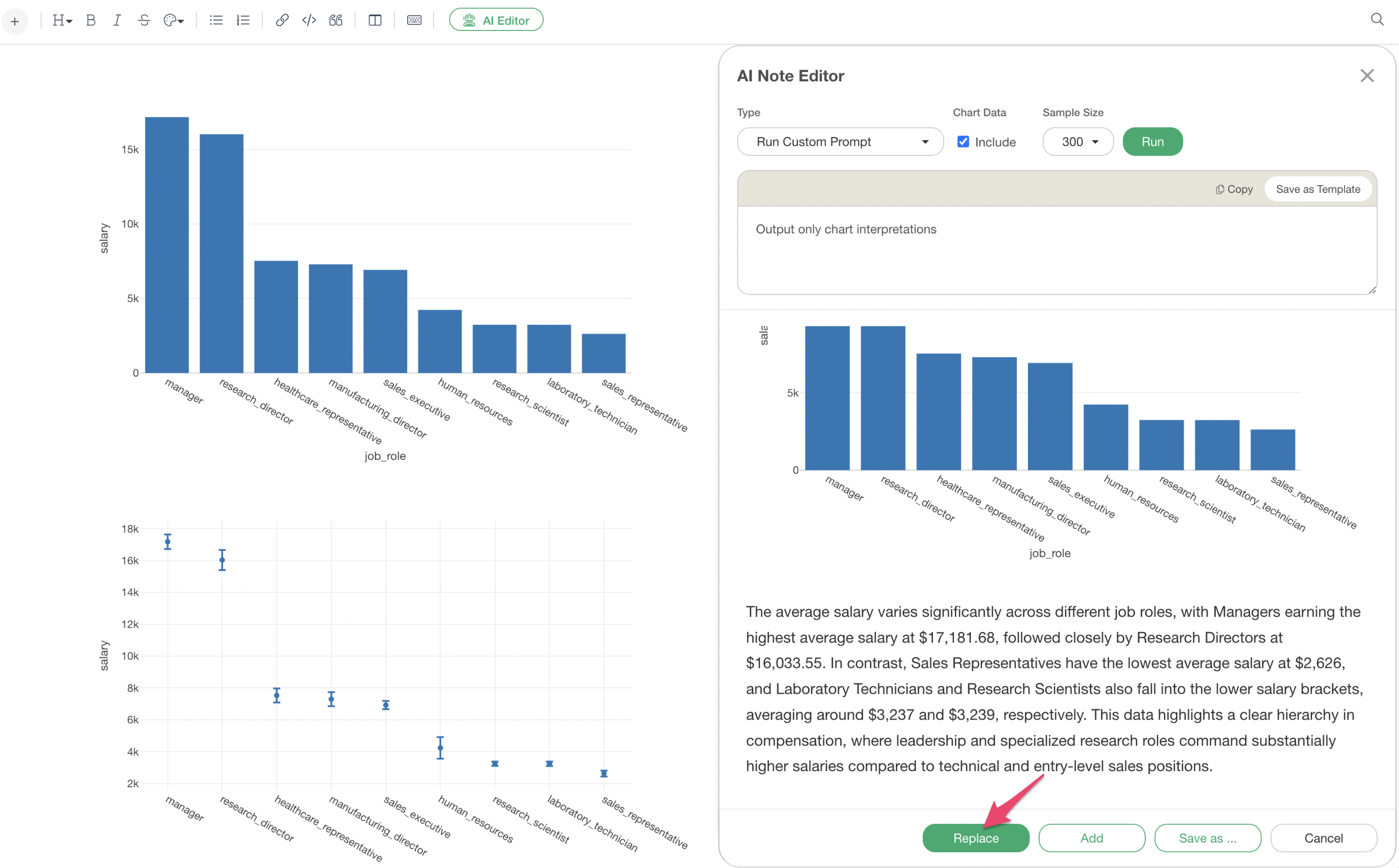
In this way, from a state where only charts are placed, AI adds detailed interpretations to each chart, including the following elements:
Specific numerical values: Accurately extract key values displayed in the chart
Comparative analysis: Identify mean, maximum, and minimum values, and quantify differences between items
Statistical evidence: Statistical indicators such as correlation coefficients and confidence intervals
Pattern discovery: Identify seasonality, trends, and outliers
Business insights: Explain the meaning and possibilities suggested by the data
Now, let’s look at how AI generates interpretations for each chart type.
Interpretation examples for each chart type
Common Charts
Even for commonly used bar charts and line charts, AI provides detailed and professional interpretations.
Bar Chart
Below is a bar chart visualizing the average salary by job title.
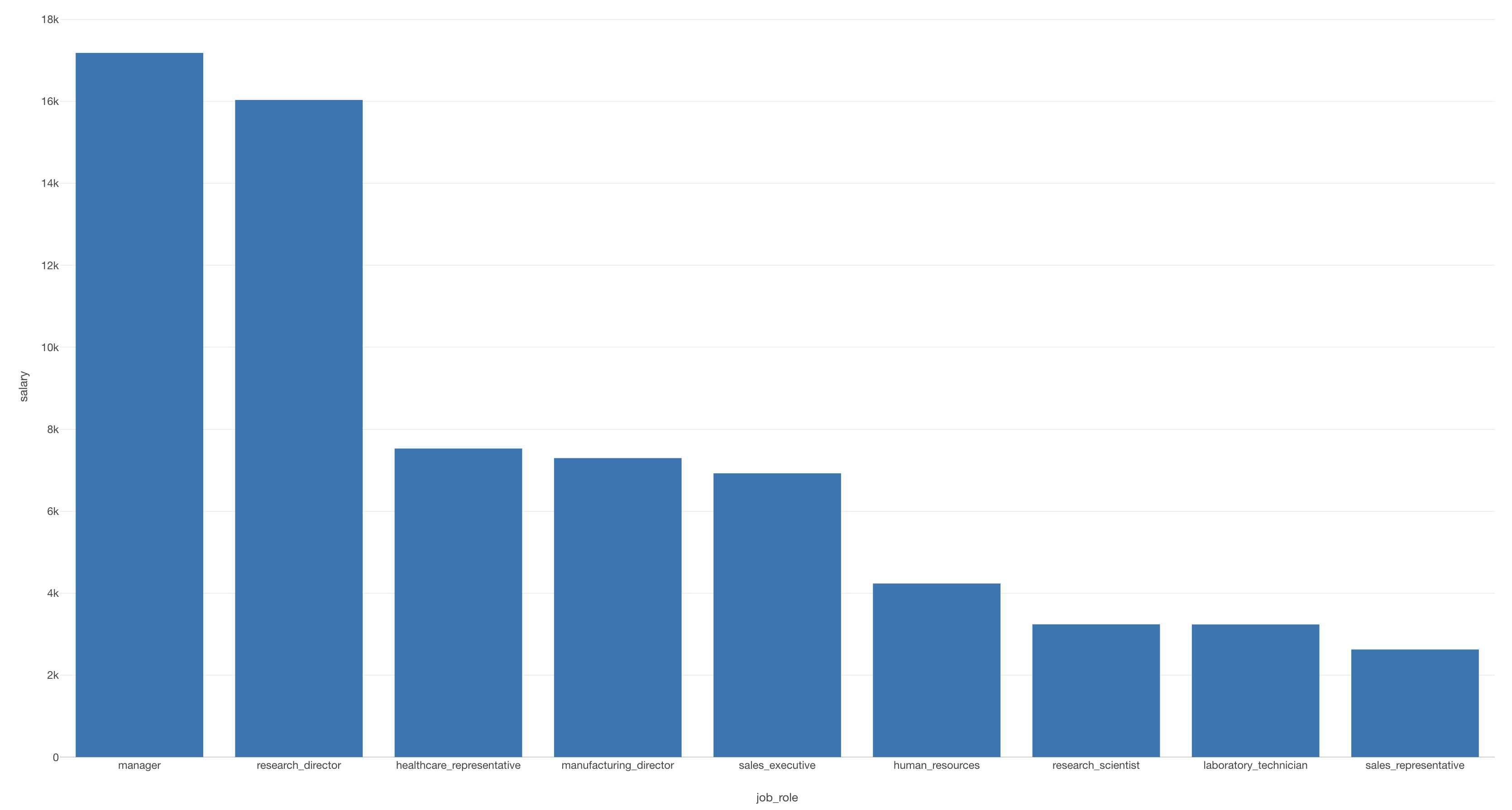
This is interpreted using the “Chart Interpretation” feature of the AI Note Editor.
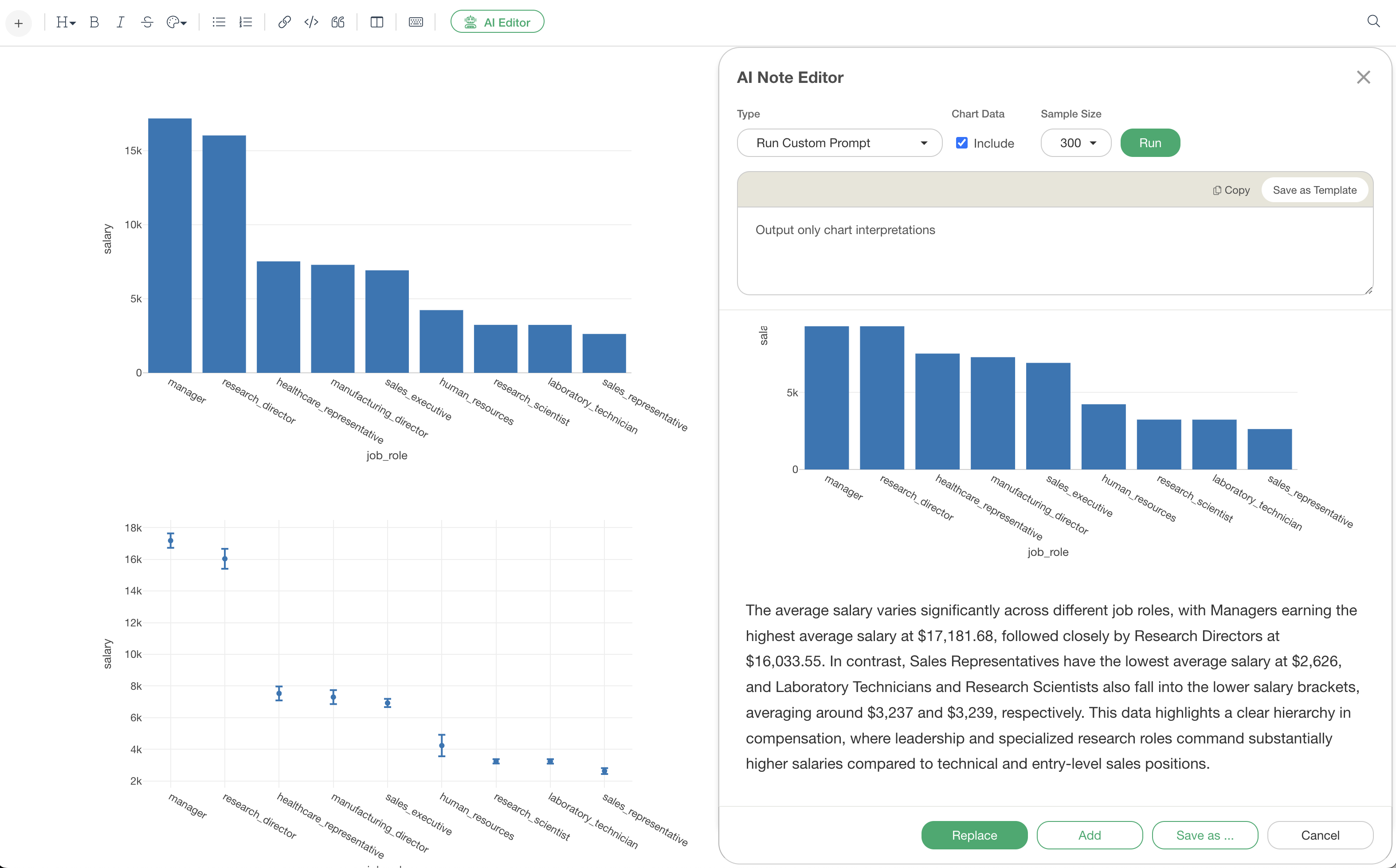
AI Interpretation Result
The average salary varies significantly across different job roles, with Managers earning the highest average salary at $17,181.68, followed closely by Research Directors at $16,033.55. In contrast, Sales Representatives have the lowest average salary at $2,626, and Laboratory Technicians and Research Scientists also fall into the lower salary brackets, averaging around $3,237 and $3,239, respectively. This data highlights a clear hierarchy in compensation, where leadership and specialized research roles command substantially higher salaries compared to technical and entry-level sales positions.
In this bar chart interpretation, the AI accurately extracts specific numerical values and compares multiple items (job titles) to verbalize trends by grouping them, such as “management layer” and “specialized positions.” Instead of just a list of numbers, it explains the meaning of the data in context, making important points easier to understand.
Line Chart
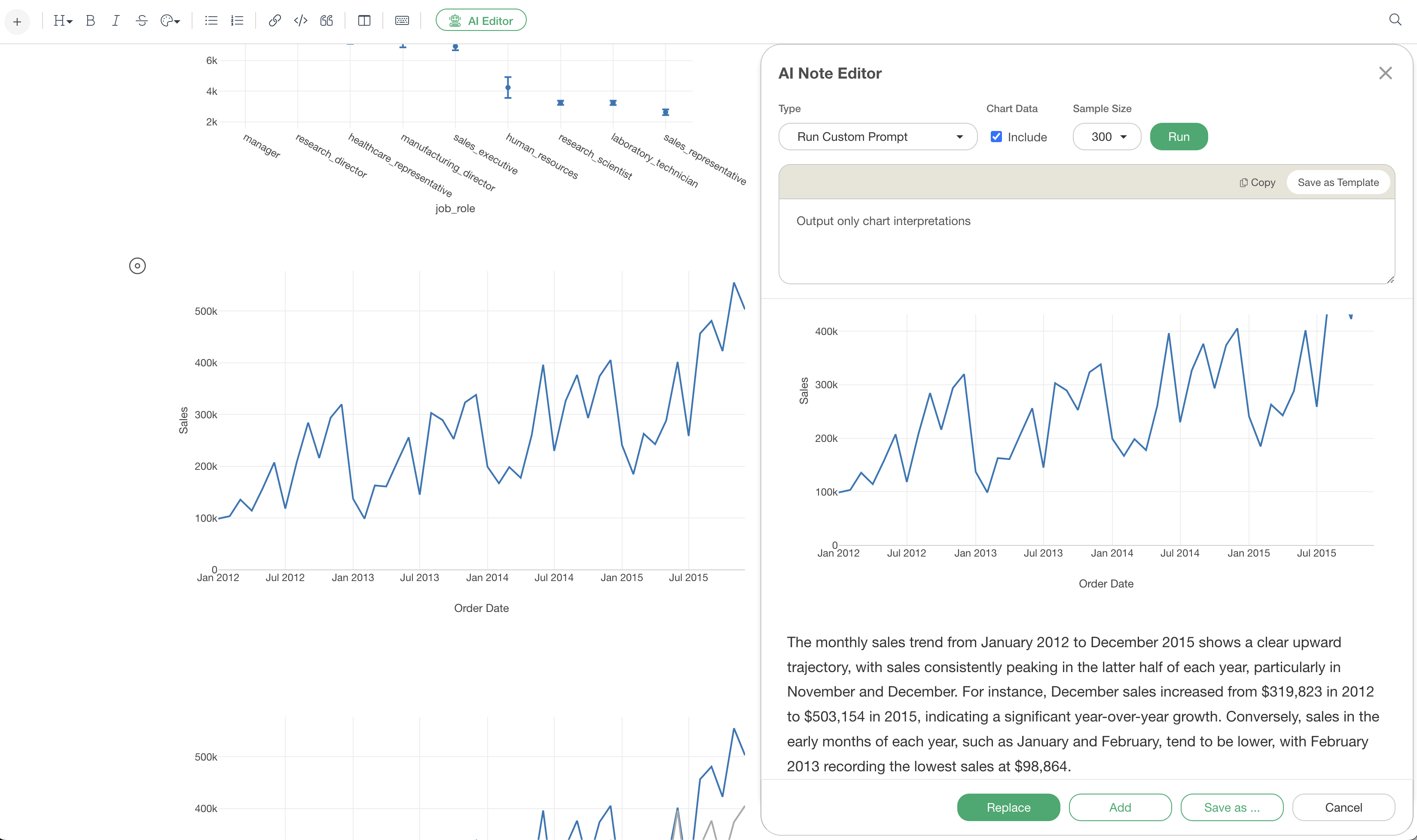
Below is a bar chart visualizing the total sales by month.
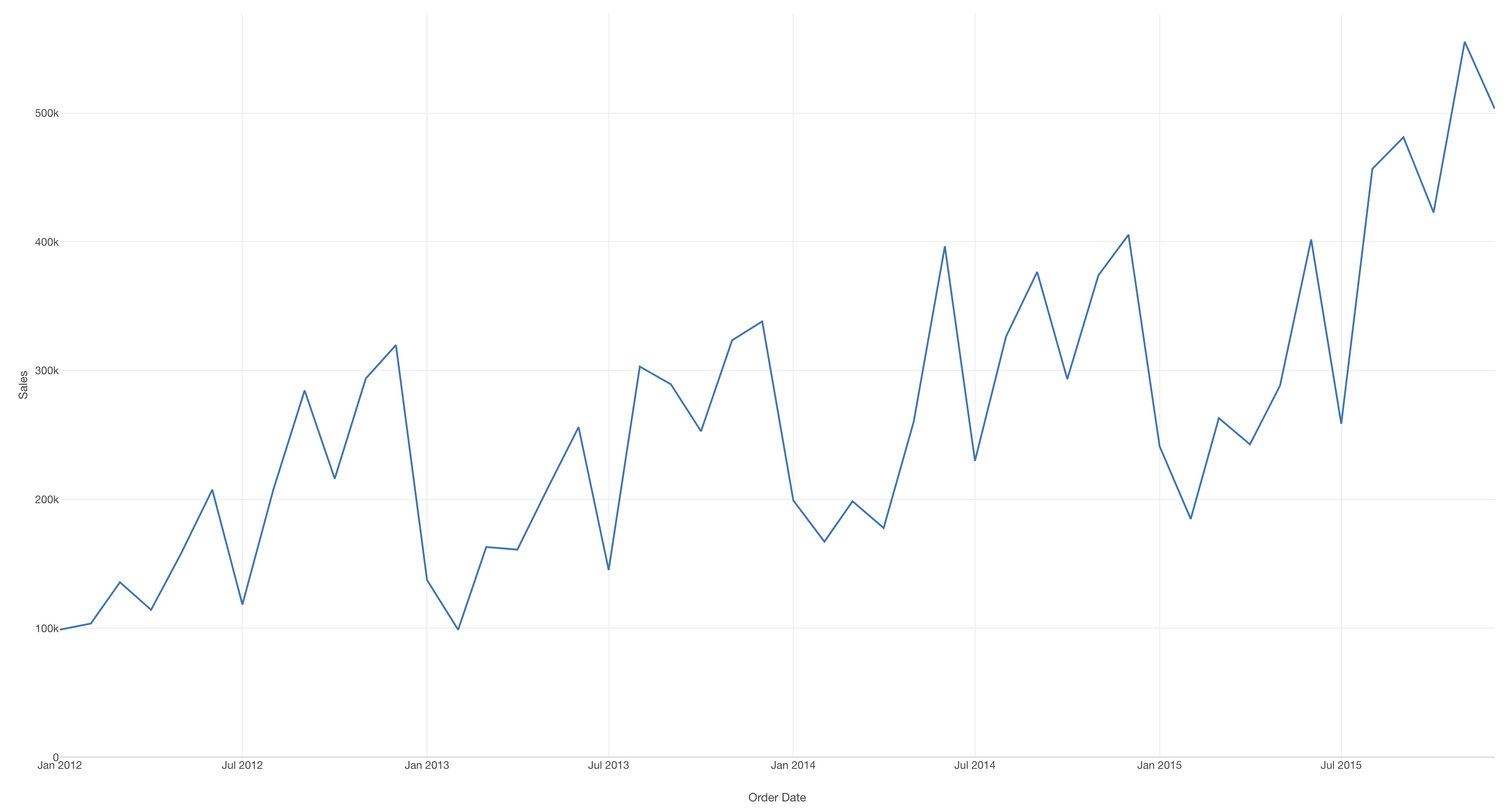
This is interpreted using the “Chart Interpretation” feature of the AI Note Editor.
AI Interpretation Result
The monthly sales trend from January 2012 to December 2015 shows a clear upward trajectory, with sales consistently peaking in the latter half of each year, particularly in November and December. For instance, December sales increased from $319,823 in 2012 to $503,154 in 2015, indicating a significant year-over-year growth. Conversely, sales in the early months of each year, such as January and February, tend to be lower, with February 2013 recording the lowest sales at $98,864.
In this line chart interpretation, the AI identifies an “increasing trend” as the overall trend. Furthermore, it discovers and explains “seasonality,” where sales increase in the latter half of each year. Since humans can sometimes overlook such seasonality, it is a strength of AI that it can capture and inform us about it.
Statistical Analysis
For charts involving statistical analysis, AI accurately interprets specialized indicators and explains their meaning.
Scatter Plot (Correlation Coefficient)
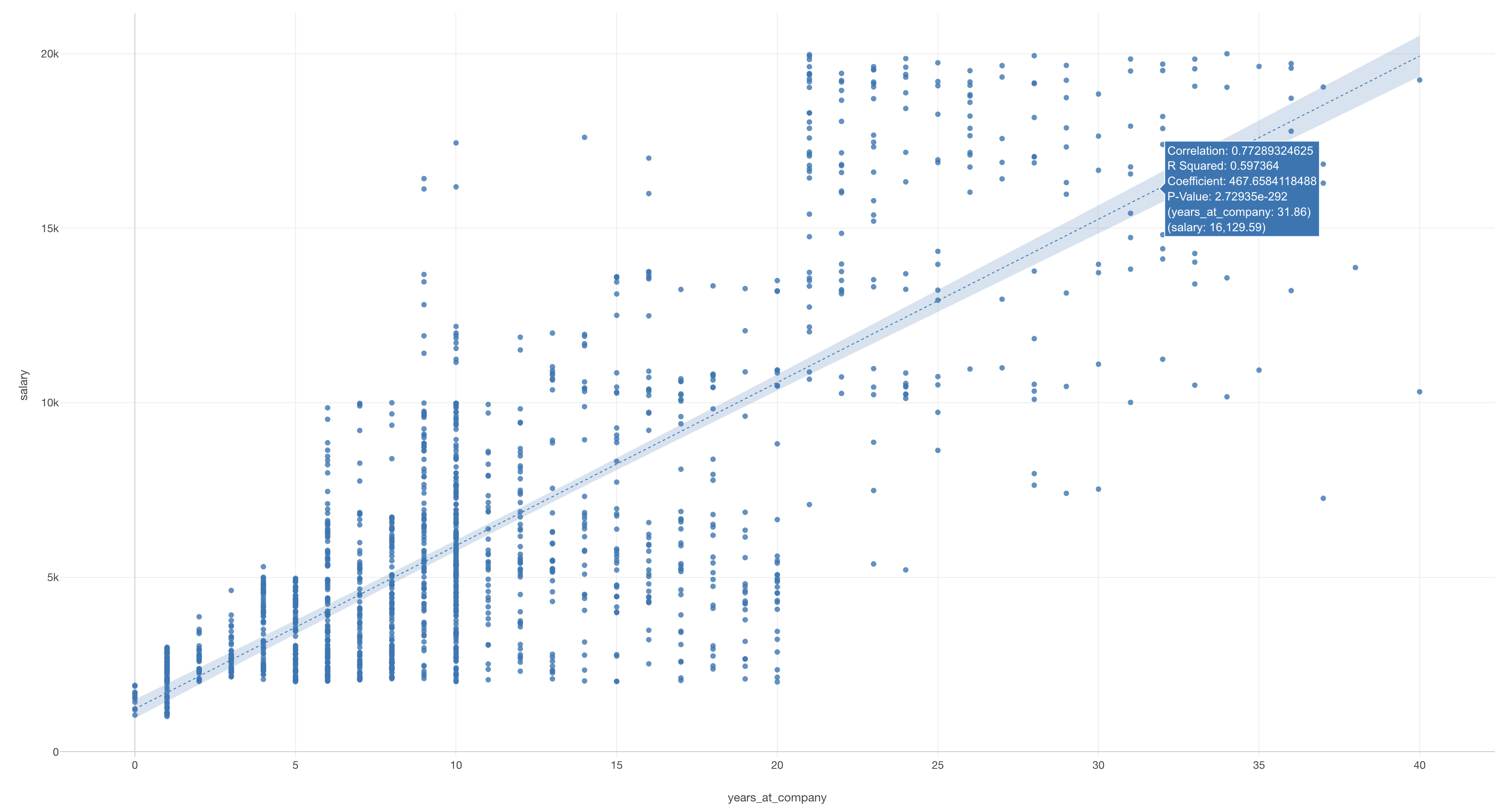
Below is a scatter plot showing the relationship between years of service and salary. A linear regression trend line is drawn on it.
This is interpreted using the “Chart Interpretation” feature of the AI Note Editor.
AI Interpretation Result
This scatter plot illustrates the relationship between “years_at_company” and “salary.” The correlation coefficient is 0.77, indicating a strong positive correlation between the two variables. The linear regression analysis shows that for every one-unit increase in “years_at_company,” “salary” tends to increase by approximately 467.66. The P-value is extremely small (2.729e-292), which is significantly less than the 5% significance level, indicating that the impact of “years_at_company” on “salary” is statistically significant. In summary, employees’ salaries tend to increase substantially with their tenure at the company.
In this scatter plot interpretation, the AI not only describes the visual trend but also accurately reports the statistical indicator of a correlation coefficient of 0.77 and explains its meaning as a “high positive correlation.” Furthermore, it provides an easy-to-understand explanation of the linear regression result in practical terms, such as “an increase of approximately $467.66 for every one year increase.” This allows even those unfamiliar with analysis to use it as an aid for their own interpretation and to express it clearly when explaining to others.
Confidence Interval
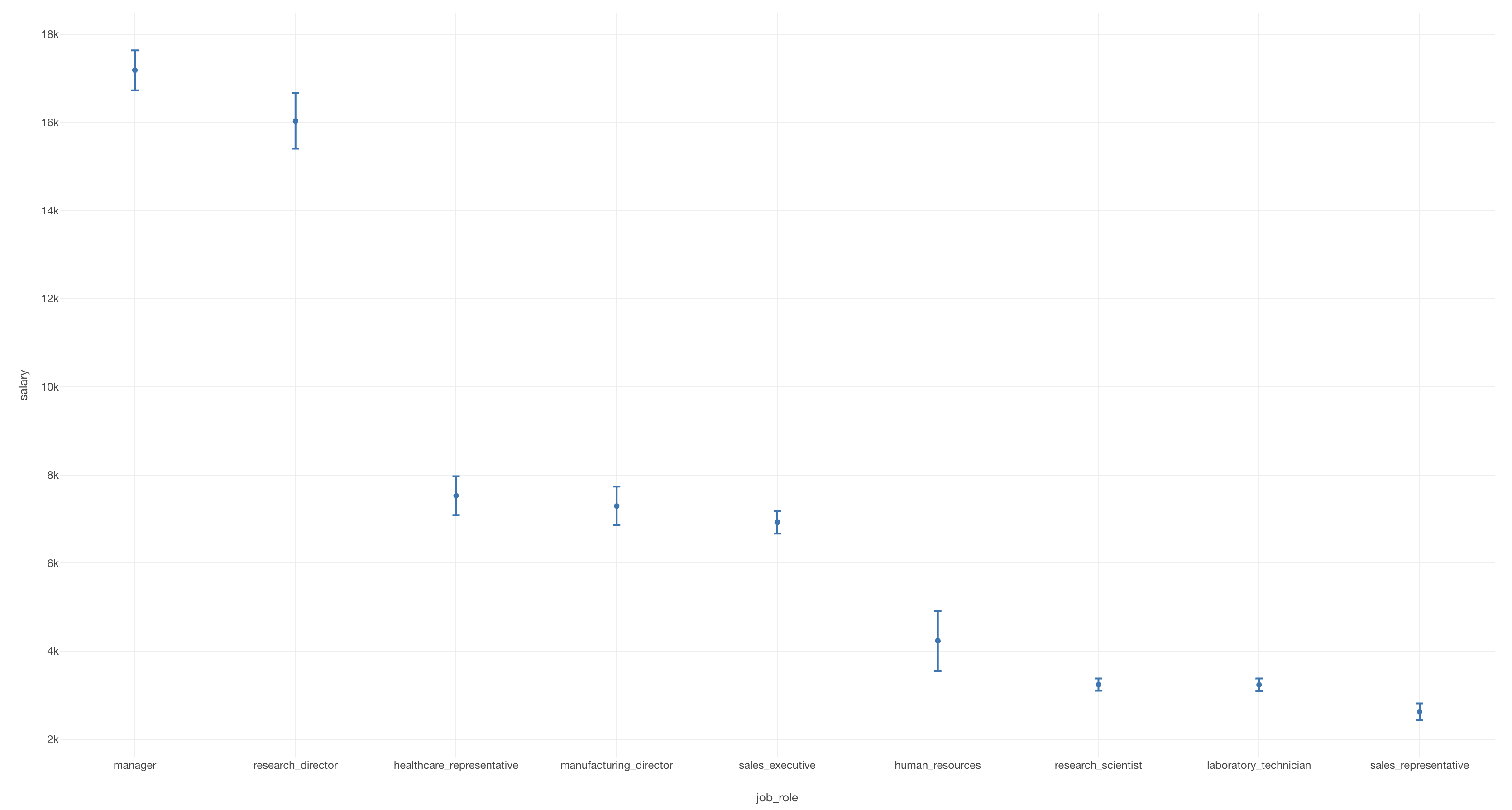
Below is an error bar visualizing the average salary by job title and its 95% confidence interval.
The 95% confidence interval is a very powerful tool for determining whether differences in means or proportions between different groups are significant, but understanding it requires knowledge.
This is interpreted using the “Chart Interpretation” feature of the AI Note Editor.
AI Interpretation Result
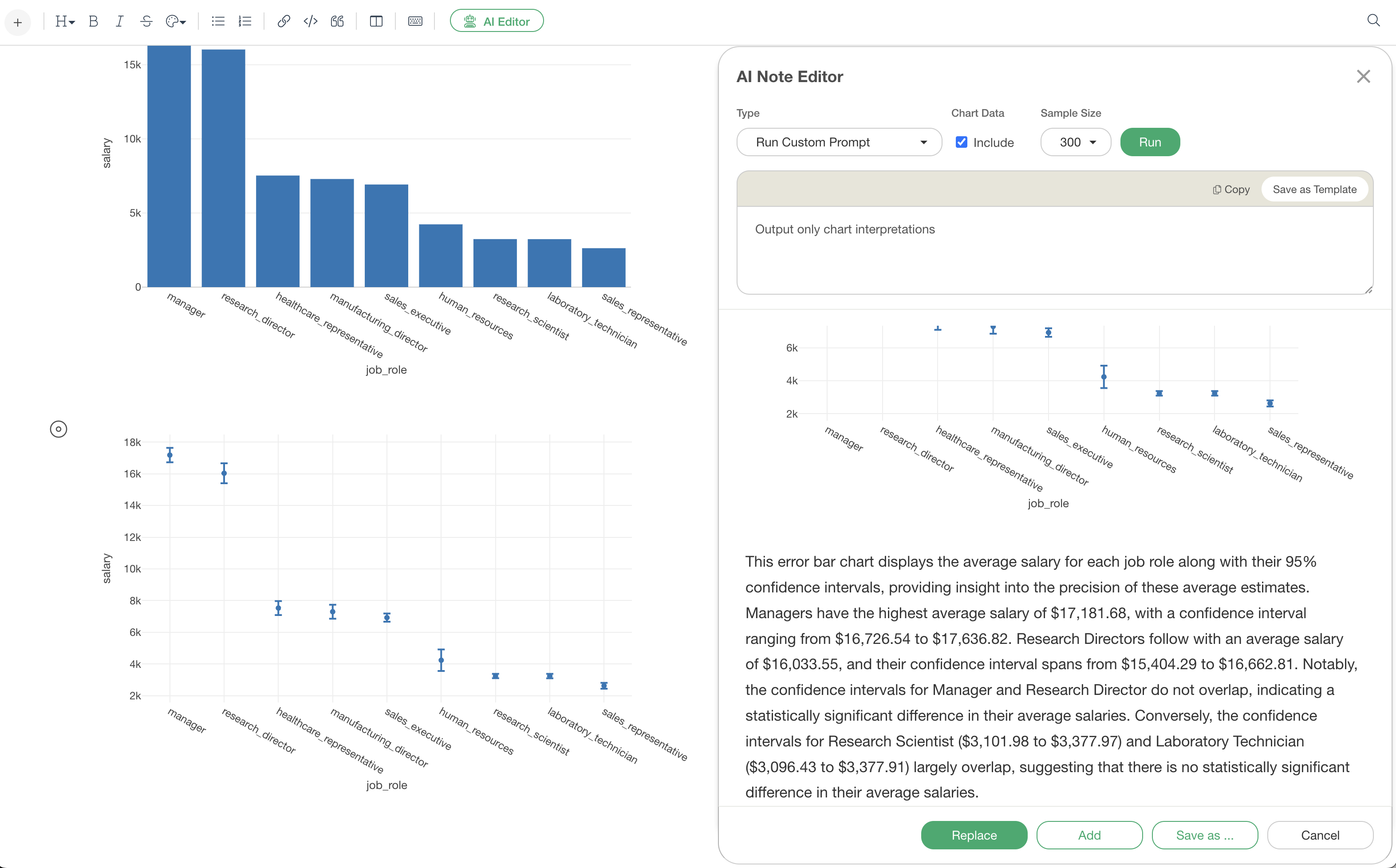
This error bar chart displays the average salary for each job role along with their 95% confidence intervals, providing insight into the precision of these average estimates. Managers have the highest average salary of $17,181.68, with a confidence interval ranging from $16,726.54 to $17,636.82. Research Directors follow with an average salary of $16,033.55, and their confidence interval spans from $15,404.29 to $16,662.81. Notably, the confidence intervals for Manager and Research Director do not overlap, indicating a statistically significant difference in their average salaries. Conversely, the confidence intervals for Research Scientist ($3,101.98 to $3,377.97) and Laboratory Technician ($3,096.43 to $3,377.91) largely overlap, suggesting that there is no statistically significant difference in their average salaries.
In this confidence interval chart interpretation, the AI accurately reports the mean and confidence interval, and then determines statistical significance from the visual information of overlapping confidence intervals. It appropriately explains both “groups with statistically significant differences” and “groups with no statistically significant differences” by comparing multiple groups. In this way, even without prior knowledge, AI can tell you how to interpret the data.
Time Series Data
In time series data analysis, AI also interprets advanced analysis results such as year-on-year comparisons and differences from predicted values.
Year-on-Year Comparison
Below is a line chart visualizing the total monthly sales along with the previous year’s monthly values using a reference line.
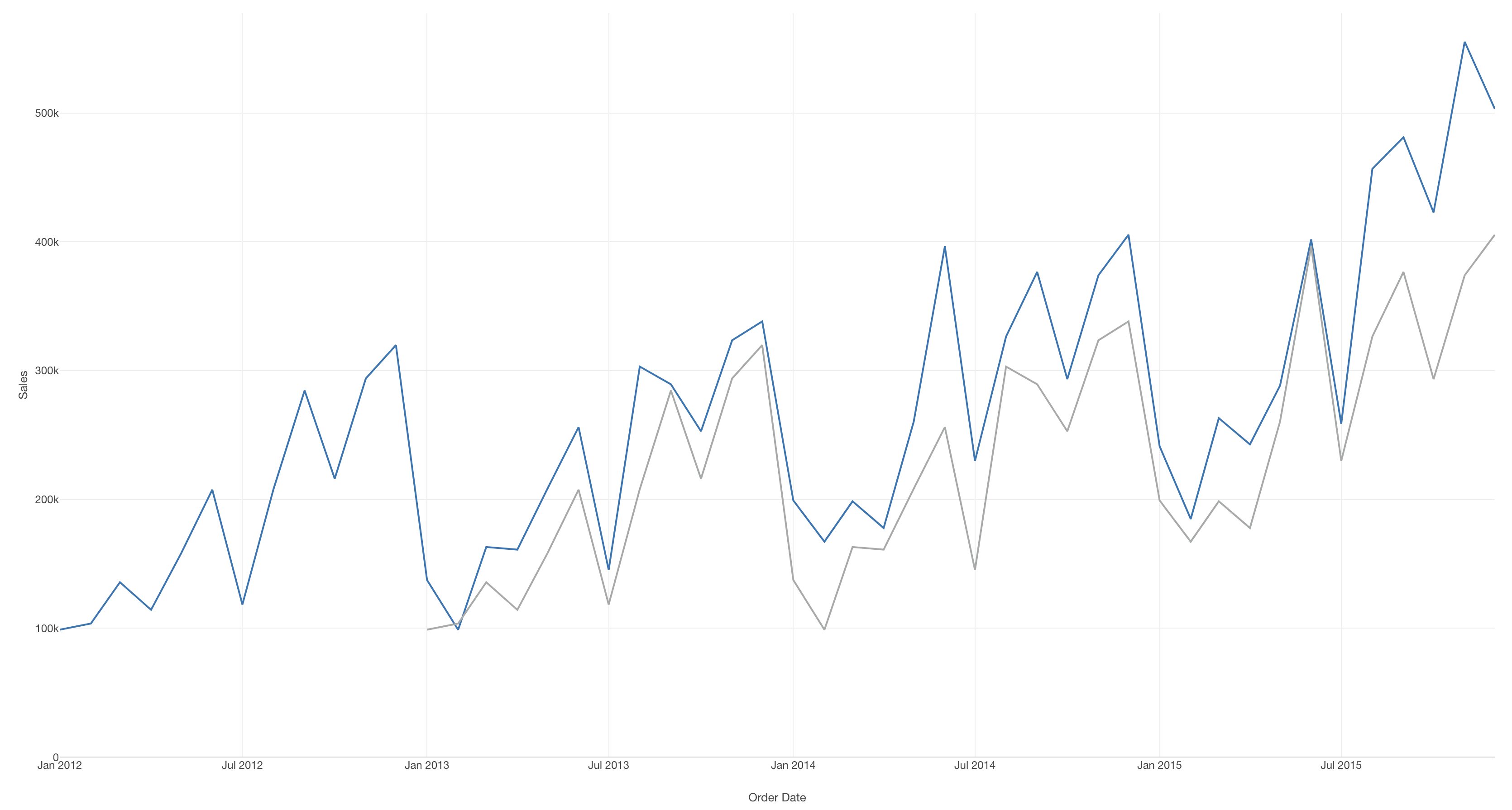
This is interpreted using the “Chart Interpretation” feature of the AI Note Editor.
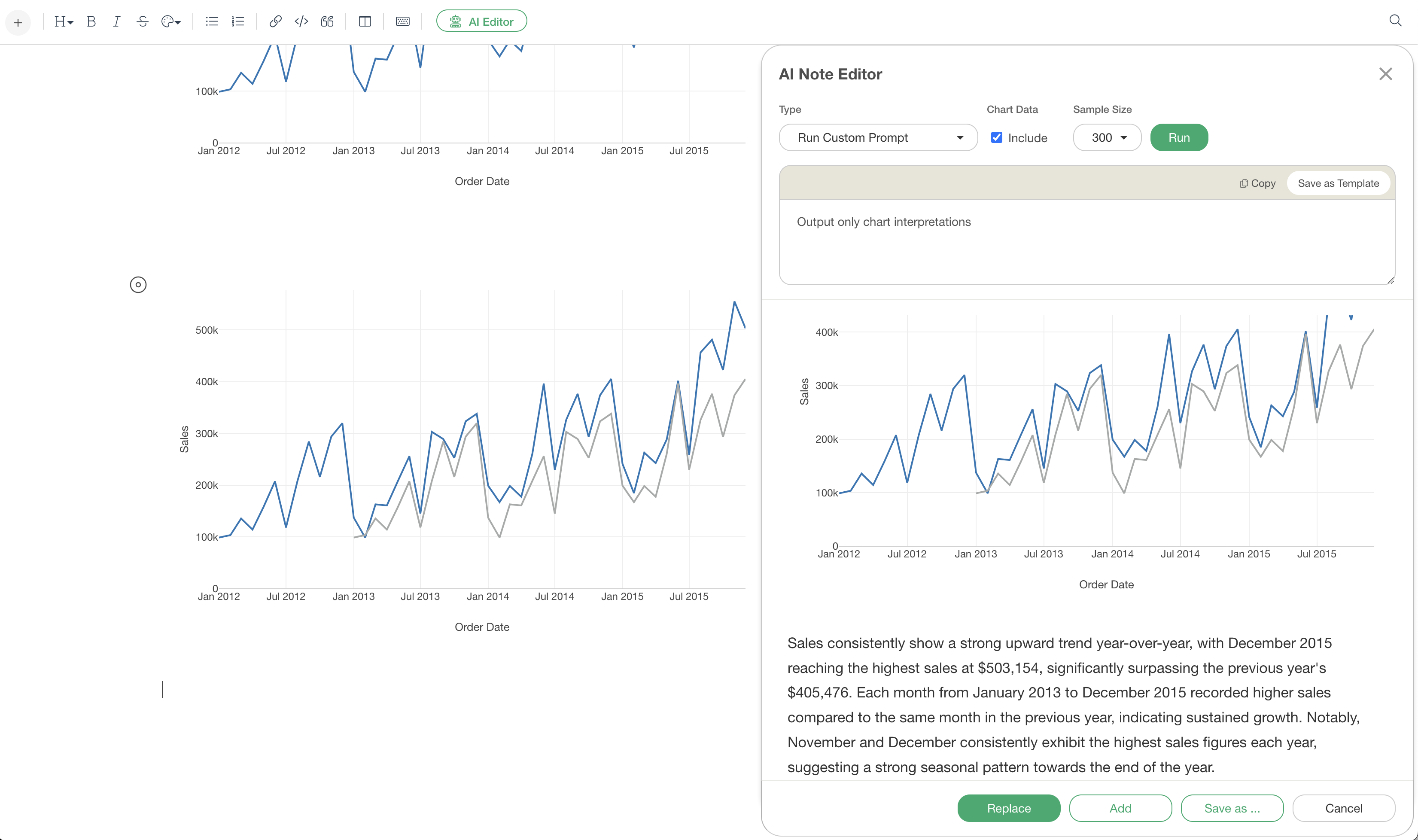
AI Interpretation Result
Sales consistently show a strong upward trend year-over-year, with December 2015 reaching the highest sales at $503,154, significantly surpassing the previous year’s $405,476. Each month from January 2013 to December 2015 recorded higher sales compared to the same month in the previous year, indicating sustained growth. Notably, November and December consistently exhibit the highest sales figures each year, suggesting a strong seasonal pattern towards the end of the year.
In this year-on-year comparison chart interpretation, the AI grasps the overall “growth trend” and then performs specific numerical comparisons. Furthermore, it highlights notable months and tells us which months experienced significant changes compared to the previous year.
Difference from Predicted Values of Trend Line (Linear Regression)
Below is a line chart visualizing the cumulative number of users by year and month.
For example, since the service was renewed from October 2024, the chart shows a linear regression trend line drawn for the period up to September 2024. The key points are the past trends and whether there is a difference from the predicted values.
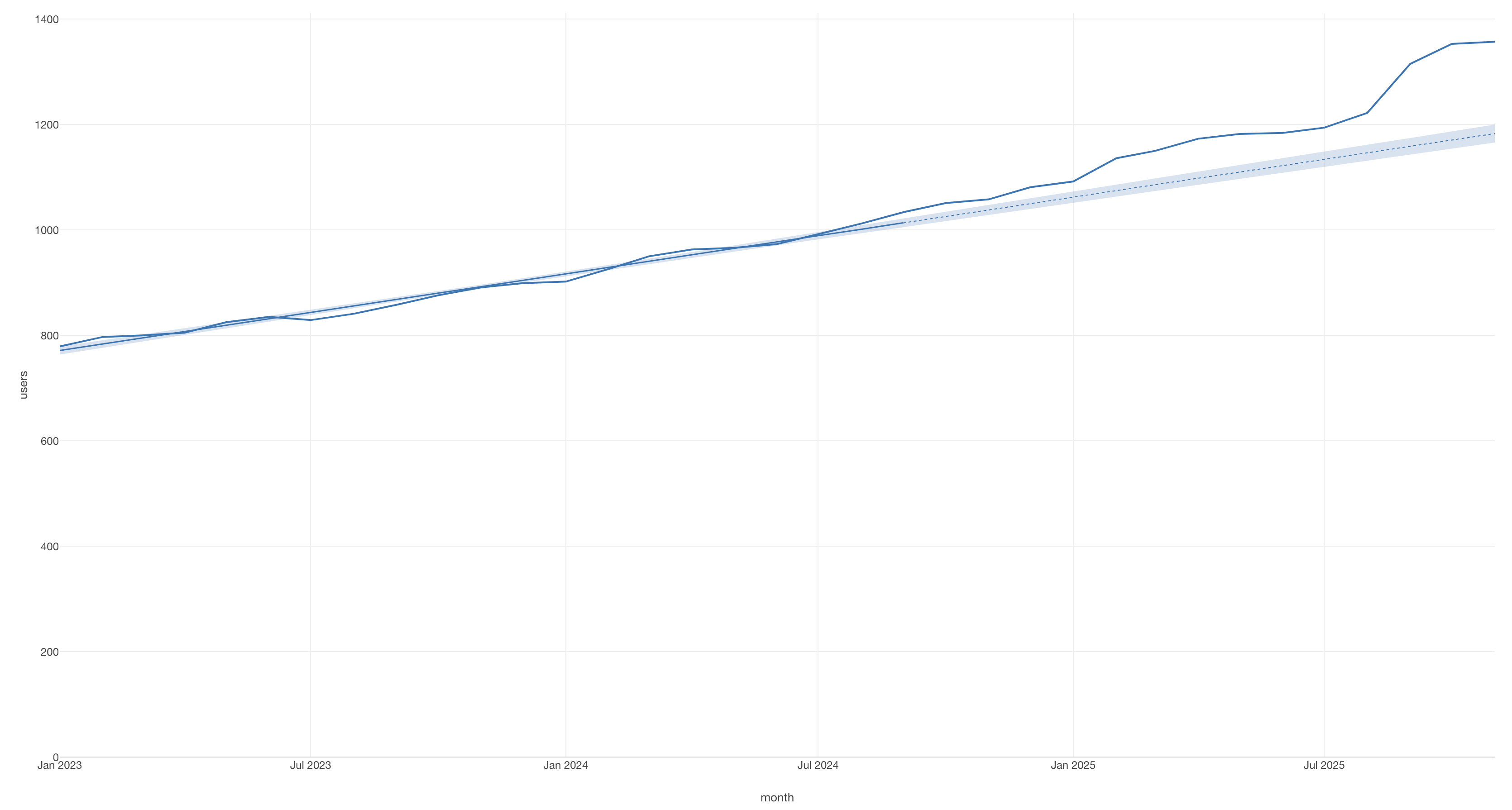
This is interpreted using the “Chart Interpretation” feature of the AI Note Editor.

AI Interpretation:
The monthly user count has shown a consistent upward trend, increasing from 779 in January 2023 to 1357 in November 2025. Notably, from September 2024 onwards, the actual user numbers have consistently exceeded the predicted values, with the largest difference observed in October 2025, where actual users were 1353 compared to a predicted 1170.48, resulting in a positive deviation of 182.52. This indicates a stronger-than-expected user growth in the latter period.
In this trend line interpretation, the AI compares actual values with predicted values and explains whether the difference is an increase (or decrease). It also explains that the actual values have “continuously exceeded” the predicted values since September 2024, and interprets the meaning suggested by the data.
Summary
The AI Note Editor’s chart interpretation feature provides professional analysis for various types of charts.
Key features of this function:
Specific and accurate: Accurately extracts and describes numerical values
Statistically valid: Correctly interprets correlation coefficients, confidence intervals, etc.
Provides insights: Discovers patterns and trends indicated by data and explains them in a business context
Saves time: Completes interpretation tasks that would take tens of minutes manually in seconds
From common charts to advanced statistical analysis and time series data, AI generates appropriate interpretations for any chart you add. This allows even data analysis beginners to create expert-level reports, and data analysts can focus on more essential tasks such as understanding data and discovering insights.
Would you like to experience it now?
Please experience the new features, including the AI Note Editor’s chart interpretation function.
If you have not used Exploratory yet, you can try our 30-day free trial.