MCP, Visually Explained
You ask ChatGPT, Gemini or Copilot questions, but you are not sure what “MCP” is. This article is for you. MCP is a common standard that connects AI to your data and apps. With diagrams, this article shows the problem that MCP solves, how MCP works, and what you can do with the Data Catalog and the Content Catalog in Exploratory v17.
I’ve created a video to explain MCP in 4 minutes, if you prefer!
AI Chat Does Not Know Your Data
AI such as ChatGPT knows a lot of general information. But it does not know your company’s sales data, or what is in the dashboard that you made yesterday.
When people want to ask AI about their data, they usually do these steps:
Copy the data as a CSV file or a screenshot, and paste it into the chat.
Read the AI’s answer, and then do the work in the app yourself.
Copy the result again, and paste it into the AI chat.
With this method, you are the “courier” between the AI and your data. This takes time. Also, if the data that you paste is old or incomplete, the AI’s answer is not correct.
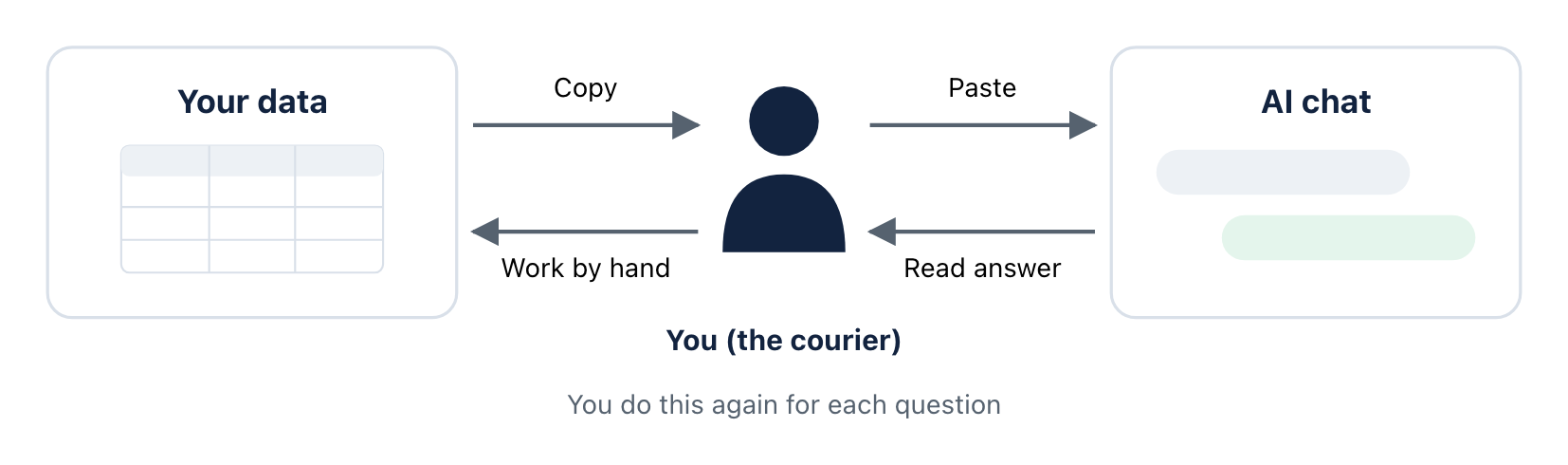
Figure 1. Without MCP, you carry the information between the AI and your data.
A very smart AI still cannot get to your data by itself. So you must carry the data with copy and paste.
What Is MCP?
MCP (Model Context Protocol) is a common standard that lets AI apps use external data and apps. Think of it as one common “port” that connects AI to data and apps. The three words in the name mean:
Model: the AI model, for example Claude, GPT or Gemini
Context: the information that the AI needs to answer
Protocol: the rules for how the two sides talk
Anthropic released MCP as an open standard in November 2024. Now OpenAI, Google, Microsoft and other companies also support it. MCP is becoming the standard way to connect AI to other apps.
People often compare MCP to USB-C. In the past, each device needed a cable with a different plug. Now one type of port connects chargers, displays and storage. MCP is like a USB-C port for AI.
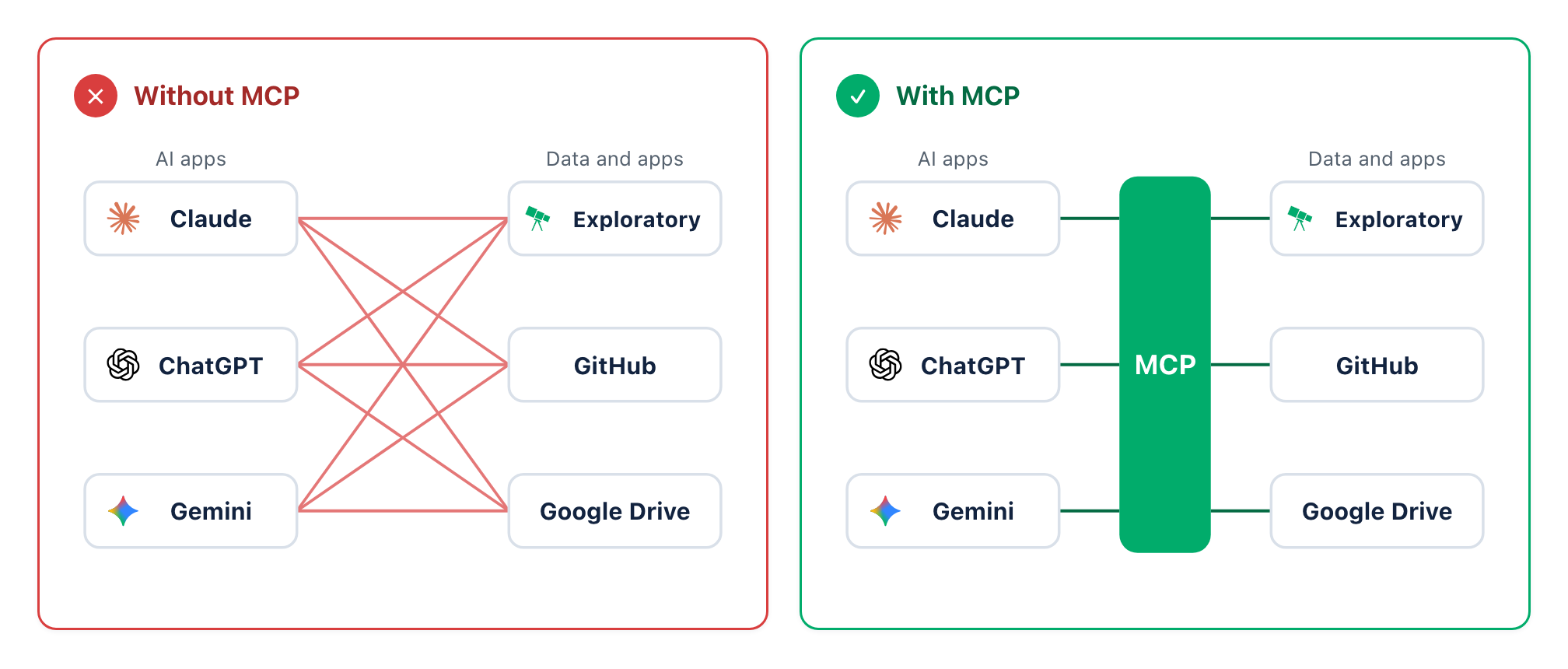
Figure 2. How apps connect without MCP and with MCP.
Without MCP, you must make a separate connection for each pair of an AI app and a service. That is 3 × 3 = 9 connections. With MCP, each app and service supports MCP one time, and then all pairs connect. That is only 3 + 3 = 6 connections.
The difference grows as the number of AI apps and services grows.
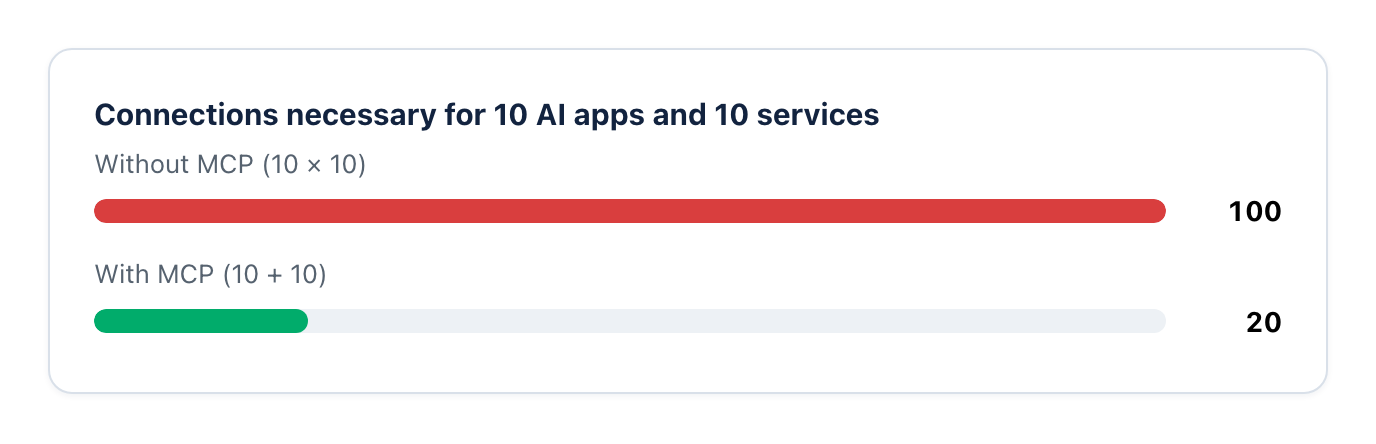
Figure 3. With MCP, the number of connections goes down from 100 to 20.
MCP gives AI apps and data apps one common way to connect. When a service supports MCP, all AI apps that support MCP can use it.
The Parts of MCP
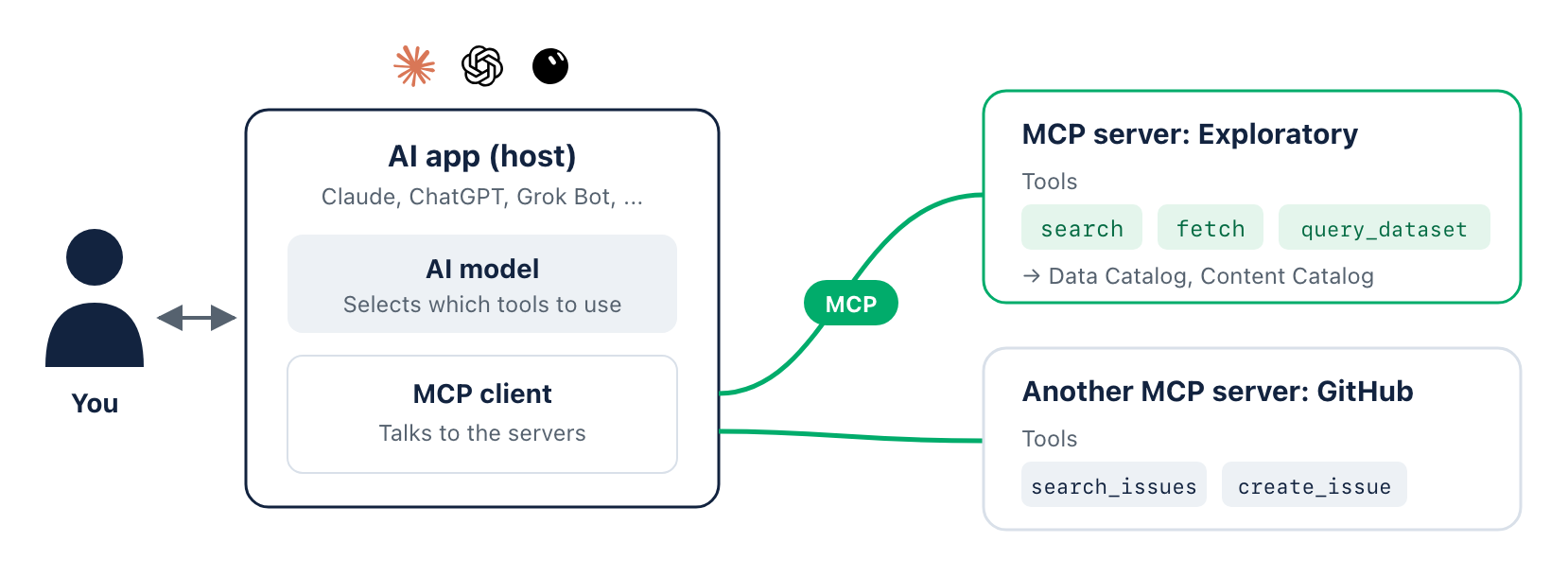
MCP has three main parts: the AI app that you talk to, the MCP server that is the contact point for a service, and the tools that the server gives.
Figure 4. One AI app can connect to many MCP servers. The tool names are examples.
| Term | What it does | Examples |
|---|---|---|
| AI app (host) | The app that you talk to. It connects the AI model and the MCP servers. | Claude, ChatGPT, Grok Bot |
| AI model | Reads the tool descriptions and decides which tool to use, and when. | Claude, GPT, Gemini |
| MCP server | A program that gives the functions of one service or app to AI, in the MCP format. | Exploratory, GitHub, Google Drive |
| Tool | One function that an MCP server gives. Each tool has a name, a description and a set of input values. | “Find data in the Data Catalog”, “Aggregate data” |
The name is “server”, but an MCP server is not always on the internet. Some MCP servers run on your computer. The Exploratory Desktop MCP, which this article shows later, is an example.
In addition to tools, MCP servers can give “resources” (documents that the AI can read) and “prompts” (templates for frequent requests). This article is about tools, because people use them most.
An MCP server gives the AI a list of the tools that it can use. From the conversation, the AI model decides which tool to use, and when.
From Question to Answer
Let’s examine what happens behind the screen when you ask AI, “Which region grew sales the most last month?” In this example, the AI app is connected to the Exploratory MCP server. Someone on your team published the sales data to the Exploratory Data Catalog.
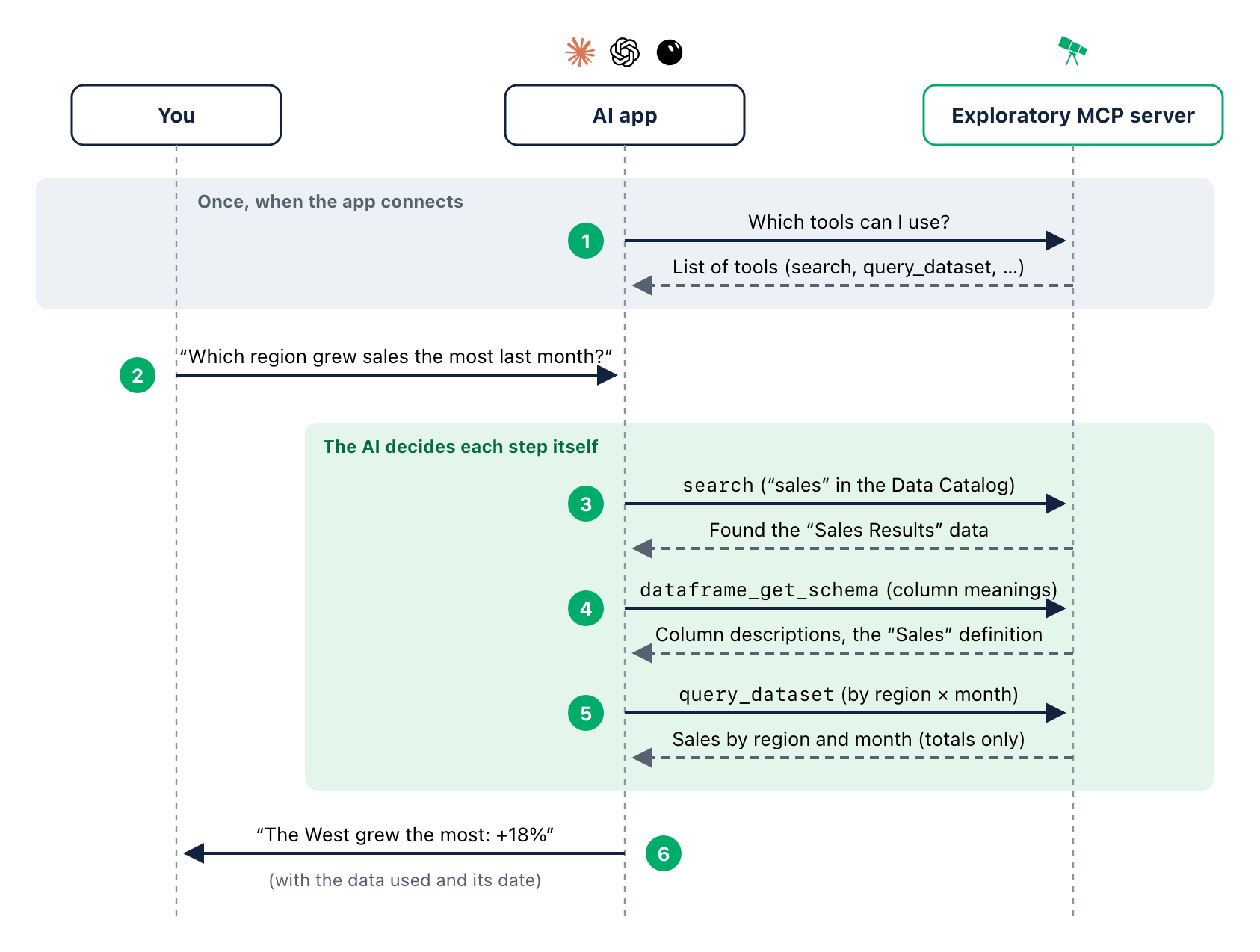
Figure 5. The messages that answer a question with data from the Data Catalog. The data name, the regions and the values are examples.
Get the list of tools. When the AI app connects to the MCP server, it gets the names and descriptions of the tools. The AI reads these descriptions and learns what each tool can do.
You ask a question. Ask in plain words, as you do in a usual AI chat. You do not need to know the tool names.
Find the data. The AI uses the
searchtool to find sales data in the Data Catalog. It finds the “Sales Results” data that someone on your team prepared and published in Exploratory.Learn what the data means. With the
dataframe_get_schematool, the AI reads the column descriptions and the definition of “Sales” that the data owner set. The AI does not have to guess what the columns mean.Aggregate on the server. With the
query_datasettool, the AI aggregates the sales by region and month. Exploratory Server does the aggregation, and the AI gets only the aggregated result.Answer. The AI answers from the aggregated values. It tells you which data it used and the date of that data, so you can check the answer.
Before the AI uses a tool, many AI apps ask you: “Can I run this tool?” In the settings of the AI app, you can select to confirm each time, or to run read-only tools automatically.
The AI selects the necessary tools from the list, calls them, and reads the results to answer. The AI, not you, finds and carries the data.
MCP and Agents
When people talk about MCP, they often also talk about “agents”. MCP changes AI that answers into AI that acts. Let’s make the relation between the two clear.
An agent is an AI that works toward a goal that you give it. It plans the steps itself, and it uses tools to do the work. In the previous section, the AI did the steps “find → learn the meaning → aggregate → answer” by itself. That is how an agent works.
MCP is a standard that connects the tools that an agent uses. It is not the agent itself. Without tools, an agent can only think. When MCP connects tools, the agent can examine real data and operate apps.
| Usual AI chat | Agent (AI connected to tools with MCP) | |
|---|---|---|
| What it does | Answers in text from what it knows | Uses tools to examine data and operate apps |
| Data it uses | Only the data that you paste | Gets the necessary data itself, through MCP servers |
| How it works | One answer for each question | Does many steps in a row, and examines each result |
| It is like | An advisor who knows a lot | An assistant who has tools |
Another article in this series explains agents in more detail.
An agent is an AI that uses tools to do work. MCP is the common standard that connects those tools.
How MCP Compares
MCP is not the only way to give data to AI. Let’s compare the methods.
| Method | How current the data is | Work | AI apps you can use |
|---|---|---|---|
| Copy and paste | As of the time you paste | A person carries the data for each question | All |
| File upload | As of the time you upload | You prepare a file for each question | Apps that accept files |
| Each AI company’s own integrations | Current | Only the first setup | Only that AI app |
| MCP | Current | Only the first setup | All AI apps that support MCP |
With MCP, you use current data from the AI app that you already use, with no extra work each time.
Use MCP Safely
With MCP, AI can get to your data and apps. This is useful, but be careful about which servers you connect and how you give permission.
Safe use
Add only MCP servers from a provider that you know.
Sign in on the official sign-in page of the service. Do not give your password to the AI.
Before you approve a tool that changes data, read what it will do.
Avoid
Adding MCP servers from an unknown source.
Pasting passwords or API keys into the chat.
Letting all tools run automatically, with no confirmation.
Caution: A web page or a file that a tool reads can contain hidden instructions for the AI. If the AI tries to do something that you did not ask for, do not approve it.
The Exploratory MCP server
To connect the Exploratory Server MCP, you sign in to Exploratory Server in your browser. You never type your password into the AI app. The AI works with the permissions of your account. So the AI cannot see notes or data that you cannot see. Also, if the publisher turned off data sharing, the AI does not get the row-level data.
Connect only MCP servers that you trust. Before you approve an action, examine what the AI wants to do.
The Data Catalog and the Content Catalog
The main new features of Exploratory v17 are the Data Catalog and the Content Catalog, which AI can use through MCP. When someone prepares and publishes data and analysis notes in Exploratory, everyone on the team can use them from the AI agents that they already use.
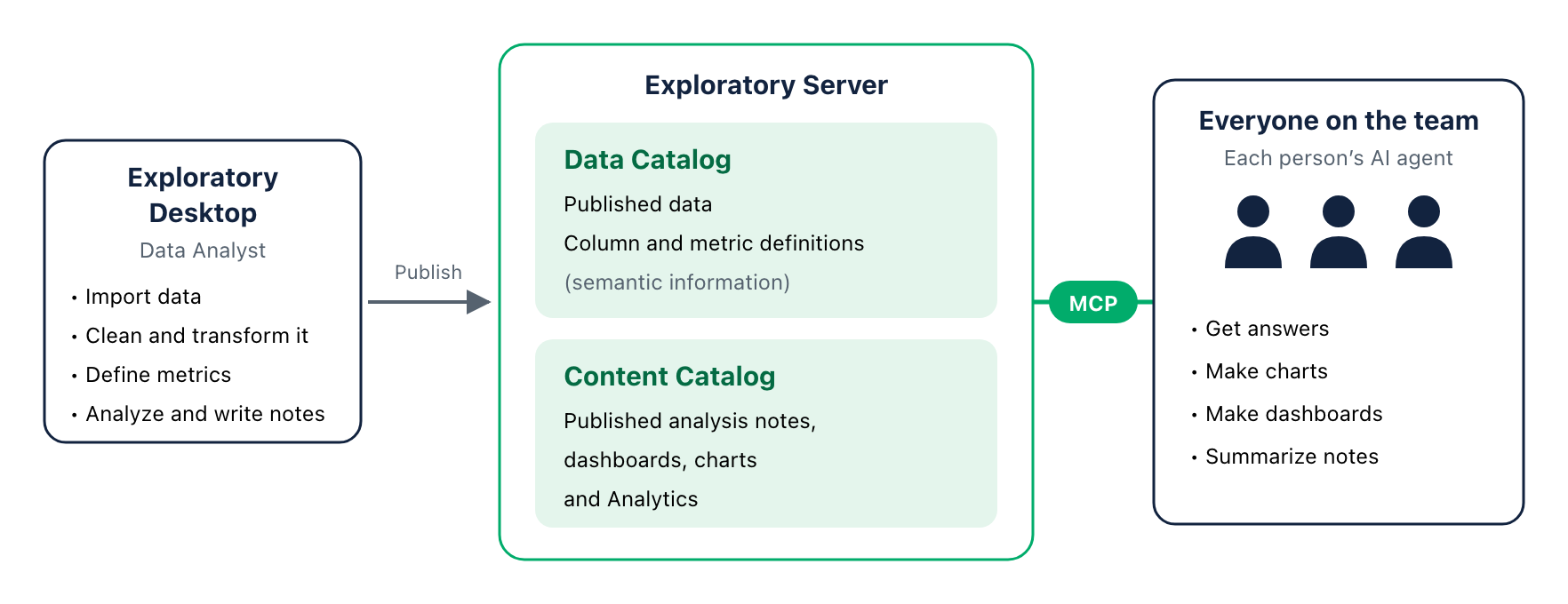
Figure 6. One person prepares the data once, and the whole team uses it. This is not a screenshot.
When you give data to AI, the preparation is the most work. You import the data, clean and transform it, and define what each column means. In Exploratory, a person who knows the data does this preparation one time, and publishes the result.
Published data goes into the Data Catalog. Analysis notes and dashboards go into the Content Catalog. Other people on the team only ask questions to the AI agents that they already use. Through MCP, the AI searches the catalogs, and answers with the prepared data and the results of existing analyses.
Data Catalog: published data
The AI finds prepared data and aggregates it.
Find published data, and read the column descriptions and the metric definitions.
Filter and aggregate the data on Exploratory Server to answer questions.
Make charts and dashboards from the aggregated results.
Example requests:
“With the Sales Results data, show me last month’s sales by region.”
“With the customer data, make a bar chart of the churn rate by age group.”
Content Catalog: published analyses
The AI finds existing analysis notes and dashboards, and reads them.
Find published analysis notes, dashboards, charts and Analytics.
Read the text of notes, the values in charts, and the results and explanations of Analytics.
Combine the content of several notes into one summary.
Example requests:
“Find the note that analyzed the causes of churn, and give me its conclusion in three lines.”
“Summarize the key points of last week’s sales dashboard as a report for the team.”
Same data, same definitions
In the Data Catalog, data can have semantic information that the data owner reviewed and approved: what the columns mean, and the definitions of metrics such as “Sales” and “Churn Rate”. The AI calculates with these definitions. So the numbers use the same definitions, for every person and every AI.
Use analyses without doing them again
An analysis note in the Content Catalog has the author’s text and the results of its charts and Analytics. The AI reads them to answer, so nobody has to do the same analysis again from the start. Each answer includes the URL of the source note.
Two MCP servers, and how to connect them
AI uses the Data Catalog and the Content Catalog through the Server MCP of Exploratory Server. v17 also has the Desktop MCP, which lets AI operate Exploratory Desktop on your computer. With the Desktop MCP, the AI can import data from the Data Catalog into Exploratory Desktop, make Exploratory charts and dashboards, and publish them.
| How to connect | MCP servers you get | Description |
|---|---|---|
| The Exploratory plugin | Server MCP and Desktop MCP | Install the plugin in Claude Code, Codex, Cursor or Antigravity. The plugin adds both MCP servers at the same time. To use the Desktop MCP, keep Exploratory Desktop running. |
| Add it as a remote MCP | Server MCP | Add https://exploratory.io/mcp to an AI
app that supports remote MCP. Then sign in to Exploratory Server in your
browser. |
Prepare and analyze the data once in Exploratory. Then everyone on the team can use that data and those analyses from their AI agents.
Summary
A usual AI chat does not know your data. So you must carry the data to it with copy and paste.
MCP is a common standard that connects AI apps to data and apps. It is like USB-C for AI.
An MCP server gives the AI a list of the tools that it can use. The AI selects the necessary tools, uses them, and answers from the results.
An agent is an AI that uses tools to do work by itself. MCP connects those tools.
Connect only MCP servers that you trust, and examine each action of the AI before you approve it.
In Exploratory v17, everyone on the team can use, from their AI agents, the data (Data Catalog) and the analysis notes (Content Catalog) that were prepared and published in Exploratory.
Try It with Exploratory
Try MCP with your own data in Exploratory.
👉 Download the latest version of Exploratory
https://exploratory.io/download
If you do not have an Exploratory account, sign up and start a 30-day free trial here:
If your trial has expired, launch the latest version and click Extend Trial to try it again.
This article is based on the specifications of Exploratory v17 before its release. Names and supported AI apps can change at release.