What is Data Catalog? Better AI Analytics Starts with Better Data
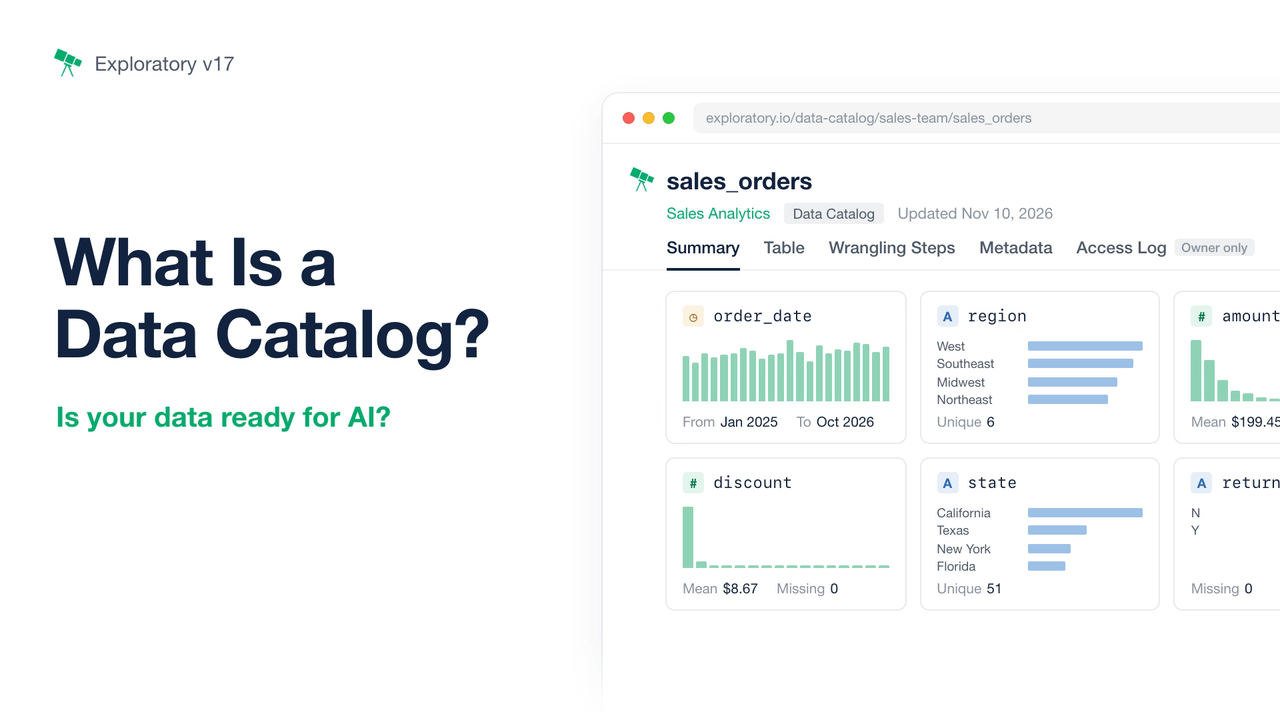
AI agents are beginning to transform the way we analyze data.
In the past, analyzing data, creating charts, and building dashboards or reports required specialized skills and a significant amount of time.
Today, AI agents can handle many of these tasks simply by following instructions in natural language. From aggregating and analyzing data to creating charts, building dashboards, and generating reports, tasks that once required considerable effort have become much easier.
But no matter how capable AI becomes, it can’t produce reliable results from unreliable data.
If an agent doesn’t understand what the data means, it may interpret your questions differently from what you intended. And if accessing the data is inefficient, both processing time and AI token costs can quickly add up.
Consider a sales dataset, for example.
| Challenge | Common Example |
|---|---|
| Data Quality | Duplicate records cause sales to be counted twice. Inconsistent region names cause the same region to be counted separately. |
| Ambiguous Meaning | Column names alone don’t tell you whether “Sales” refers to gross sales or net sales. |
| Inefficient Data Access | Downloading an entire dataset for every question wastes time and AI tokens. |
| Governance and Privacy | You can’t tell who accessed your data or how. Some data can’t be uploaded to a server in the first place. |
These problems don’t automatically disappear just because AI agents have become better at analyzing data.
On the other hand, once you have clean, well-prepared data that has been validated by someone who understands the business rules, creating charts, dashboards, and answering questions about that data becomes relatively easy with today’s AI.
Now that AI can perform analysis so quickly, perhaps we should spend more of our time on what matters most: preparing, validating, and defining our data correctly.
This is the problem we’re addressing with Exploratory Data Catalog, introduced in Exploratory v17.0.
What Is Exploratory Data Catalog?
Exploratory Data Catalog lets you publish data that has gone through reproducible data preparation, enrich it with information that explains what the data means, and make it accessible to AI agents through MCP.
MCP (Model Context Protocol) is a standard protocol that allows AI agents to connect to external data sources and tools.
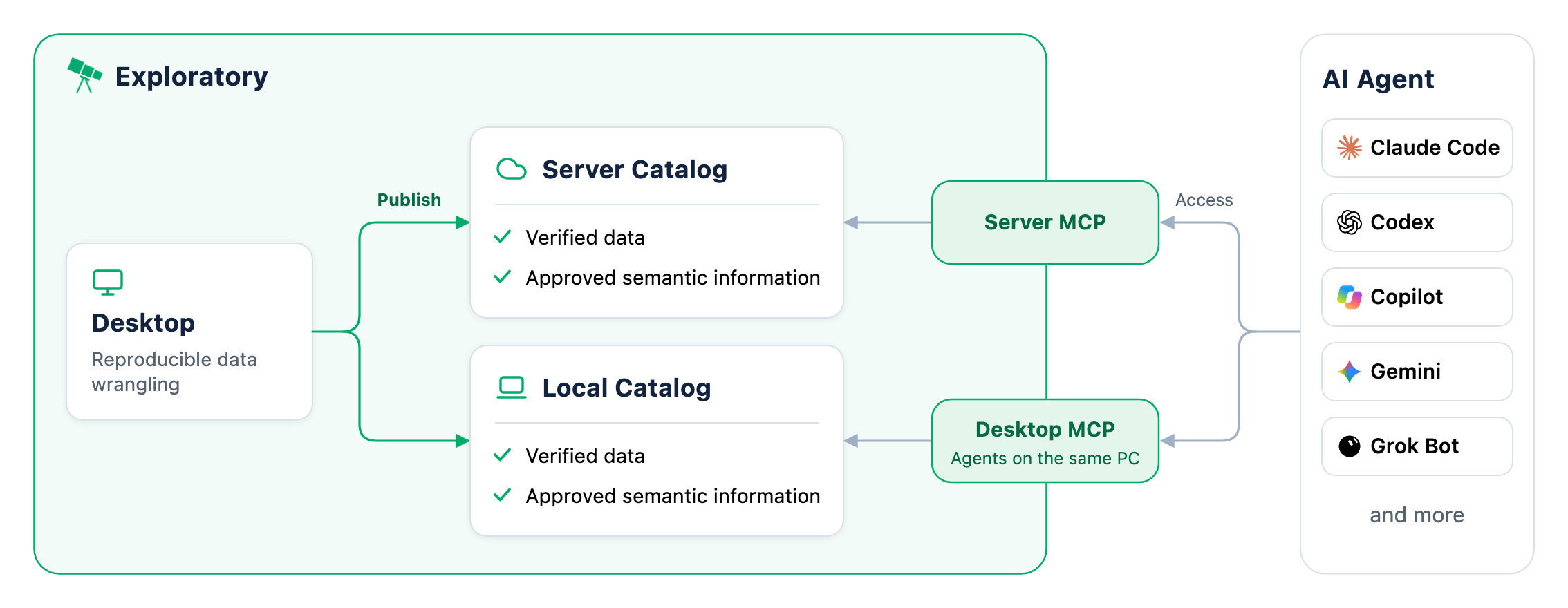
To help AI agents understand and efficiently use trustworthy data, Exploratory Data Catalog provides four key capabilities.
1. Prepare — Start with Data You Can Trust
Prepare clean, analysis-ready data through reproducible data wrangling.
2. Understand — Give AI the Business Context It Needs
Use AI Assisted Semantic and related documents to help AI agents understand what the data means and which business rules to follow.
3. Access — Get Only the Data You Need, Fast
Use MCP and flexible queries to let AI agents retrieve exactly the data they need, when they need it.
4. Control — Manage and Monitor Data Access
Control access permissions and monitor activity through access logs, so you know how AI agents are using your data.
You can publish your data to either a server or a local Data Catalog and make it accessible to AI agents through their respective MCP integrations.
Throughout this article, we’ll use a sales dataset and a simple question — “What are the net sales by region in 2026?” — to walk through these four capabilities.
Prepare: Start with Data You Can Trust
If you leave data cleaning and metric calculations to an AI agent every time it performs an analysis, you may end up with inconsistent results that are difficult to verify.
Instead, you want to provide agents with data that has already been prepared and validated by people who understand the business.
Reproducible Data Wrangling
Exploratory provides a wide range of data wrangling capabilities, from importing data and handling missing values to removing duplicates, joining datasets, standardizing records, and calculating new metrics.
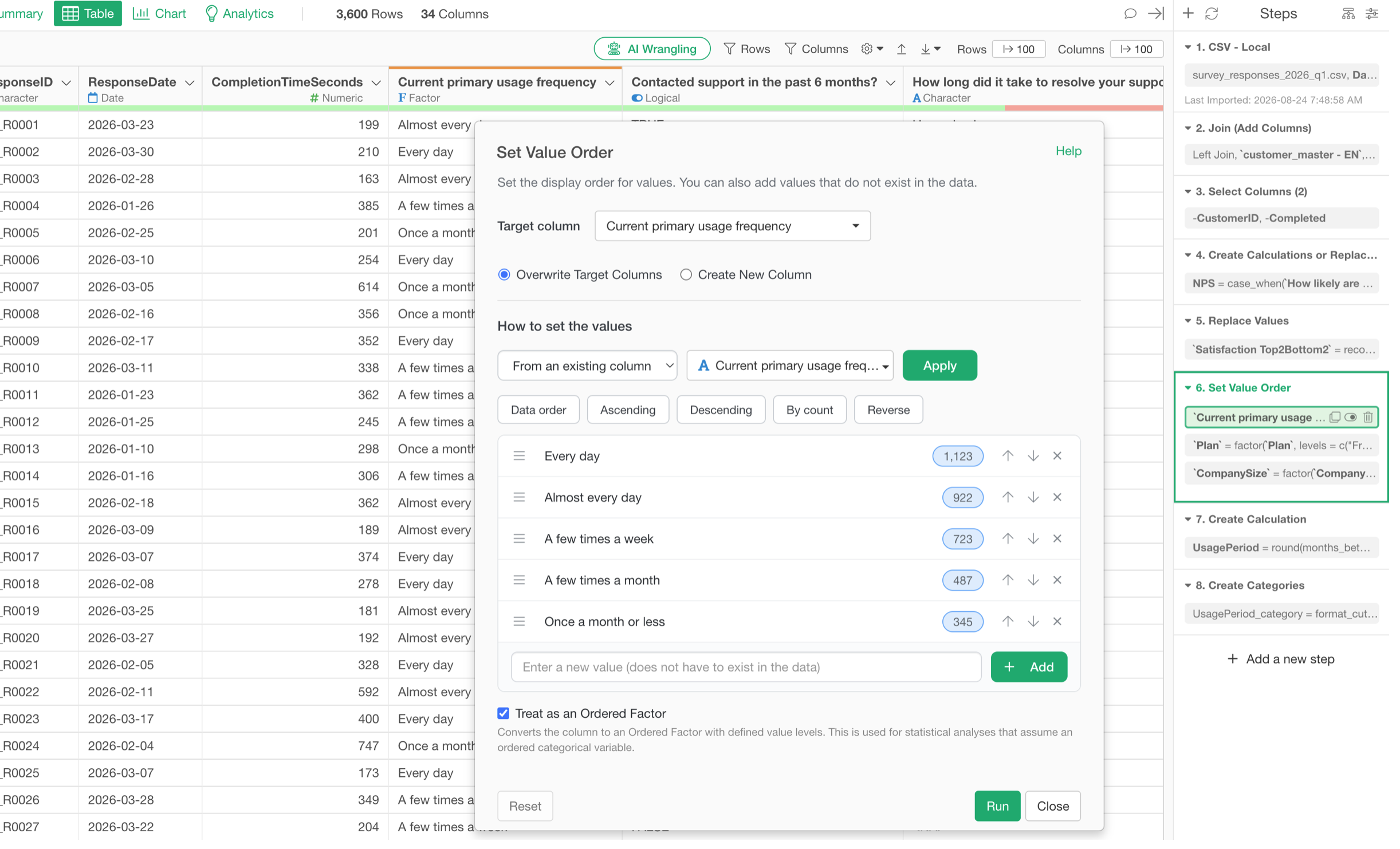
For example, with sales data, you can remove duplicate orders, handle canceled orders appropriately, and calculate net sales after accounting for discounts and returns.
The important point is that you don’t have to ask an AI agent to figure out these calculations every time.
Instead, people who understand the business rules can prepare the data, inspect the results, and verify that everything is calculated as intended.
In Exploratory, each data wrangling operation is saved as a step in the panel on the right.
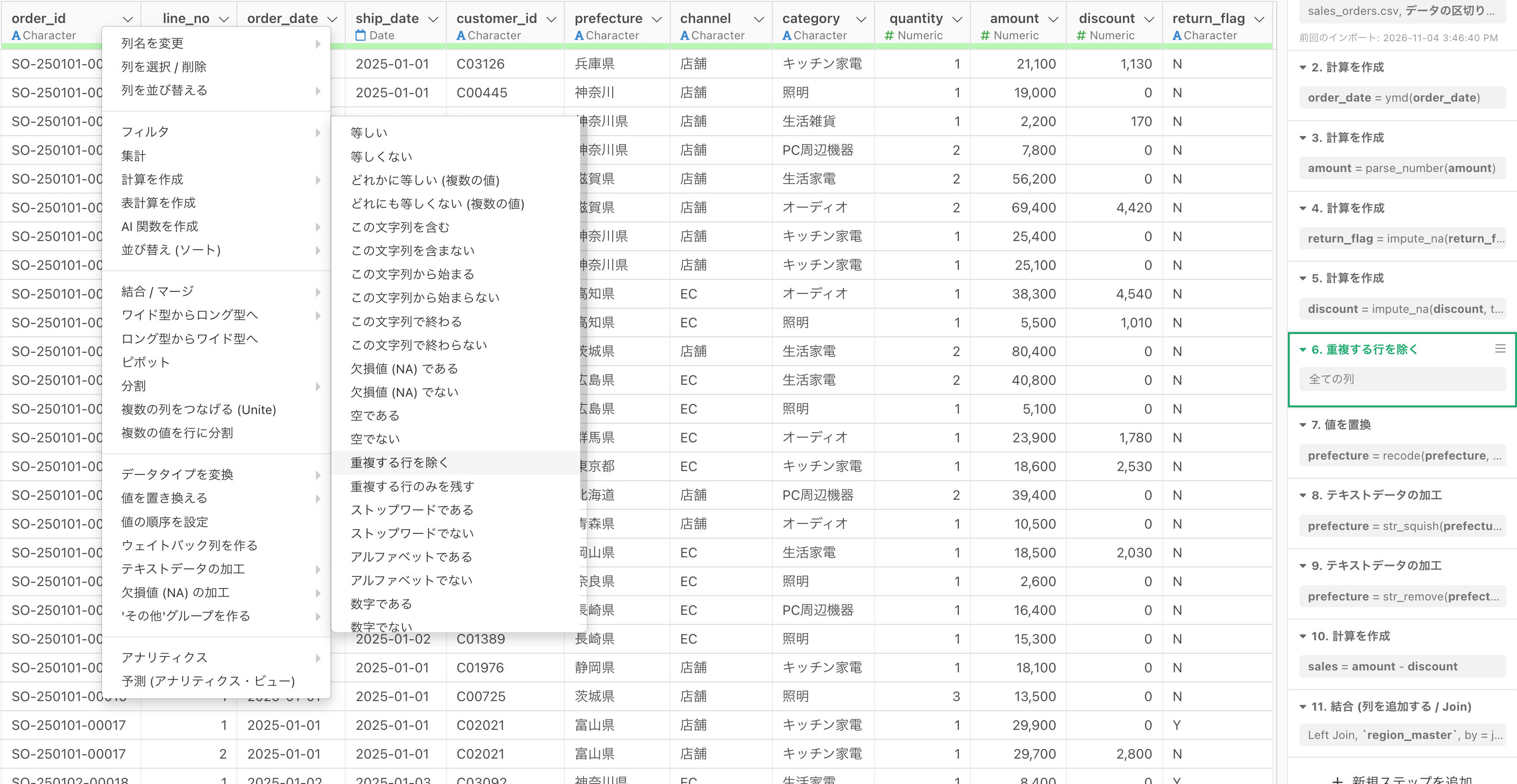
You can also visualize these steps in a diagram to see how the data was prepared.
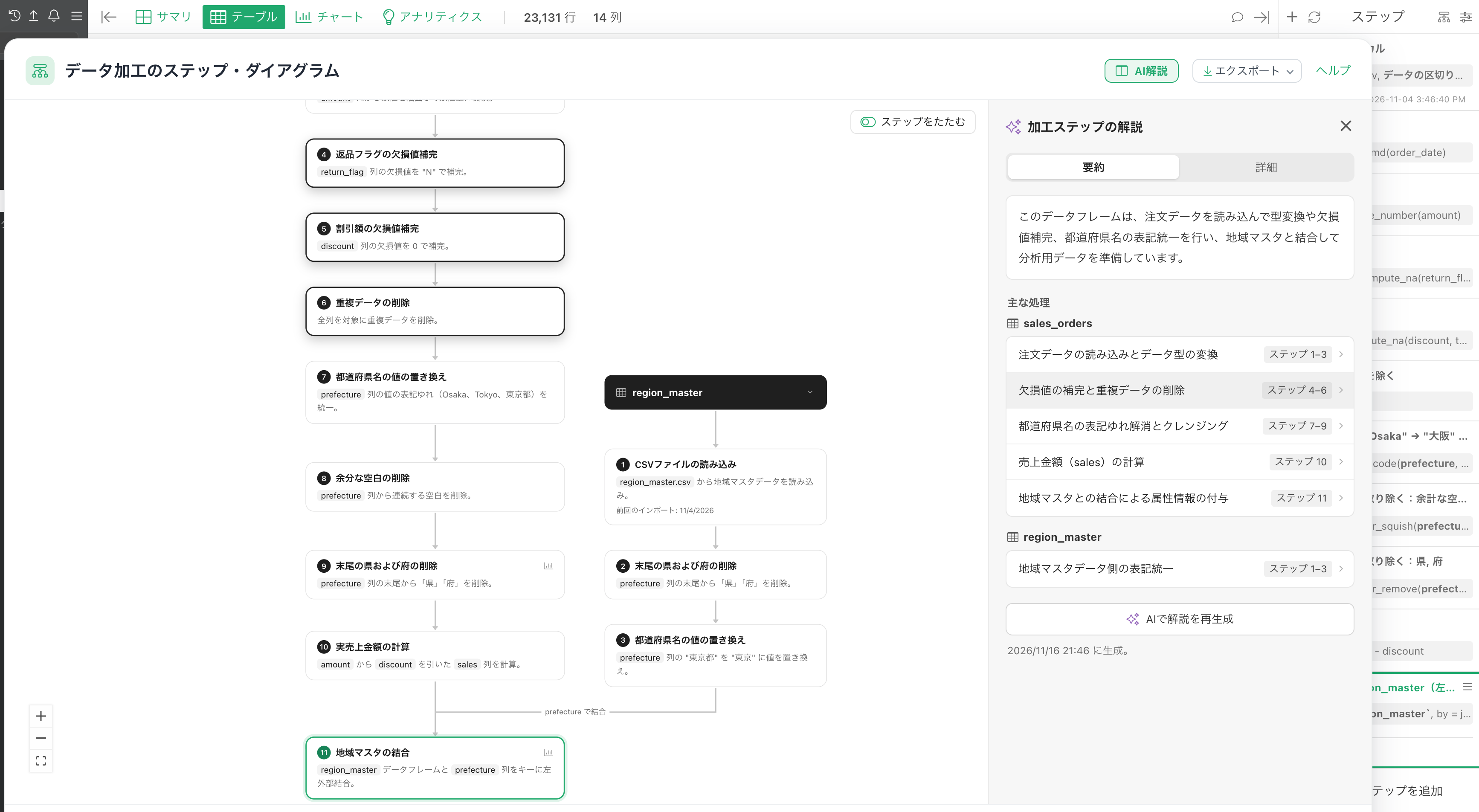
This makes it easy to review what was done, modify individual steps when necessary, and reproduce the entire process.
Once the data is prepared, you can publish it to either your local or server Data Catalog, making the validated data available for AI agents to use repeatedly.

Understand How the Data Was Prepared
Even when a dataset is clean and well-structured, it’s difficult to trust it if you don’t know how it was created.
For example, if a dataset contains a column called “Net Sales,” you might want to know exactly how those values were calculated.
Exploratory Data Catalog lets you view the data wrangling steps behind a published dataset as a diagram.
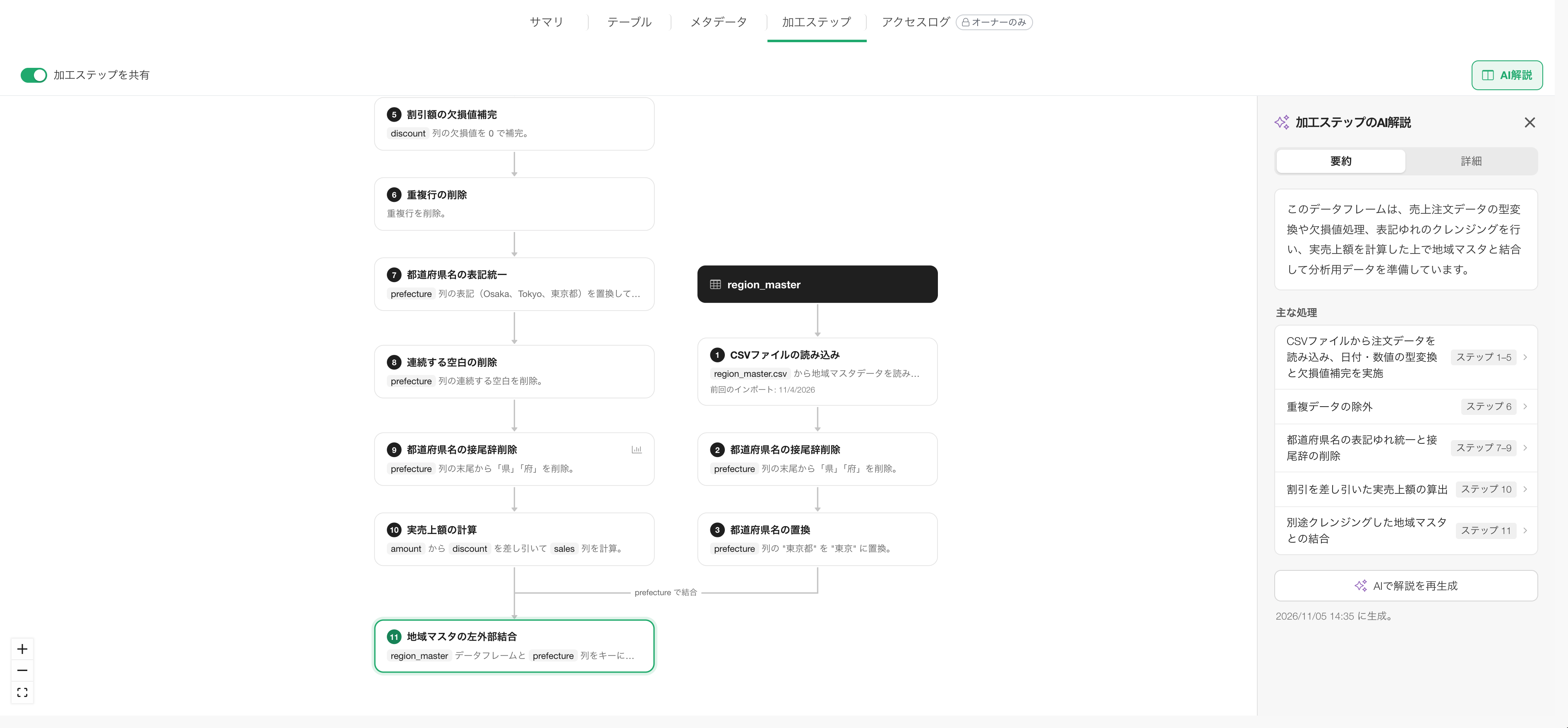
You can visually trace where the data came from, which filters and joins were applied, how calculations were performed, and how the final dataset was produced.
This makes it much easier to understand and verify the preparation process behind the data.
Keep Your Data Up to Date with Scheduling
Preparing data isn’t a one-time task.
With sales data, new orders and returns are added every day. That means the data published to your Data Catalog needs to be updated regularly.
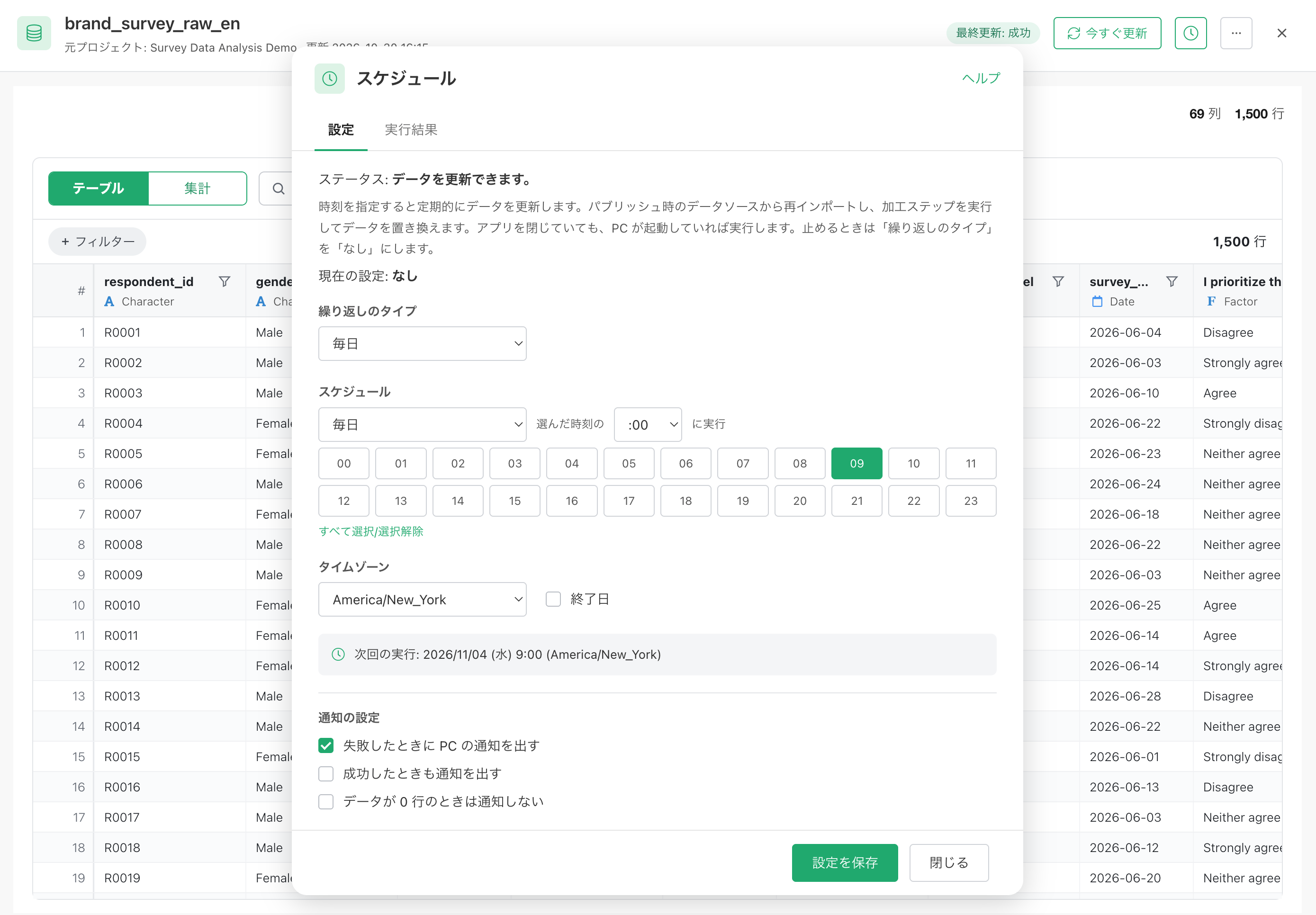
With scheduling, Exploratory can automatically retrieve the latest data from its source and rerun the necessary data wrangling steps at specified times.
Because the data wrangling process is reproducible, the same business rules can be consistently applied to new data.
Starting with Exploratory v17, you can also schedule updates for datasets published to your local Data Catalog.
The scheduling feature uses your computer’s built-in scheduling system, so your updates can run at the specified times even when Exploratory Desktop isn’t open.
Of course, your computer needs to be running, and the required data sources must be accessible at the scheduled time.
Understand: Give AI the Data Meaning and Business Rules It Needs
Having clean, well-prepared data is one thing. Making sure AI agents use that data the way you intended is another.
That’s why Exploratory Data Catalog allows you to add semantic information to your published datasets.
Column Names Don’t Tell the Whole Story
Let’s say you have a sales dataset with the following columns.
| Column | Description |
|---|---|
gross_sales |
Sales before discounts |
discount_amount |
Discount amount |
return_amount |
Return amount |
net_sales |
Net sales |
order_date |
Order date |
region |
Region |
Now, suppose you ask an AI agent:
“What are the net sales by region in 2026?”
Which column should the agent use?
Should it use gross_sales or net_sales?
How should discounts and returns be handled when calculating net sales?
These questions can’t always be answered from column names or data types alone.
To make the right decisions, an AI agent needs to understand the meaning of the data, along with the business rules and domain knowledge behind it.
Semantics: Add Meaning and Business Rules to Your Data
With Exploratory Data Catalog, you can add semantic information to published datasets.
In data analytics, semantics goes beyond the literal meaning of a word. It describes the business definitions, rules, and context that help people and AI agents interpret and use data correctly.
Semantic information can include much more than simple column descriptions.
For example, you can define the dataset overview, data granularity, primary date columns, update information, column meanings and roles, alternative names, business metrics and their calculation rules, and common questions with example aggregations.
For our sales dataset, we could add the following definition for the business metric “Net Sales.”
Net Sales
Net Sales represents sales after accounting for discounts and returns.
When aggregating net sales, use the sum of the net_sales
column. Do not use gross_sales, and do not subtract
discounts or returns again.
The net_sales column already contains calculated values
that account for canceled orders, discounts, and returns.
By providing this information to AI agents, you make it much easier for them to determine which columns to use and how to aggregate the data correctly.
Automatically Generate Semantic Information from Your Data Wrangling Steps with AI
But there’s an important challenge here.
Even if semantic information is essential for AI agents, creating all of it manually can be a lot of work.
When you have datasets with many columns, documenting the meaning, business rules, and calculation methods for each one can become a time-consuming process.
That’s why we introduced a feature that allows AI to automatically generate semantic information based on your data wrangling steps in Exploratory.

When you prepare data in Exploratory, the information about how that data was created is already available.
For example, Exploratory knows which columns were joined, which conditions were used to filter records, and which formulas were used to calculate new columns.
This information provides valuable clues about what the data means and which business rules were applied.
Exploratory can use these data wrangling details as context for AI to generate semantic information, including dataset descriptions, column definitions, and business metrics.
Of course, AI-generated descriptions aren’t always correct.
For example, AI might infer how net sales are calculated from a formula, but it may not know whether that calculation matches your company’s current business rules.
That’s why Exploratory lets you review AI-generated semantic information and either approve or reject it.
This reduces the manual effort required to create semantic information while ensuring that the definitions shared with AI agents reflect your intended business rules.
Only human-approved semantic information is made available to AI agents.

Semantic Information Is Also Available in the Local Data Catalog
Semantic information isn’t limited to datasets published on Exploratory Server.
You can also add it to datasets published to your local Data Catalog in Exploratory Desktop.

By adding semantic information to data you’ve prepared and validated locally, AI agents running on the same computer can use your Data Catalog while taking the business context into account.
Access: Get the Data You Need, When You Need It, in Just the Right Amount
Just because an AI agent can access your data doesn’t necessarily mean it can analyze that data efficiently.
Suppose you ask an AI agent:
“What are the net sales by region in 2026?”
If your sales dataset contains 10 million rows, does the agent really need to download all 10 million rows and then search through and aggregate the data itself?
Downloading the entire dataset for every question takes time. And if large amounts of that data are passed to an AI model, token consumption and costs can quickly add up.
After all, you don’t actually need 10 million rows to answer this question.
You might only need a few dozen rows containing the aggregated net sales for each region.
Wouldn’t it be better to retrieve only the data you actually need in the first place?
Flexible Data Queries
That’s why Exploratory Data Catalog supports flexible queries when retrieving data.
For example, you can perform operations such as:
Filter: Retrieve only the rows that match specified conditions.
Select Columns: Retrieve only the columns you need.
Aggregate: Calculate sums, averages, and other metrics by group.
Join: Combine multiple datasets published to the Data Catalog.
For our question, “What are the net sales by region in 2026?”, the
agent can filter the data to 2026, group it by region, and retrieve only
the sum of net_sales for each region.
There’s no need to download millions of rows.
By returning only the necessary information, Exploratory reduces the amount of data transferred and the processing required on the agent side. It also reduces the amount of data that needs to be passed to the AI model.
Faster Queries with DuckDB
We’ve also integrated DuckDB into Exploratory Data Catalog to significantly improve query performance.
During our internal development tests, we confirmed that queries against datasets containing millions to tens of millions of rows could return results in under one second.
Of course, actual performance depends on various factors, including network speed between the AI agent environment and Exploratory Server. So you may not see exactly the same performance in your environment.
By combining flexible queries with fast processing, AI agents can retrieve only the data they need, when they need it, and in just the right amount.
This makes data analysis and report generation much more efficient.
Direct Access from AI Agents Through MCP
Exploratory Data Catalog supports MCP (Model Context Protocol).
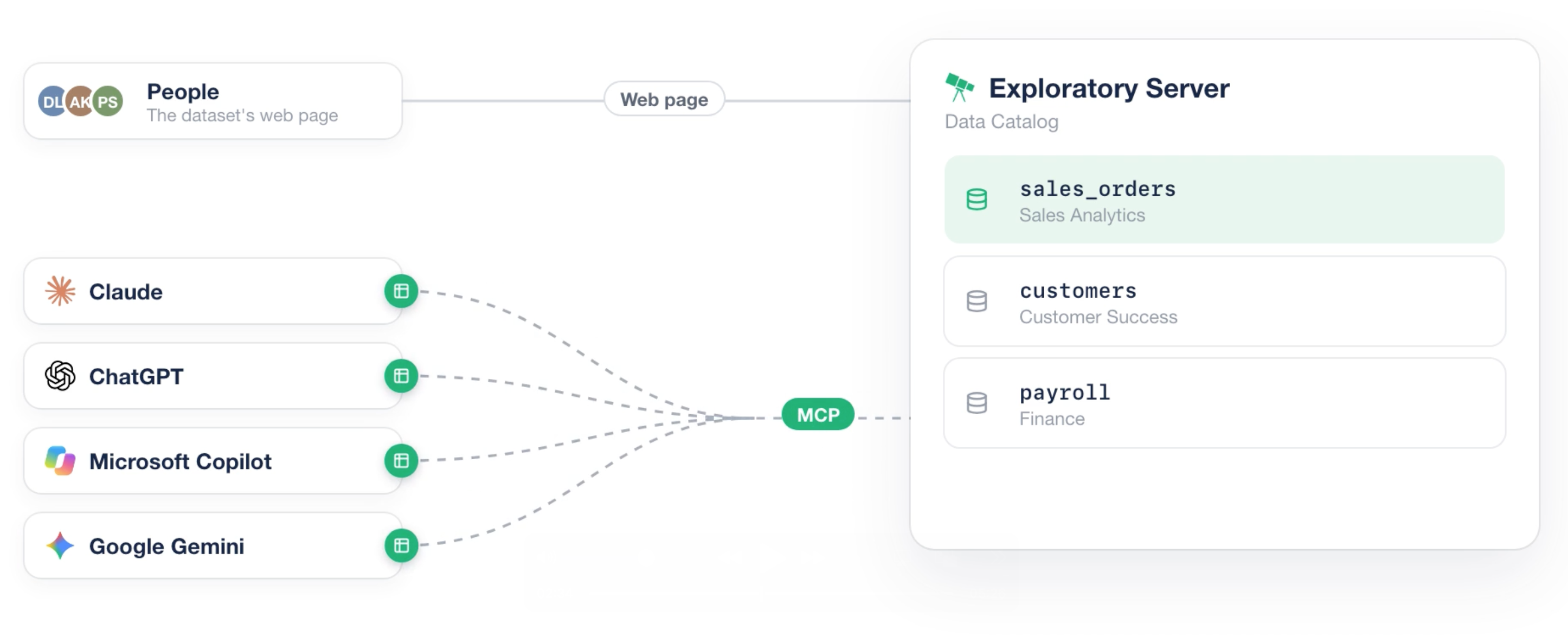
MCP allows AI agents to connect to external data sources and tools.
When you publish data to Exploratory Server, AI agents can access it through Server MCP.
For more information about Exploratory Server MCP and how to connect it to AI agents such as Claude Code, see the Server MCP documentation.
Similarly, data published to the local Data Catalog in Exploratory Desktop can be accessed through Desktop MCP by AI agents running on the same computer, such as Claude Code or Codex.
For more information, see the Desktop MCP documentation.
This means your AI agents can inspect your datasets and semantic information, execute the queries they need, and use the results to perform analysis and generate reports.
No Need to Upload Your Data to a Server
In many organizations, uploading data to an external server is restricted by company policies or privacy requirements.
With Exploratory’s local Data Catalog, you can make your data accessible to local AI agents without uploading it to Exploratory Server.
You can prepare data locally, automatically update it on a schedule, enrich it with semantic information, and execute fast queries — all from your local environment.
Control: Manage and Monitor Data Access by AI Agents
Making data easily accessible to AI agents is powerful, but it’s equally important to manage how that data is accessed.
For example:
Who is accessing which datasets?
How are they accessing the data?
What queries are AI agents executing?
Are there any unusual access patterns, such as repeatedly retrieving large amounts of data?
Being able to answer these questions is an important part of making data safely available to AI agents.
Control MCP Access for Each Dataset
Exploratory Data Catalog lets you manage MCP access for individual datasets.
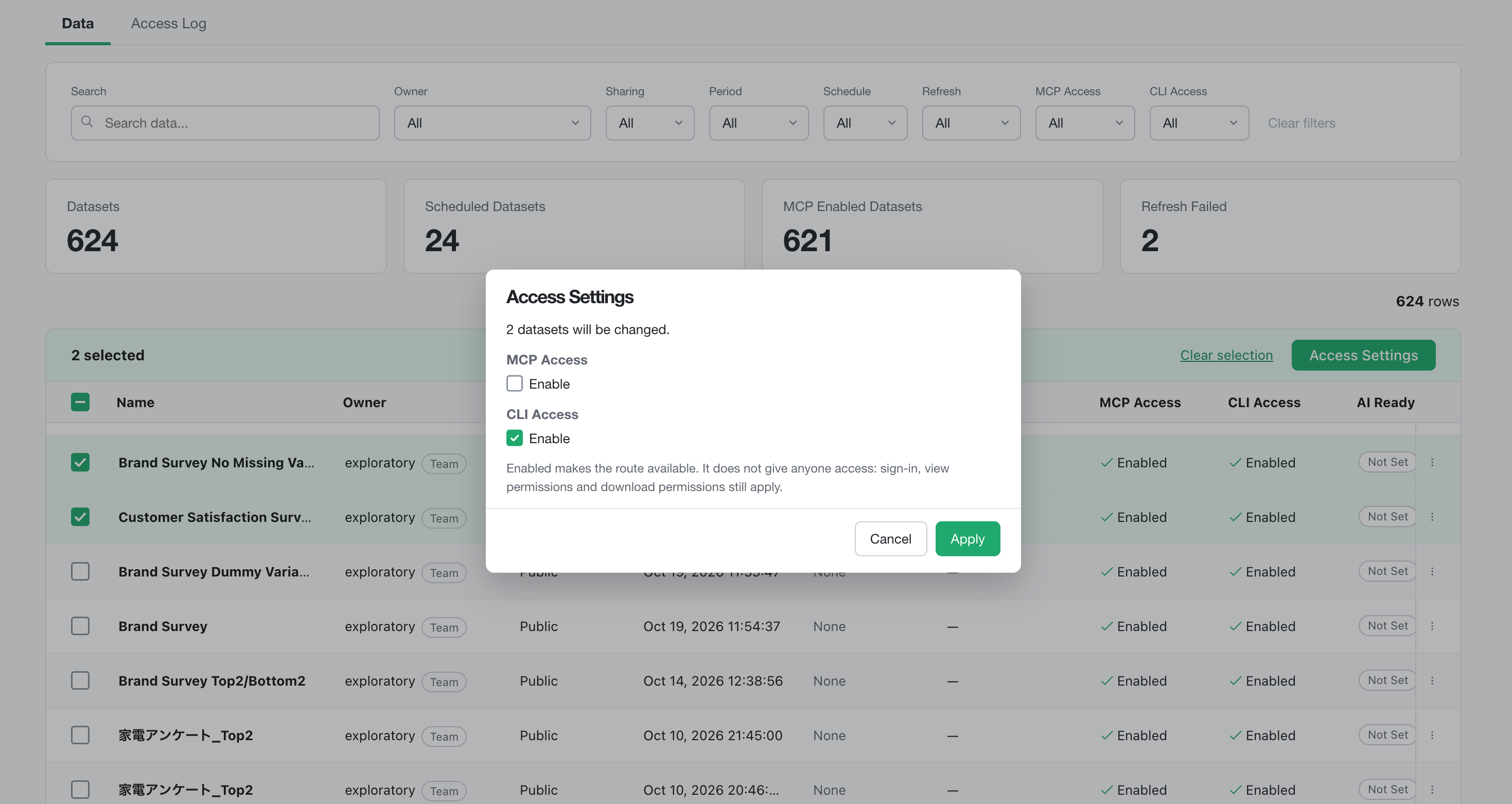
This allows you to control which datasets are available to AI agents through MCP.
Access Logs and Query History
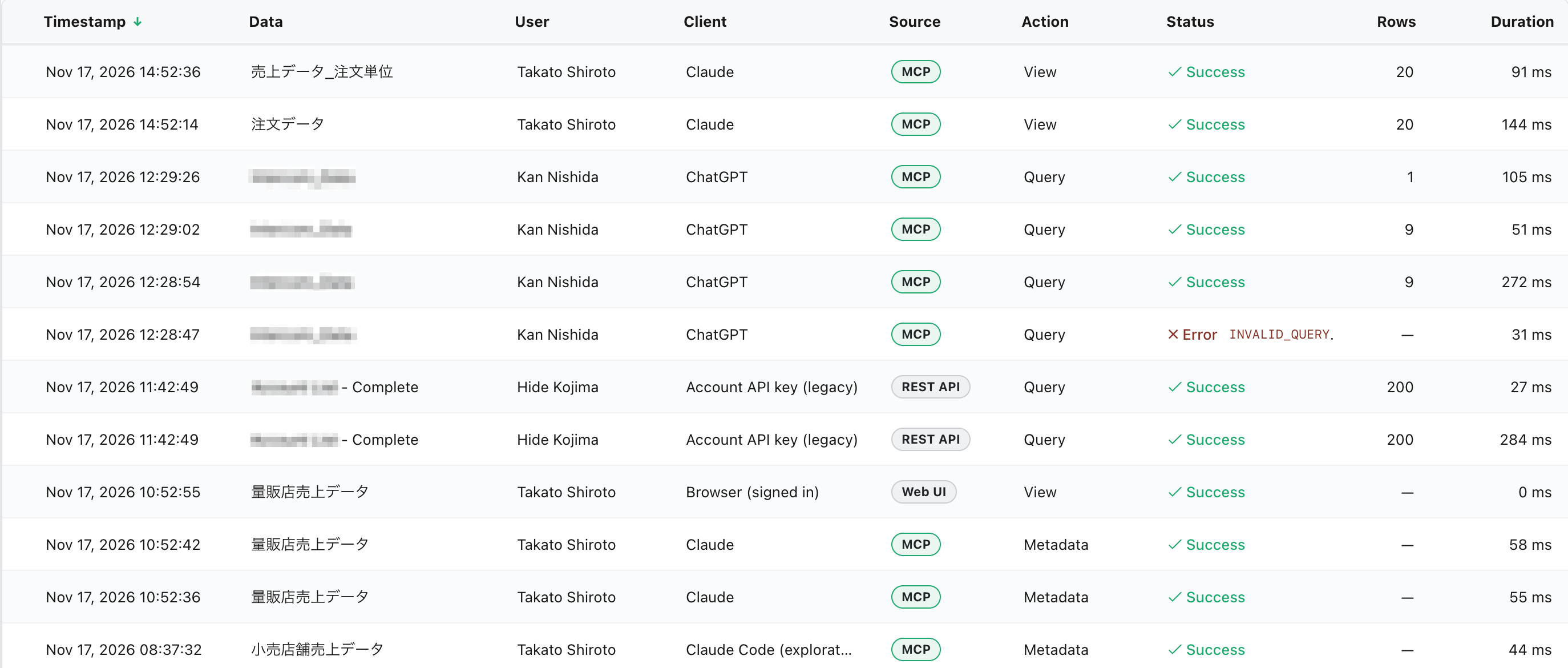
Exploratory also records data access activity, which you can review from the Access Log page.
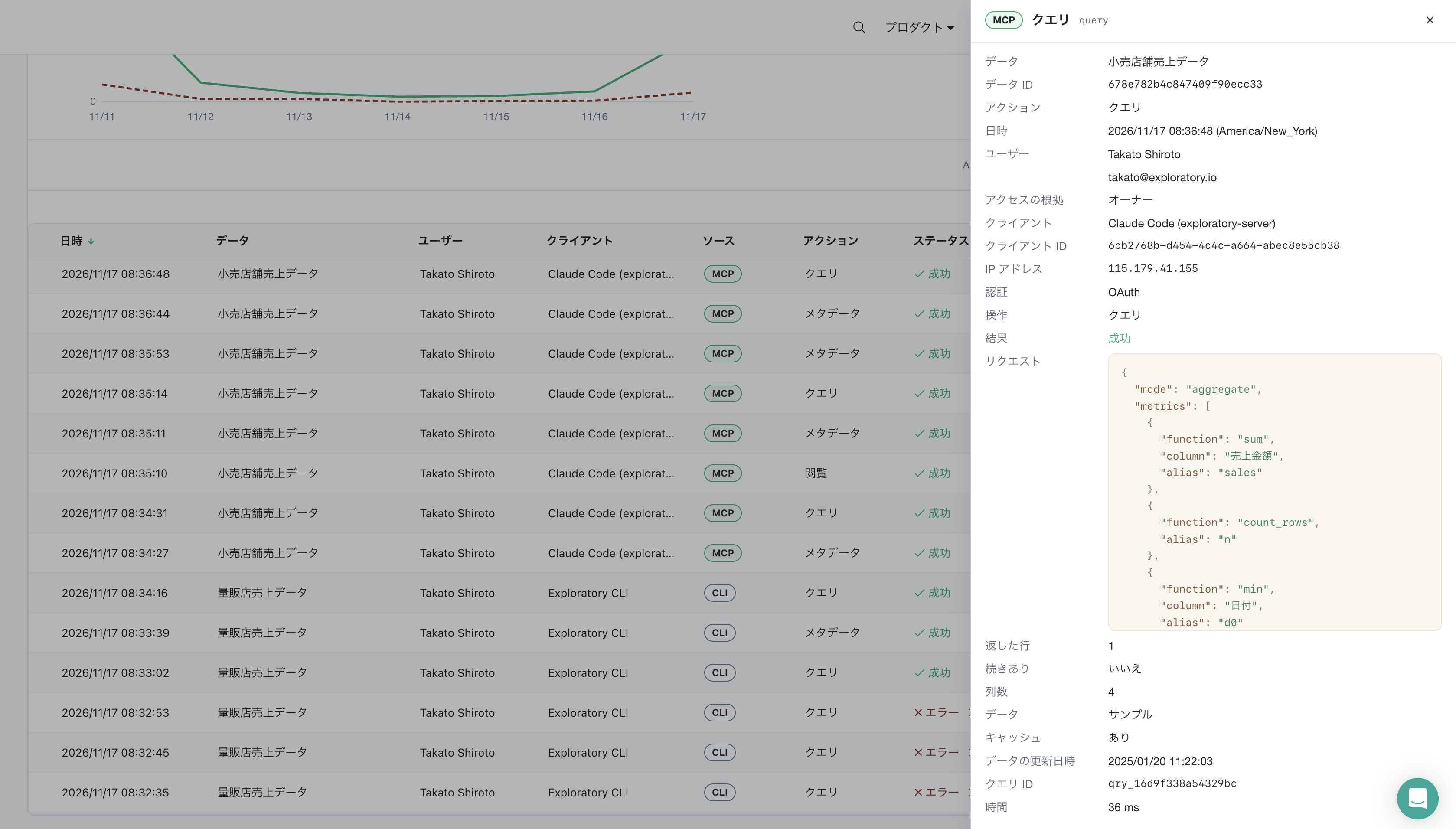
The access logs provide information such as:
Access Method: MCP, API, or UI
Access Source: Country, IP address, and client
Query Details: Query content, processing time, and execution status
This information is available to the dataset owner for reviewing and monitoring access activity.
AI agents can take advantage of your data, while the data owner stays informed and in control of how that data is being used.
This is another important capability of Exploratory Data Catalog.
Conclusion: Better AI Analytics Starts with Better Data
AI agents are transforming the way we work with data.
Tasks that once required considerable time and effort — aggregating data, performing analysis, creating charts and dashboards, and generating reports — can increasingly be handled by AI agents.
But no matter how powerful AI agents become, we can’t trust their analytical results if the underlying data is unreliable.
And even when the data itself is correct, AI agents may not produce the analysis we intended unless they understand its meaning, business rules, and context.
That’s why preparing data correctly and having people carefully verify how that data was prepared are more important than ever.
Once trustworthy data has been prepared, it can be made available to AI agents and reused for a wide range of analyses and reports.
Exploratory Data Catalog provides four key capabilities to support this new data analytics workflow in the age of AI agents.
Prepare: Create human-validated data through reproducible data wrangling.
Understand: Communicate data meaning and business rules through human-approved semantic information.
Access: Retrieve only the data you need, quickly and efficiently.
Control: Choose where your data is stored and monitor how it’s accessed and used.
Together, these capabilities create a continuous workflow, from preparing and validating data to making it available for AI-powered analysis.
Before asking AI agents to analyze your data, why not make sure your data is ready for them?
Make Your Data AI-Ready.
Try Exploratory v17.0
Try Exploratory Data Catalog with your own data.
Download the latest version of Exploratory: https://exploratory.io/download
New to Exploratory? Start your 30-day free trial: https://exploratory.io/
Additional Resources